


Empowering Your Business with Tailored Magento ERP Solutions – At Atwix, we understand the importance of seamless integration for effective eCommerce. Our expertise in Magento ERP integration can transform data flow, streamline processes, and drive growth. This article explores popular ERP solutions compatible with Magento, providing insights to help you choose the best fit for your business. From integration nuances to system benefits, we guide you to align your eCommerce strategy with robust ERP solutions.
Disclaimer: We don’t endorse any particular integrations.
Typically, it’s pretty straightforward why ERPs are important for enterprises, but in the case of Magento or Adobe Commerce, the benefits are even more fruitful. Your employees will spend less time on repetitive tasks, and your consumers will receive more precise information about the product.
Table of Contents:
- ERP Comparison at a Glance
- A Note on Magento Versions
- The Most Popular ERP’s to Integrate with Magento:
- How to Integrate ERP Software to Magento 2
- How Sirius by Atwix Simplifies Magento ERP Integration
- Factors to Consider Before Choosing an ERP for Magento Integration
- Example of Successful ERP-Magento Integration
- Atwix As Your Magento ERP Integration Partner
When you connect the ERP to Magento/Adobe Commerce, your inventory, orders, customer data, and shipping details are synced between these two platforms. You can say goodbye to complex processes and manual order management and let both systems exchange near-real-time data.
ERP Comparison at a Glance
Before diving into detailed reviews, here’s a quick comparison of the nine ERP systems covered in this guide:
| ERP System | Best For | Scalability | Magento Fit | Cost Level |
| SAP Business One | Growing enterprises | High | Strong (native connector) | High |
| Oracle ERP Cloud | Large enterprises | Very High | Good (cloud-based) | Very High |
| Microsoft Dynamics | Diverse processes | High | Strong (14+ extensions) | High |
| QuickBooks ERP | Small businesses | Limited | Good (basic sync) | Low |
| Infor CSD | Distribution | High | Deep integration | High |
| Odoo | SMBs, flexibility | Medium | Good (open-source) | Low-Medium |
| Sage ERP | Finance-heavy ops | Medium-High | Good | Medium-High |
| JD Edwards | Large/global ops | Very High | Robust | Very High |
| Epicor Kinetic | Manufacturing | High | Deep integration | High |
A Note on Magento Versions
Magento 1 reached end-of-life in June 2020 and no longer receives security updates or official support. All ERP solutions and integration guidance in this article focus exclusively on Magento 2 (Adobe Commerce), which is the current, actively supported platform. If your business is still running Magento 1, migrating to Magento 2 should be a priority before investing in ERP integration.
The Most Popular ERP’s to Integrate with Magento:
Here are the nine best ERPs for Magento 2:
1. SAP Business One
SAP Business One offers seamless integration with Magento for real-time data synchronization, comprehensive financial management, advanced inventory and warehouse capabilities, CRM, and integrated reporting and analytics. It is robust, scalable, and customizable but can be costly and complex, often requiring additional training and specialized expertise.
Features
- Seamless integration with Magento for real-time data synchronization.
- Comprehensive financial management, including accounting, budgeting, and banking.
- Inventory management with advanced warehousing and distribution capabilities.
- Customer relationship management (CRM) for enhanced customer service.
- Integrated reporting and analytics for insightful business decisions.
Pros and Cons
Pros:
- Robust and scalable, suitable for growing businesses.
- Extensive customization options to fit specific business needs.
- Strong financial capabilities, ideal for complex accounting requirements.
Cons:
- Relatively high cost of ownership and implementation.
- Complexity may require additional training and support.
- Integration can be challenging without specialized expertise.
The Magento SAP Business One Solution includes predefined activities for automating critical business operations such as downloading and uploading orders, customer data, stock, and pricing between your Magento shop and SAP Business One.
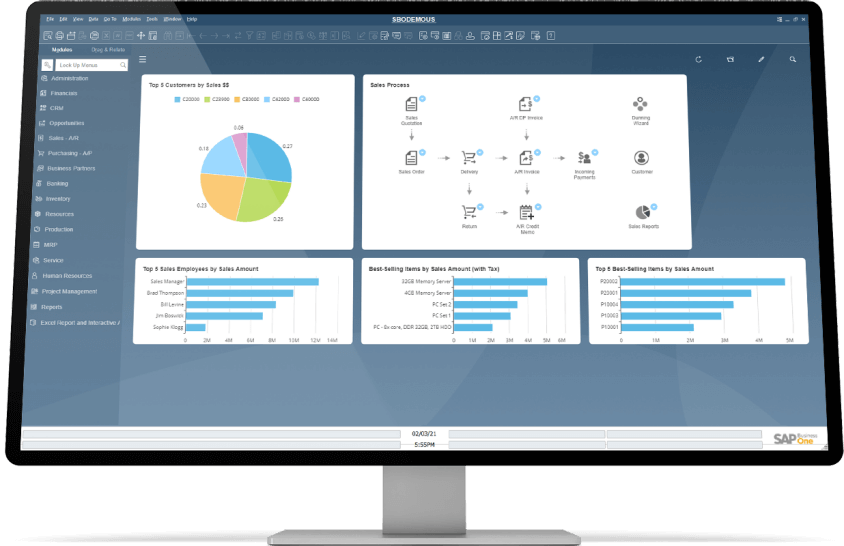
By eliminating repetitive staff data input and related administrative mistakes, Magento ERP integration with SAP eliminates the hidden expenses involved with routine order management procedures. This Magento 2 ERP allows you to easily sync critical order and stock information between the two systems.
Oracle ERP Cloud
Oracle ERP Cloud is a scalable, cloud-based solution with advanced financial management, supply chain, procurement, project management, and compliance capabilities. It supports business growth with strong analytics and reporting tools but can be expensive and complex, necessitating extensive training and customization.
Features
- Cloud-based solution offering scalability and flexibility.
- Advanced financial management with real-time insights and analytics.
- Efficient supply chain and procurement management.
- Project management tools for better resource allocation.
- Enhanced compliance and risk management capabilities.
Pros and Cons
Pros:
- Highly scalable, supporting business growth and expansion.
- Strong analytics and reporting tools for data-driven decisions.
- Continuous updates and improvements in a cloud environment.
Cons:
- Can be expensive, especially for small to medium-sized businesses.
- The complexity of features might require extensive training.
- Customization might need additional investment and expertise.
Oracle is a reputable name in providing a comprehensive set of products and services to various industries. Its established brand guarantees exceptional customer service and consistent performance for organizations of all sizes.
Oracle ERP Cloud has an easy-to-use user interface (UI) that facilitates data navigation and reading.
Oracle ERP has several financial, risk management, and procurement tools. Because it supports many country ledgers, accounting standards, and currencies, a company may expand its scope and operate in multiple countries without financial issues.
Discover Atwix
ERP Integration Services
Propel your business to the top with Atwix ARP Magento/Adobe Commerce integration.

Microsoft Dynamics
Microsoft Dynamics provides versatile integration capabilities with different versions, a unified commerce experience, integrated CRM functionalities, and supply chain optimization. It offers a user-friendly interface with customizable dashboards but can be costly and complex, requiring ongoing maintenance and updates.
Features
- Versatile integration capabilities with various Microsoft Dynamics versions.
- Unified commerce experience combining e-commerce, sales, and operations.
- Enhanced customer service with integrated CRM functionalities.
- Efficient financial management and business intelligence tools.
- Supply chain optimization for improved inventory and order management.
Pros and Cons
Pros:
- Wide range of functionalities suitable for diverse business processes.
- Strong integration with other Microsoft products and services.
- User-friendly interface with customizable dashboards.
Cons:
- Integration complexity varies across different Dynamics versions.
- Can be costly, depending on the version and extent of customization.
- Requires ongoing maintenance and updates for optimal performance.
Microsoft is a Magento-certified partner. There are 14+ Microsoft extensions available, so you will have more choices in which one can work best for you. With an intelligent application that is easy to customize, expand and link to other applications and services you already use, it is simple to foster innovation.
The system provides comprehensive supply chain modernization tools, including enhanced warehousing, inventory, fulfillment, material procurement, and logistics management.
On the downside, some of the extensions are rather pricey. The cost might exceed $15,000 or more. And because of the steep learning curve, this solution is best suited for major corporations and international organizations.
Some of the most popular Microsoft Dynamics ERP includes:
Dynamics AX
Dynamics AX is a comprehensive enterprise resource planning (ERP) software suite for finance and operations. It assists worldwide organizations in organizing, automating, and optimizing their operations, whether on-premises, in the cloud, or via hybrid deployment.
Microsoft Dynamics CRM
Microsoft Dynamics CRM is offered as a cloud service or as an on-premises installation. This version, like CRM 4, can be modified using sophisticated extensions. Among its new features are visualizations, dashboards, document management, grid filters, dialogs, repeating appointments, custom activities, goal management, fetch-based reports, MAPI-based Outlook clients, FLS VISITOUR, and more.
Dynamics GP
Dynamics GP is a mid-market accounting ERP that stores data on Microsoft SQL Server. It is written in Dexterity and is part of the Microsoft Dynamics range of intelligent business applications.
Dynamics NAV
Get the resources you need to manage your Dynamics NAV on-premises solutions for finance, manufacturing, customer relationship management (CRM), supply chains, analytics, and electronic commerce.
QuickBooks ERP
QuickBooks ERP streamlines Magento integration for efficient e-commerce management, robust accounting features, real-time financial reporting, and simple inventory management. It is affordable and user-friendly but has limited scalability, basic inventory features, and less customization potential.
Features
- Streamlined integration with Magento for efficient e-commerce management.
- Robust accounting features including invoicing, payroll, and expense tracking.
- Real-time financial reporting and insights.
- Simple inventory management suitable for small to medium businesses.
- Easy-to-use interface with minimal learning curve.
Pros and Cons
Pros:
- Affordable and user-friendly, ideal for small businesses.
- Strong accounting capabilities with comprehensive financial reporting.
- Cloud-based, offering flexibility and accessibility.
Cons:
- Limited scalability for larger or more complex business needs.
- Basic inventory and order management features.
- Less customization potential compared to other ERP systems.
QuickBooks Enterprise is the ERP version of the brand’s accounting and company management software. The Enterprise goes beyond ordinary accounting software to provide end-to-end solutions for mid-sized businesses. Enterprise assists businesses in making more educated financial decisions by providing insights, procedures, and customized reports.
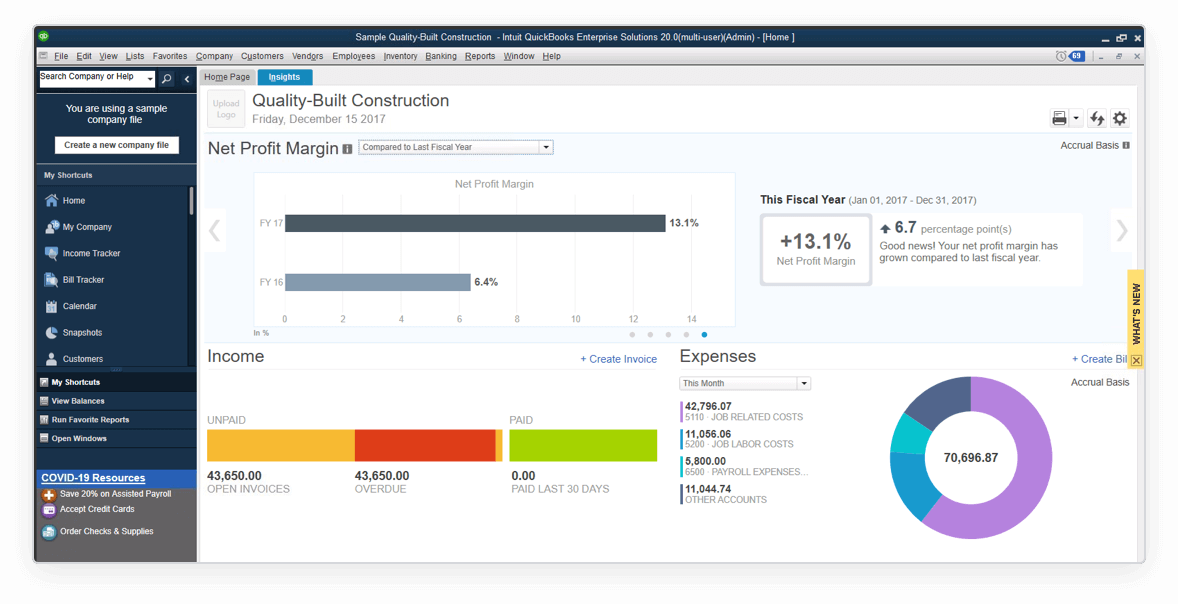
Through comprehensive inventory monitoring and administration, aided payroll, advanced pricing tools, and advanced reporting, the enterprise solution help businesses in managing critical activities in an accessible and connected environment.
Infor CSD (CloudSuite Distribution)
Infor CSD is tailored for distribution businesses with deep Magento integration, advanced supply chain and warehouse management, financial and sales tools, CRM capabilities, and mobile analytics. It is specialized for distribution but can be complex, requiring specific training and support, and has a higher cost of implementation and maintenance.
Features
- Tailored for distribution businesses with deep Magento integration.
- Advanced supply chain and warehouse management.
- Financial and sales management tools for complete business oversight.
- CRM capabilities for improved customer engagement.
- Mobile and analytics features for on-the-go business management.
Pros and Cons
Pros:
- Specialized for distribution industry with tailored functionalities.
- Comprehensive supply chain management tools.
- Strong mobile and analytical capabilities for dynamic business environments.
Cons:
- May not be as suitable for non-distribution industries.
- Can be complex, requiring specific training and support.
- Higher cost of implementation and maintenance.
Infor OS is the convergence of industry-leading cloud technologies, resulting in a comprehensive program designed for agility, stability, innovation, and expansion in a real multi-tier cloud environment. The platform challenges the need for point-to-point technology to enable scalable business management and serves as the foundation for all of Infor’s industry-specific CloudSuite solutions.
The cloud-based application platform, big data insights, and an open architecture for simple integration and deployment transform today’s most innovative technologies into a toolkit.
Odoo
Odoo is an open-source ERP with flexible Magento integration, a modular structure, a comprehensive suite including sales, CRM, project management, and HR, and a user-friendly interface. It is highly customizable and cost-effective but may require technical expertise for installation, has potential security concerns, and relies on community support.
Features
- Open-source ERP with flexible Magento integration.
- Modular structure allowing tailored solutions for businesses.
- Comprehensive suite including sales, CRM, project management, and HR.
- User-friendly interface with easy navigation and customization.
- Strong community support and regular updates.
Pros and Cons
Pros:
- High degree of customization and flexibility.
- Cost-effective, especially for small to medium-sized businesses.
- Strong integration capabilities with various business applications.
Cons:
- May require technical expertise for installation and customization.
- Open-source nature might lead to security concerns.
- Support can be reliant on community and third-party providers.
Odoo ERP is desktop or cloud-hosted and accessible from any device and location. Apple iOS and Google Android are two mobile device operating systems. Odoo Enterprise includes a plethora of additional features.
Odoo delivers a large selection of business apps for a wide range of company needs. Businesses just pay for the applications that they require. You may use the Odoo CRM app or Salesforce for CRM. Combining Odoo with third-party apps to optimize company operations, management, and financial procedures is simple.
Sage ERP
Sage ERP integrates efficiently with Magento for e-commerce management, offering extensive financial and accounting tools, inventory and order management, business intelligence, and CRM and HR management. It has strong financial capabilities and scalability but can be complex and costly, with some limitations in customization.
Features
- Efficient integration with Magento for e-commerce management.
- Extensive financial and accounting tools.
- Inventory and order management optimized for various business sizes.
- Business intelligence and reporting for data-driven decision-making.
- CRM and HR management for comprehensive business operations.
Pros and Cons
Pros:
- Strong financial and accounting capabilities.
- Scalable to support business growth.
- User-friendly interface with customizable features.
Cons:
- Integration can be complex and may require expert assistance.
- Cost can be a barrier for small businesses.
- Some users report limitations in customization and flexibility.
Sage Business Cloud X3 is an ERP software system with integrated financial management, sales, customer support, distribution, inventory, manufacturing, and business intelligence. Sage Business Cloud X3 is web-based, browser-independent, and mobile-responsive. At the same time, it may be implemented on-premises and as a service on Sage’s AWS cloud or a partner-provisioned cloud.
Even if the built-in financial reporting is restricted, many reporting tools are available. Since X3 maintains the data in great detail, these reporting tools may show your data in whatever way you need. It is a highly versatile software that can be set to handle extremely complicated transactions with a high level of automation.
JD Edwards ERP
JD Edwards ERP provides robust integration with Magento, comprehensive financial, manufacturing, and distribution management, advanced reporting and analytics, mobile solutions, and scalable architecture. It is highly customizable and suitable for large businesses but can be overwhelming for small businesses, with a higher total cost of ownership and complexity.
Features
- Robust integration capabilities with Magento.
- Comprehensive financial, manufacturing, and distribution management.
- Advanced reporting and analytics tools.
- Mobile solutions for on-the-go business management.
- Scalable architecture supporting global business operations.
Pros and Cons
Pros:
- Highly customizable to meet specific business requirements.
- Strong functionality for large and complex businesses.
- Good scalability and support for international operations.
Cons:
- Can be overwhelming for small businesses due to its complexity.
- Higher total cost of ownership including implementation and maintenance.
- Requires trained personnel for effective use and maintenance.
JD Edwards EnterpriseOne delivers a robust, fully integrated ERP software package with numerous databases and deployment choices, including on-premise, private, public, and hybrid clouds, for maximum flexibility and minimal TCO.
JD Edwards EnterpriseOne blends business value, standards-based technology, and deep industry capability into a system that will revolutionize your business, with over 80 application modules, end-user reporting, and customization features. This software uses Oracle’s Mobile Platform to enhance business execution and deliver a comprehensive enterprise mobile solution that includes everything from deployment to designing and expanding mobile applications.
Epicor Kinetic
Epicor Kinetic offers deep integration with Magento, advanced tools for manufacturing, distribution, and financial management, real-time data analytics, mobile access, and cloud deployment. It is focused on manufacturing and distribution, offering a comprehensive set of features but requiring significant investment and tailored more towards medium to large businesses.
Features
- Deep integration with Magento for seamless e-commerce operations.
- Advanced tools for manufacturing, distribution, and financial management.
- Real-time data analytics for strategic business insights.
- Mobile access and cloud deployment options for flexibility.
- Extensive customer relationship and supply chain management features.
Pros and Cons
Pros:
- Strong focus on manufacturing and distribution industries.
- Comprehensive set of features supporting a range of business processes.
- Flexible deployment options including on-premises and cloud.
Cons:
- May require significant investment in terms of time and resources.
- Complexity in implementation and customization.
- Tailored more towards medium to large businesses, potentially overkill for small enterprises.
Epicor Kinetic differs from other ERPs by its growing emphasis on resource planning and management inside and beyond geographies and business borders.
Epicor Kinetic is a solution designed with manufacturers in mind. With real-time business information and built-in collaboration capabilities, an easy, flexible, and guided user experience with integrated learning helps optimize your profitability. Kinetic provides the capability required to manage a contemporary, future-driven organization ready to capitalize on data and adapt digitally.
How to Integrate ERP Software to Magento 2
Implementing ERP integration with Magento 2 involves several detailed steps to ensure a seamless and effective integration process. Here is an enhanced breakdown of the process, including a bulleted list for clarity:
1.Planning and Preparation:
- Define Objectives: Clearly outline the goals and scope of the integration.
- Stakeholder Involvement: Engage relevant stakeholders, including IT professionals and end-users, to ensure the integration meets functional requirements and is user-friendly.
2.ERP System Selection:
- Research and Select: Choose an ERP system that aligns with Magento 2 and fulfills your business needs. Consider factors such as scalability, features, and integration capabilities.
3.Data Preparation:
- Data Quality and Consistency: Cleanse and standardize data to ensure it is ready for integration.
4.Technical Configuration:
- System Configuration: Configure the ERP system to work with Magento 2. This may involve customizations to meet specific business requirements.
- Testing: Conduct extensive testing to ensure data flows seamlessly between Magento 2 and the ERP system.
5.Integration Implementation:
- Integration Tools: Utilize connectors or middleware platforms to facilitate data exchange between Magento 2 and the ERP system.
- Automation and Monitoring: Implement automated monitoring and logging to detect and resolve issues promptly.
6.Post-Implementation:
- Continuous Monitoring: Regularly monitor the integration to ensure it remains effective and efficient.
- Maintenance and Updates: Address any issues promptly and adapt to changing business needs.
Detailed Steps:
- Define Objectives and Scope: Establish clear goals for what you want to achieve with the eCommerce ERP integration.
- Involve Stakeholders: Ensure IT professionals and end-users are part of the planning process.
- Select an Appropriate ERP System: Research and choose an ERP that best fits your business needs and integrates well with Magento 2.
- Prepare Data: Clean and standardize data to ensure quality and consistency.
- Configure and Customize: Set up the ERP system and customize it if necessary to meet specific requirements.
- Test Extensively: Perform thorough testing to ensure data flows correctly between systems.
- Implement Integration Tools: Use connectors or middleware to facilitate data exchange.
- Automate Monitoring: Implement automated monitoring to promptly detect and address issues.
Continuous Monitoring and Maintenance: Regularly check the integration’s performance and make necessary adjustments.
How Sirius by Atwix Simplifies Magento ERP Integration
While the ERP systems above handle your back-office operations, the integration layer between your ERP and Magento is where most businesses struggle. Generic middleware and pre-built connectors often break under the complexity of real B2B operations — customer-specific pricing, multi-warehouse inventory, contract terms, and approval workflows.

Sirius is Atwix’s purpose-built ERP integration platform designed specifically for B2B eCommerce on Magento and Adobe Commerce. Unlike generic iPaaS tools that charge per transaction and rely on rigid templates, Sirius provides a flexible integration framework with pre-built support for systems like Prophet 21, Infor, Salesforce, and more.
What Makes Sirius Different
- Unified API Endpoint: Access any connected system through a single GraphQL interface. Your eCommerce platform doesn’t need separate integrations for ERP, CRM, and WMS.
- Intelligent Caching: Field-level caching with configurable TTL reduces API calls to slow ERP systems. When customers browse 50 product variants, you’re not hitting the ERP 50 times.
- Queue-Based Order Processing: Orders never get lost. If the ERP goes down during order submission, RabbitMQ holds the queue and orders sync automatically when systems reconnect.
- Real-Time and Batch Sync: Choose sync methods per data type. Price updates happen in real-time. Full catalog syncs run on schedule. You control the balance between performance and data freshness.
- Centralized Monitoring Dashboard: Track every sync operation with status logging. When orders fail to sync, you see exactly which step broke and why.
Feature Spotlight: Shared Quotes — Turn Phone Orders Into Self-Service Buyers
One of the biggest challenges in B2B eCommerce adoption is getting existing customers — the ones who still call or email for quotes — to start buying online. Sirius solves this with the Shared Quotes feature, which turns every phone quote into a gateway to self-service purchasing.
How It Works
- Step 1 — Customer Calls for a Quote. Your customer requests a quote the old-fashioned way — by phone or email. Nothing changes for them.
- Step 2 — Quote Created in ERP. Your sales team builds the quote in Prophet 21 or Infor, just like they always have. No new tools to learn, no workflow disruption.
- Step 3 — Email with Link Sent. Sirius generates a branded email with the quote and a direct link to your eCommerce store. One click for the customer.
- Step 4 — Cart Ready on Login. The customer clicks the link, sets up their password (or logs into their existing account), and finds the quoted products already in their cart. Zero friction.
- Step 5 — Checkout and Converted. They complete the order online. You’ve just converted a phone customer into a self-service buyer — permanently. This works for existing customers who haven’t gone digital yet and new prospects who call in instead of browsing your site.
Feature Spotlight: Customer Account Creation – Online-Ready From Day One
When your team adds a new customer in the ERP, Sirius automatically creates a matching account on your eCommerce platform. By the time you send them their login details, everything is already set up — their pricing, their account history, their catalog access. Customers don’t need to register themselves or wait for manual setup. They’re online-ready from day one.
This bidirectional sync also works in reverse: when a customer self-registers on your storefront, Sirius creates the corresponding account in your ERP automatically. No duplicate entries, no manual data entry, no delays.
Factors to Consider Before Choosing an ERP for Magento Integration
Before choosing an ERP for Magento integration, businesses must evaluate several key factors to ensure the best fit for their needs. Compatibility with Magento is essential for seamless integration and real-time data synchronization. Scalability is also crucial, allowing the ERP system to grow with the business and adapt to changing requirements.
Additionally, optimizing your Magento 2 store for better performance is crucial. Consider improving performance with AWS CloudFront to enhance your site’s speed and user experience.
Factors to Consider Before Choosing an ERP for Magento Integration
- Compatibility with Magento: Ensure the ERP system is fully compatible with Magento 2 for seamless integration and real-time data synchronization. Check whether native connectors exist or if middleware is required.
- Scalability: The ERP system should accommodate business growth and adapt to changing needs without requiring a full re-implementation.
- Functionality: Assess the ERP’s functionality across key areas like financial management, supply chain management, and customer relationship management.
- Total Cost of Ownership: Consider the total cost including initial setup, customization, ongoing maintenance, and per-transaction fees for middleware. Calculate the 3-year total cost, not just year one.
- Integration Complexity: Evaluate whether the integration requires custom development, pre-built connectors, or a dedicated integration platform like Sirius. B2B scenarios with customer-specific pricing, multi-warehouse operations, and custom approval workflows often break pre-built solutions.
- Support and Training: Check the level of support and training provided by the ERP vendor to ensure a smooth implementation and ongoing operational efficiency.
- Ease of Use: The ERP system should be user-friendly, facilitating a smooth transition for employees and minimizing the learning curve.
Be sure to check the most popular Magento SEO extensions too.
Example of Successful ERP-Magento Integration
Revolutionizing B2B Commerce: The Byrne Electrical Story
Byrne Electrical Specialists’ journey to digital transformation serves as an exemplary case of ERP-Magento integration. Facing challenges with their aging technology, Byrne sought to revolutionize their B2B platform. Partnering with Atwix, they implemented Magento Commerce, integrating it seamlessly with Infor SyteLine’s ERP solution. This strategic move streamlined their eCommerce operations, elevating both customer experience and internal workflows. The integration leveraged Magento’s robust features, like sophisticated product configuration and efficient order management, underscoring the transformative impact of ERP integration on business efficiency and digital growth.
Be sure to check out the complete case study.
The Byrne Electrical integration was powered by Atwix’s integration framework — the same technology foundation that evolved into Sirius. Today, Sirius makes this level of integration achievable in as few as 8 weeks for businesses running Prophet 21, Infor, or similar ERP systems. Be sure to check out the complete case study.
Atwix As Your Magento ERP Integration Partner
Choosing Atwix as your Magento ERP integration partner brings unparalleled expertise and tailored solutions to your business. Our deep understanding of both Magento and various ERP systems enables us to create seamless, efficient integrations that enhance your eCommerce operations.
With Sirius, our purpose-built ERP integration platform, we’ve taken years of integration experience and distilled it into a framework that handles real B2B complexity — customer-specific pricing, multi-warehouse operations, shared quotes, automatic account creation, and more. Sirius supports Prophet 21, Infor, Salesforce, and other major systems out of the box.
With a track record of successful integrations like Byrne Electrical Specialists, Atwix stands as a leader in facilitating digital transformations. Trust us to be the catalyst for your business’s growth and efficiency in the digital space.
Ready to streamline your ERP integration? Contact Atwix to discuss your requirements and see how Sirius can accelerate your B2B eCommerce operations.
The HyperVSN and Atwix collaboration also showcases how innovative solutions like website redesign and marketplace development can drive business scalability and customer engagement.