


B2B digital commerce is complex. Your buyers expect negotiated pricing, multi-user accounts, fast approvals, real-time inventory, and tight integration with ERP and CRM systems. Shopware B2B features provide comprehensive tools to handle all of that in one flexible platform, including customer portals, approval workflows, custom pricing engines, and deep ERP integration.

Based on Atwix’s experience as a Platinum Shopware Partner with over 50 B2B implementations, this guide walks you through the complete Shopware B2B features set, including when it works best, its associated costs, integration considerations, and how to go live without disrupting your internal processes.
- B2B Components vs B2B Suite – Where Shopware B2B Features Live
- Shopware B2B Features: Complete Breakdown of 12 Essential Capabilities
- 1. Customer Portals with Self-Service Tools
- 2. Custom Pricing Engine
- 3. Quote Management and RFQ Handling
- 4. Multi-Level Approval Workflows
- 5. Bulk Ordering and Quick Order Tools
- 6. Inventory Management and Real-Time Syncronization
- 7. Advanced Order Tracking and Management
- 8. Contract Management
- 9. Return and RMA Handling
- 10. Multi-Currency and Multi-Language Support
- 11. Mobile Optimized B2B Experience
- 12. ERP, CRM, and PIM Integration Capabilities
- When Shopware Excels for B2B
- Industry Use Cases and Proof Points
- Shopware B2B Cost and ROI
- Gartner Recognition
- Top Shopware B2B Plugins
- How to Set Up a High-Performance Shopware B2B Store
- Shopware B2B Tips and Best Practices from Atwix
- Unlocking the Full Potential of Shopware B2B
- Register for the November 18 B2B Webinar
B2B Components vs B2B Suite – Where Shopware B2B Features Live
Before evaluating Shopware B2B features, it’s important to understand where they live. New development focuses on B2B Components within the Shopware 6 core, while the legacy B2B Suite is being deprecated. This decision affects which features you can use and how future-proof your project will be.
For companies planning their roadmap today, the decision is straightforward. B2B Components represent the future of Shopware B2B. Starting with Shopware 6.8, the B2B Suite will no longer be supported, and the development focus will move fully to a modular component-based approach.
B2B Components sit directly within the Shopware 6 core, providing a composable toolkit. You only activate what you need, from approval workflows to employee accounts. The older B2B Suite bundled a full set of features together, which worked well for earlier versions, but is less flexible for modern, headless, API-heavy architectures.
Side-by-Side Comparison
| Feature | B2B Components | B2B Suite (Legacy) |
| Architecture | Modular, API first, part of Shopware 6 core | Monolithic bundle installed as a plugin |
| Integration Model | Native integration with headless and PWA setups | Limited headless support, traditional framework only |
| Customization Level | Granular configuration down to the user and role level | Primarily account-level configuration |
| Future Support | Active development, new features, and updates | Deprecated in version 6.8 |
| Pricing | Included with Evolve and Beyond plans | Previously part of Shopware Enterprise |
| Headless Readiness | Fully compatible with headless frontends | Limited and less flexible |
| Ideal Use Case | New projects and modernizing existing B2B stores | Existing older implementations that are planning a migration |
For any new project, Atwix recommends B2B Components as the clear path forward. If you are currently on B2B Suite, planning a step-by-step migration to Components before upgrading to Shopware 6.8 will help you maintain stability while gaining access to new features.
Shopware B2B Features: Complete Breakdown of 12 Essential Capabilities
Shopware B2B features cover the entire buyer journey, from self-service portals and custom pricing to approvals and contracts, as well as deep ERP integration. Below is a breakdown of twelve essential capabilities, along with practical notes from Atwix projects on when to turn each one on.
1. Customer Portals with Self-Service Tools
The first thing your buyers interact with is the portal. If the customer portal is slow or confusing, adoption will suffer. Shopware provides a clean interface that lets buyers manage their own day-to-day tasks.
- Order history with detailed line items and statuses
- Real-time shipment tracking and logistics information
- Invoice, credit memo, and document downloads
- Address book management for multiple locations
- One-click reorders for repeat purchases
- Inventory and availability visibility before checkout
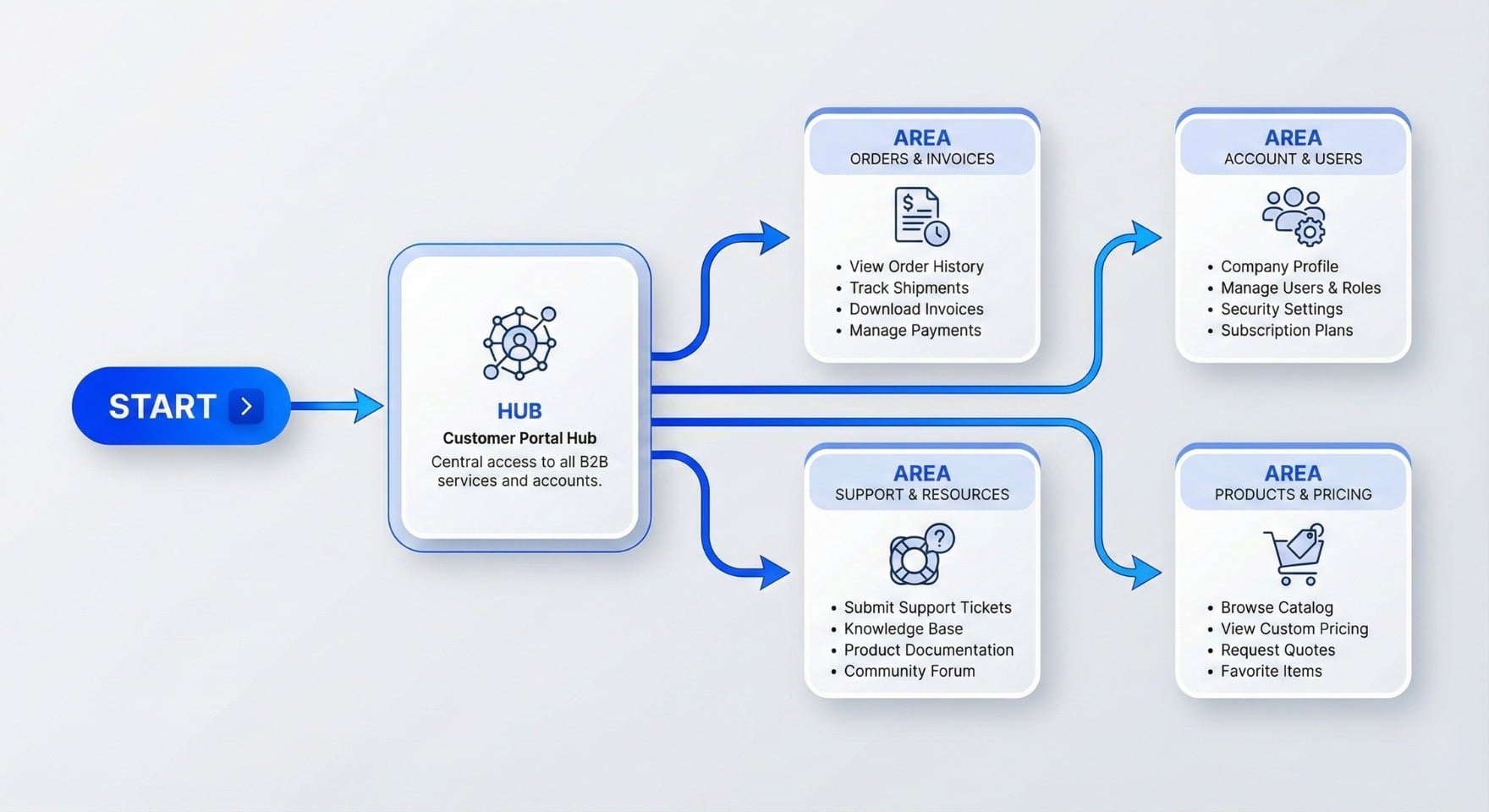
A strong portal reduces manual work for your sales and support teams, and gives customers a consistent place to check everything related to their account. This Shopware B2B feature becomes the daily workspace for your buyers, so clarity and speed matter more than visual fireworks.
2. Custom Pricing Engine
B2B pricing is rarely as simple as a single price per SKU. It usually includes contract rates, tier discounts, and customer-specific conditions. Shopware B2B pricing handles this complexity without custom code in most scenarios.
- Tiered pricing based on quantity brackets
- Contract-specific pricing for key accounts
- Customer group price lists for segments such as distributors or resellers
- Volume-based discounts applied in real time
- Support for promotional prices for fixed periods
- Multi-currency prices with correct tax handling
When you connect Shopware to your ERP, pricing rules can be aligned with the same logic that exists in your back-office system, which keeps both sales and finance teams comfortable.
The pricing engine is one of the most business-critical Shopware B2B features, because it reflects your contracts and discount logic.
3. Quote Management and RFQ Handling
For many B2B companies, orders begin as quote requests instead of immediate online purchases. Shopware supports this quote-first approach with built-in RFQ tools.
- Customers can request quotes directly from product or cart views
- Sales teams prepare and send quotes within the platform
- Quotes include full price breakdowns and validity dates
- Accepted quotes convert into orders with no rekeying
- Quote revisions and versions are tracked for reference
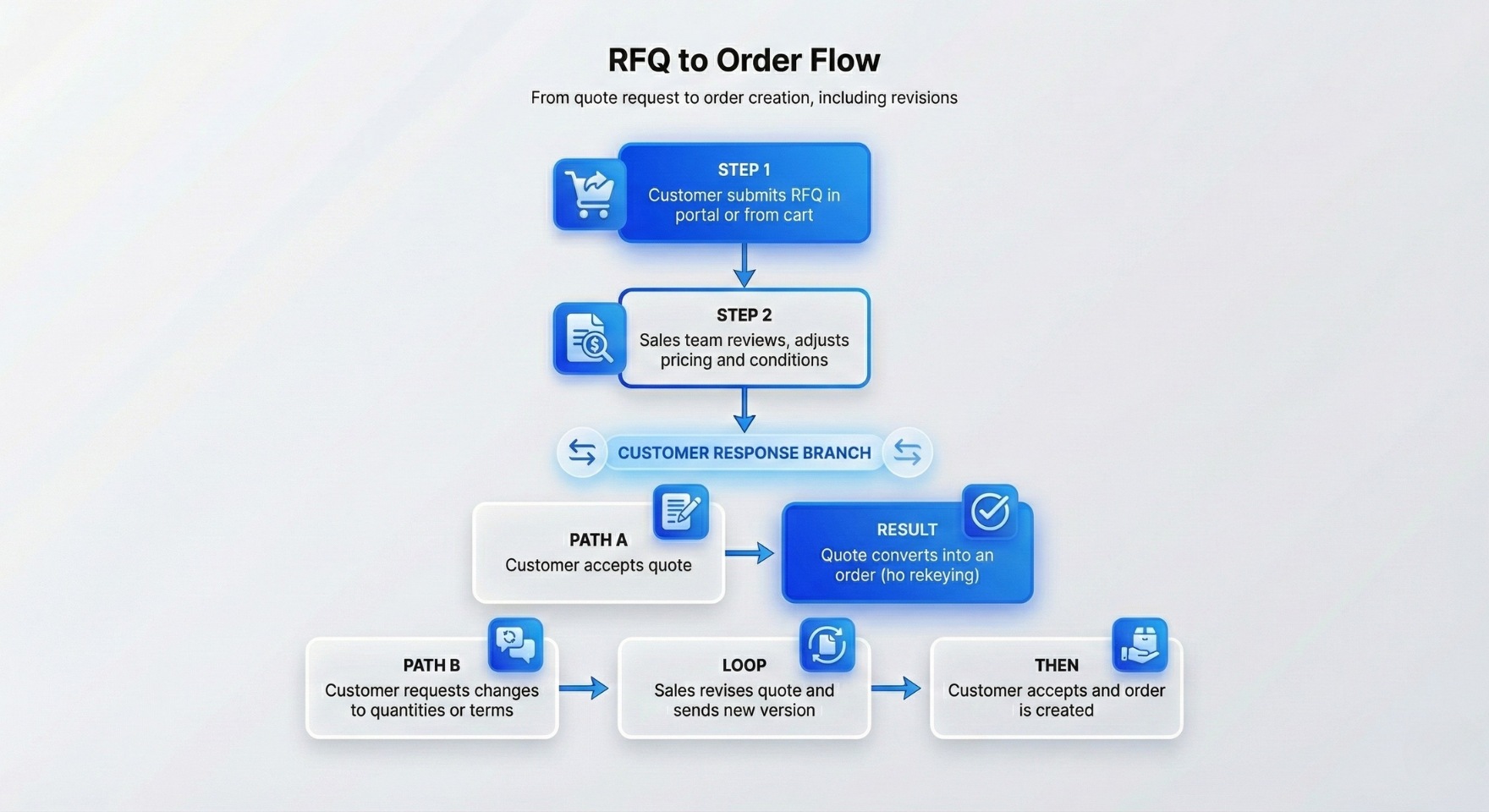
This keeps sales conversations centralized, instead of scattered across email threads and spreadsheets.
4. Multi-Level Approval Workflows
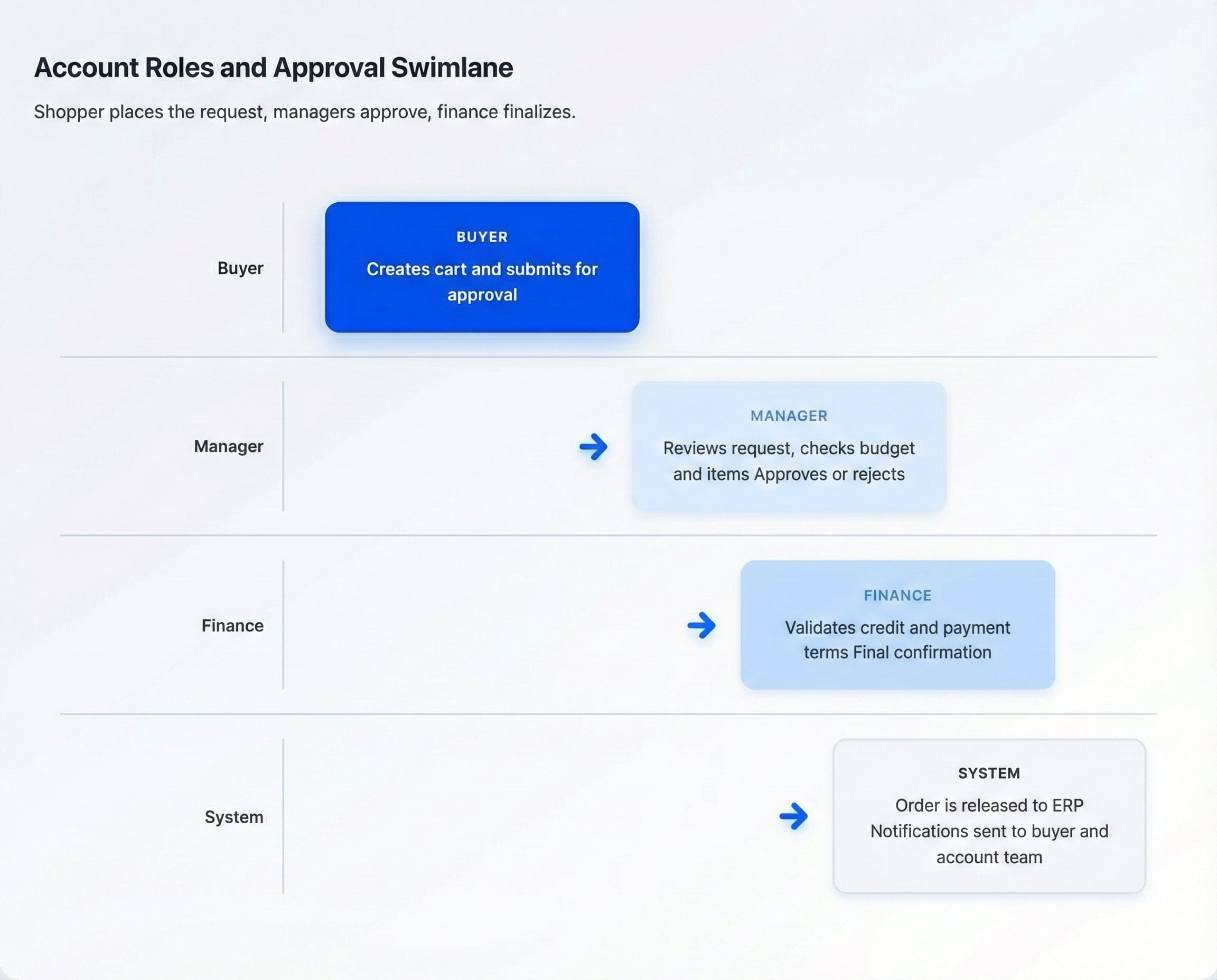
B2B purchasing often needs multiple approvals. A buyer may have the ability to place a draft order, but it requires approval from a manager or a finance role. Shopware supports this with configurable approval rules.
- Role-based approvals based on spend limits
- Budget controls at the team or department level
- Different workflows for different customer segments
- Automated email notifications at each step
- Complete approval history for audit purposes
Approval flows accelerate decision-making while maintaining control in the right hands, which is especially crucial for regulated or high-risk industries.
5. Bulk Ordering and Quick Order Tools
B2B buyers often know exactly what they need. They want to type in SKUs, paste from spreadsheets, or upload files instead of browsing category pages for every order.
- CSV upload for large orders
- Quick order form for entering SKUs and quantities
- Saved order templates for frequently repeated orders
- Shared shopping lists across buyer teams
With correctly configured quick order flows, a large repeat order that used to take 30 minutes by phone can be placed online in a few minutes.
6. Inventory Management and Real-Time Syncronization
Inventory misalignment is one of the fastest ways to lose trust in B2B. Shopware supports multi-warehouse and real-time inventory connections to your ERP, keeping displayed stock aligned with reality.
- Inventory per warehouse or location
- Real-time or scheduled sync with ERP or WMS
- Low stock alerts and thresholds
- Reserved stock for pending quotes and approvals
- Backorder and lead time support
7. Advanced Order Tracking and Management
Once an order is placed, buyers want clear visibility. Shopware supports complex fulfillment patterns from partial shipments to multiple deliveries.
- Real-time order status updates
- Shipment notifications with tracking links
- Support for partial shipments and split orders
- Recurring order scheduling
- Order modification options before fulfillment
8. Contract Management
Long-term B2B relationships rely on contracts that define pricing, terms, and commitments. Shopware allows you to reflect these contracts in the digital experience.
- Store contract data and link it to accounts
- Apply contract pricing automatically
- Track contract start and end dates
- Set reminders for renewals
- Monitor progress toward volume commitments
9. Return and RMA Handling
Returns are a common part of B2B life, especially in industries with high order volumes or those involving technical products. Shopware structures RMA (Return Merchandise Authorization) flows to keep them manageable and transparent.
- Customers raise RMA requests from their accounts
- Reason codes and categories for analysis
- Automated or manual approval rules
- RMA numbers and documentation
- Restocking and inventory updates aligned with ERP
10. Multi-Currency and Multi-Language Support
For B2B sellers with international customers, Shopware delivers localized experiences without the need for separate platforms.
- Display prices in customer currency
- Language-specific storefront content
- Region-specific tax rules and compliance
- Local payment methods
- Support for multiple regional storefronts
11. Mobile Optimized B2B Experience
B2B buyers increasingly work from mobile devices. Shopware offers a responsive interface that makes it simple to place orders, approve requests, and check stock from a phone or tablet.
- Mobile-friendly navigation
- Mobile quick ordering and approvals
- Responsive account dashboards
- Support for mobile-centric field sales workflows
12. ERP, CRM, and PIM Integration Capabilities
The real power of Shopware B2B is evident when it integrates seamlessly with ERP, CRM, and PIM. Shopware was built with an API first philosophy, which makes deep integration much easier.
- Connectors and middleware for SAP, NetSuite, Dynamics, Infor, Epicor, Odoo, and others
- Real-time product, inventory, and pricing sync
- Batch synchronization for large catalogs
- Bi-directional customer data flows with CRM
- Centralized product data management with PIM
Atwix typically utilizes a middleware layer, allowing your ERP and Shopware to evolve independently while still sharing all the necessary data for accurate pricing, ordering, and reporting.
When Shopware Excels for B2B
Shopware is not the only B2B platform on the market, but it hits a very attractive sweet spot for many companies. It combines strong B2B features, modern architecture, and predictable licensing.
Ideal Company Size
- Small to Mid-Market (5 million to 50 million annual revenue): Shopware offers enterprise-level capabilities without the heavy license bill.
- Growing Mid Market to Enterprise (50 million to 500 million): B2B Components let you scale up features and integrations as you grow.
- Global Enterprises (500 million and above): The Beyond plan handles complex multi-region operations with advanced support.
Best Fit Industries
Atwix has seen particularly strong product-market fit in the following sectors:
- Manufacturing: Complex product structures, documentation, and quote-heavy processes.
- Distribution: High SKU counts, multi-warehouse setups, and frequent stock changes.
- Wholesale: Tiered pricing, recurring bulk orders, and multi-user accounts.
- Regulated Industries: Need for controlled approvals and detailed audit history.
Competitive Positioning vs Other Platforms
| Platform | Core Strengths | Best Use Case |
| Shopware | Modern architecture, modular B2B components, predictable pricing | Mid-market and upper mid-market B2B companies that want flexibility |
| Magento (Adobe Commerce) | Very deep customization and a massive ecosystem | Global enterprises with extremely complex catalogs and logic |
| Shopify Plus | Simplicity and fast initial launch | B2C first brands with lighter B2B requirements |
| BigCommerce | Fast deployment and headless options | Companies that need to launch quickly with moderate B2B complexity |
Industry Use Cases and Proof Points
High-level features are useful, but decision makers also want to know how these capabilities translate into real-world results. Below are examples that illustrate what companies achieved with a well-executed Shopware B2B implementation.
Manufacturing: BUFA Chemicals
BUFA Chemicals is a long-established manufacturer that modernized its buying experience with Shopware. Instead of phone and email orders, customers use a self-service portal that mirrors each customer’s specific agreement.
- Order processing time reduced by around 60 percent
- Sales team time freed up to focus on strategic accounts
- 24/7 ordering across different time zones
- Significant reduction in manual entry errors
Distribution: Multi-Warehouse European Distributor
A European industrial distributor with 15 warehouses needed real-time visibility into stock to keep customer promises. Shopware, integrated with ERP, delivered a single view of inventory.
- Real-time inventory levels across all warehouses
- Automatic routing to the nearest warehouse with stock
- Fulfillment times reduced by about 35 percent
- Improved customer satisfaction scores and fewer out-of-stock issues
Wholesale: Office Furniture Supplier
A wholesale office furniture supplier used Shopware to automate complex pricing structures and bulk ordering for B2B customers.
- Five customer pricing tiers are configured in the pricing engine
- Volume discounts are calculated instantly in the cart
- Contract-specific pricing is displayed only to relevant buyers
- Average order value increased by around 25 percent
Shopware B2B Cost and ROI
Licenses and implementation budgets are a significant factor in any platform decision. Shopware stands out by offering predictable subscription levels and a broad range of implementation options.
Licensing Overview
| Plan | Approximate Monthly Cost | Best For | Key Inclusions |
| Evolve | About 2400 euros per month | Small to mid-market B2B sellers | B2B Components, advanced search, enhanced support |
| Beyond | About 6500 euros per month | Large and complex enterprises | All Evolve features plus digital sales rooms, multi-inventory, priority support |
Final pricing depends on factors such as order volume and GMV; however, these levels provide a useful reference for planning.
Implementation Budget Ranges
- Small to mid-size projects: 50 thousand to 150 thousand
- Mid-market implementations: 150 thousand to 400 thousand
- Enterprise programs: 400 thousand to 1 million plus
The biggest cost drivers are integration complexity, the number of systems, the amount of custom work, and the scale of data migration.
Typical ROI Timeline
While exact numbers vary by company, the following pattern is common:
- Year 1: Order efficiency improves by 30 to 40 percent, phone and email orders drop significantly, and the first automation savings appear. About 15 to 25 percent of project investment is typically recovered.
- Year 2: Average order values increase, customer acquisition costs decline, and digital adoption stabilizes. Many companies recover 75 to 100 percent of the initial implementation cost by the end of year two.
- Year 3 and beyond: Benefits compound through improved retention, expanded product lines, and entry into new markets. Full ROI is often reached between months 18 and 24.
Quantified Automation Savings
- Order Processing: Manual order entry can take 15 to 20 minutes per order. Automation reduces this to a few minutes or fully hands-off flows. For 10,000 orders per year, that represents 1,500 to 2,000 hours saved.
- Approval Workflows: Manual approvals can take days. Automated approvals often shorten this to hours, speeding up cash flow and revenue recognition.
- Customer Self-Service: Moving common tasks into the portal reduces ticket volume by 40 to 60 percent in many cases, which directly cuts support costs.
- Pricing Accuracy: Automated pricing rules limit the financial impact of human error, especially for large or frequent orders.
Gartner Recognition
Shopware has been recognized as a Visionary in the 2025 Gartner Magic Quadrant for Digital Commerce, marking multiple consecutive years of inclusion. That position reflects a strong combination of the ability to execute and a comprehensive vision.
For B2B decision-makers, this recognition serves as an additional data point that supports the choice of Shopware as a strategic platform, rather than just a tactical, short-term solution. It signals ongoing investment in features, integrations, and partner ecosystem growth.
Top Shopware B2B Plugins
Although Shopware B2B is strong out of the box, its plugins allow you to refine and extend the experience even further. Atwix usually recommends starting lean and adding only what solves a real business need.
- Quick Order tools for faster SKU-based ordering
- Employee and rights management to define complex account structures
- Customer-specific prices for fine-grained pricing control
- Business Essentials to tailor B2B and B2C experiences in the same store
- VAT ID validation for tax compliance
All new plugins should be tested in a staging environment that matches production as closely as possible. This avoids potential performance surprises or conflicts after deployment.
How to Set Up a High-Performance Shopware B2B Store
A successful Shopware B2B project is not only about features. It is about the order in which you implement them and how you align them with your internal processes. Below is the practical seven-step approach Atwix uses with B2B clients:
Step 1: Define Core Requirements
Start with a discovery phase. Involve sales, finance, operations, IT, and customer service. Map out how orders are handled today and what your ideal target state looks like.
- What pricing and discount rules are active today
- Which approvals are required and for which order sizes
- Which ERP, CRM, and PIM systems are in play
- How returns and RMAs are handled
- What metrics define success for the project
Step 2: Choose Evolve or Beyond
Select the Shopware plan that best matches your scale and roadmap. Evolve is ideal for mid-market needs. Beyond supports large global operations and more advanced requirements.
Step 3: Configure the B2B Components
Once the base plan is selected, configure the B2B components that support your workflows.
- Set up customer groups and account structures
- Define pricing rules and discount logic
- Configure approval workflows and roles
- Establish payment terms by segment
- Set minimum order quantities and order limits
Step 4: Integrate ERP, CRM, and PIM
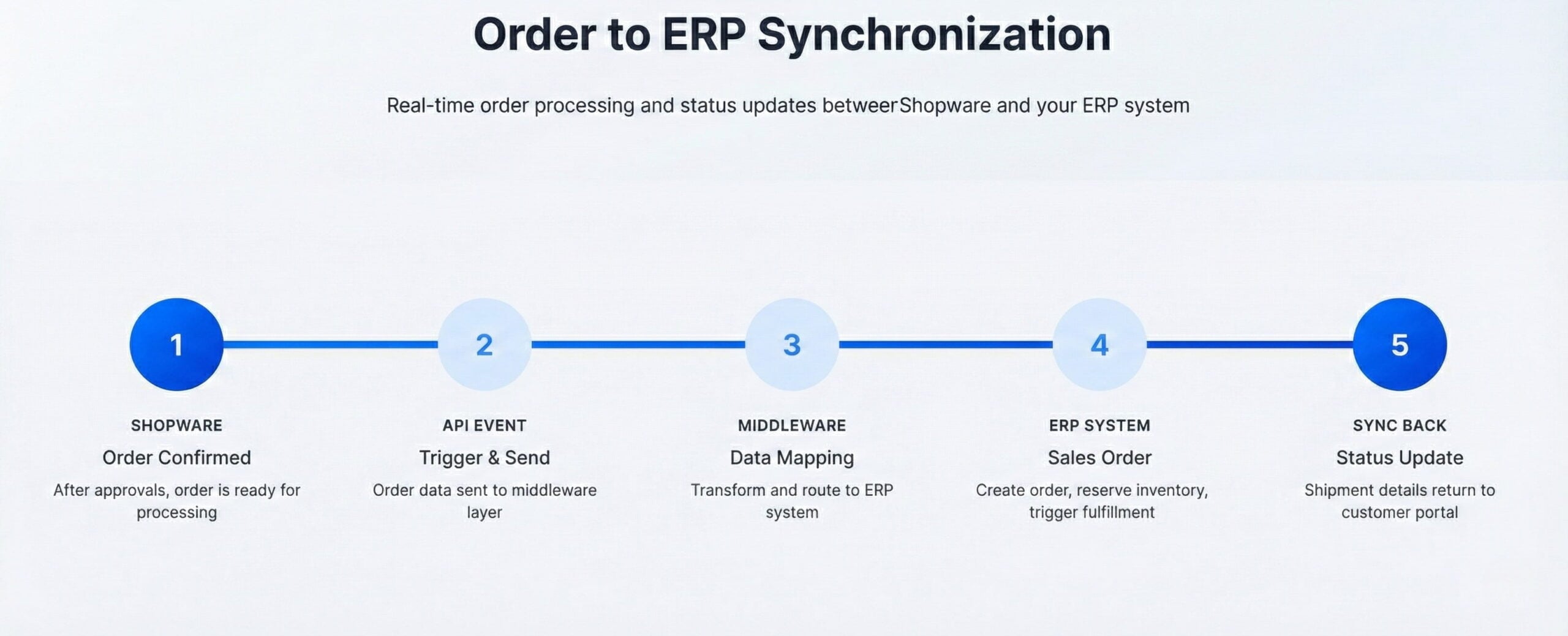
Integration is where Shopware becomes the central digital hub of your B2B operation. A typical integration architecture looks like this:
Start with core processes, such as product and inventory synchronization, and then add more advanced capabilities, like contract pricing or complex credit management, as you gain confidence.
Step 5: Test Thoroughly
Testing is where B2B projects often succeed or fail. Make sure you:
- Test each role and permission configuration
- Run through full approval workflows with sample orders
- Validate pricing for different customers and segments
- Stress test integration under heavy load
- Run user acceptance testing with real customers or pilot groups
Step 6: Launch and Train Users
Launch is not just flicking a switch. It is about onboarding internal teams and customers so they actually use what you’ve built.
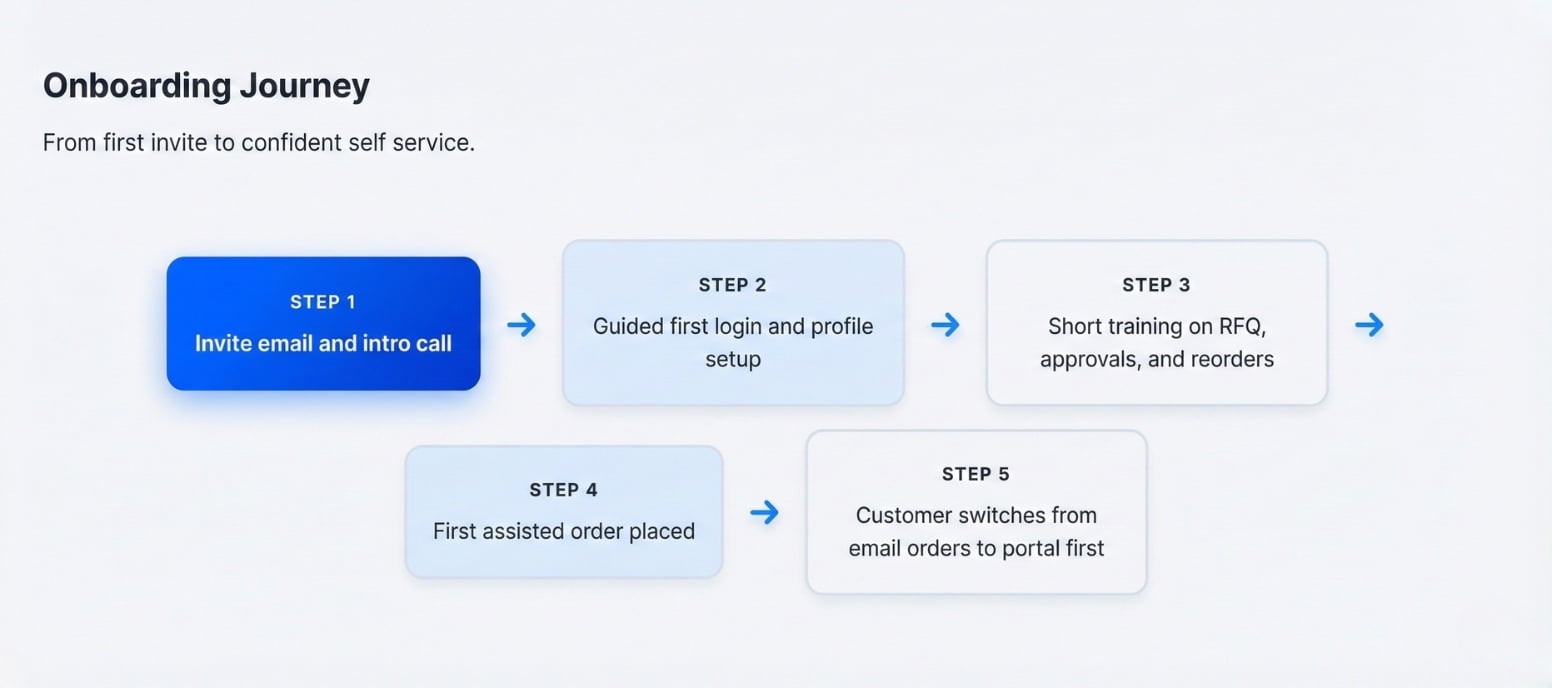
- Create video tutorials for the portal and key workflows
- Prepare written guides and FAQs for buyers
- Train sales teams so they can support customer adoption
- Offer assisted first orders for strategic accounts
Step 7: Monitor and Optimize
After launch, keep a close eye on performance and usage.
- Monitor cart abandonment and checkout friction
- Track average order value and order frequency
- Measure approval time for different segments
- Review support tickets to find UX issues
- Adjust roles, workflows, and integrations as business needs change
Shopware B2B Tips and Best Practices from Atwix
After working on numerous Shopware B2B implementations, Atwix has identified patterns that help projects succeed and deliver real business value.
Focus on the Biggest Bottlenecks First
Do not try to automate everything on day one. Select the processes that consume the most time or pose the highest risk, such as manual pricing updates, slow approvals, or excessive phone ordering.
Keep Roles and Permissions Simple
Start with a small set of clear roles rather than a highly fragmented permission model. You can always add more granularity later once users are comfortable with the platform.
Invest in Onboarding
Great B2B stores still fail if customers do not know how to use them. Take onboarding seriously by providing training materials, guided tours, and personalized outreach to key accounts.
Use Analytics to Drive Iteration
Leverage Shopware analytics and external BI tools to understand how buyers actually behave. Monitor cart abandonment, order value, repeat purchase patterns, and approval delays. Use these insights to decide what to optimize next.
Stay Flexible and Ready to Adjust
B2B structures change when companies acquire others, expand into new regions, or reorganize departments. The modular nature of B2B Components and Shopware APIs makes it possible to adjust without having to start over.
Work with Experienced Partners
A strong implementation partner can shortcut months of trial and error. Atwix brings knowledge from many B2B industries and can help you avoid common pitfalls, particularly in areas such as ERP integration and workflow design.
Unlocking the Full Potential of Shopware B2B
Shopware B2B is more than a storefront. It becomes the central digital layer that connects your customers, your internal teams, and your core systems. With its modular components, API first architecture, and strong integration capabilities, it can support everything from simple bulk ordering portals to multi-brand, multi-region enterprise platforms.
Combined with Atwix’s experience in B2B and advanced ERP integration, you can move from manual, offline processes to a scalable digital engine that supports your growth plans. The result is faster order cycles, better customer experiences, and a data-rich view of your business.
If you are exploring options for a new B2B platform or planning to modernize an existing store, Shopware is a strong candidate worth serious consideration.
Register for the November 18 B2B Webinar

Want to see real examples and live walkthroughs of Shopware B2B in action? Join Atwix experts on November 18 for a focused session on features, architectures, and lessons learned from real projects.
- Learn how to choose between B2B Components configuration options
- See best practice approval, pricing, and integration flows
- Ask questions specific to your industry and use case
Frequently Asked Questions
Got some questions? We’re here to answer. If you don’t see your question here, drop us a line with out Contact form.
How does Shopware handle complex B2B pricing models?
Shopware provides customer-specific pricing through its B2B Suite and Rule Builder. Businesses can create pricing rules based on customer groups, order volume, contract terms, and discount structures. Shopware B2B features also allow for personalized catalogs, ensuring different customer segments see only relevant products and prices.
Can Shopware integrate with my ERP system
Yes, Shopware B2B supports seamless integration with ERP systems like SAP, Microsoft Dynamics, and Odoo. These integrations enable real-time synchronization of inventory, customer data, order processing, and financial reporting. Shopware’s API-first architecture ensures smooth customization and automation for different business needs.
What are the key benefits of Shopware for B2B compared with other eCommerce platforms
Shopware offers a modular system with both B2B Components and a full B2B Suite, allowing businesses to choose the right level of functionality. It provides multi-user account management, seamless ERP and CRM integrations, automated workflows, and an open-source API-first structure for flexibility. These features make it more adaptable to B2B needs compared to traditional eCommerce platforms.
How can Atwix help plan and launch my Shopware B2B store
Atwix is a Shopware Platinum Partner specializing in B2B eCommerce. The team provides consultation, custom development, plugin recommendations, ERP integrations, and ongoing support to optimize and scale Shopware B2B stores. Businesses looking for tailored solutions and expert guidance can partner with Atwix for a seamless B2B eCommerce transformation.
You may also find interesting