


If you run an online store, conversion rate is one of those numbers you should always keep an eye on. It tells you how well your website turns visitors into paying customers – basically, how persuasive and user-friendly your online experience really is. The higher the rate, the better your site is at turning interest into sales.
There are plenty of ways to measure and improve conversion rates, and no shortage of experts who can help you out. But before you go hunting for fancy tools or expensive audits, remember: you probably already have a great place to start – the good old Google Analytics.
What to Watch in Google Analytics
You can set up a few key metrics in Google Analytics to understand what’s driving (or hurting) your conversion rate. Here are some of the most useful ones:
- Landing page relevance & first impression
Does what visitors see match what they expected from your ad or search result? Metrics like bounce rate, scroll depth, time on page, and CTA click rate tell you if you’re meeting their expectations. - Mobile performance & usability
Mobile traffic often makes up most of your sessions, but it usually converts at about half the rate of desktop. Check how your pages load, how responsive they are, and whether small interaction delays might be costing you sales. - Checkout funnel friction
Look at how many users drop off between cart, checkout, payment, and confirmation. Each step is a potential point of frustration or confusion. - Traffic quality & sources
Not all visitors are equal. Compare conversion rates by channel or campaign – paid vs organic, social vs direct. Even the best site won’t convert well if the traffic isn’t a good match. - Product discovery & category flow
Explore internal search terms, filter usage, add-to-cart rates, and exit pages. If finding products feels like work, people quietly leave. - Trust and reassurance
Reviews, clear shipping info, return policies, and visible support all make a difference. A big gap between new and returning customer conversions often signals trust issues. - Performance & reliability
Technical issues kill trust fast. Keep an eye on page load times, errors, redirects, 404s, and out-of-stock loops. A slow or broken site drives shoppers away before they even reach checkout.
Meet GA4’s “Exploration Mode”
Google Analytics 4 introduced something called Exploration Mode – a more flexible way to dig into your data and build custom reports. You can create different tabs, test views, and play around with insights without touching your main dashboards.
Let’s say you want to examine checkout funnel friction. In the right sidebar of GA, open Explorations and create a new one. Choose the Funnel Exploration report type, set Item category as your main dimension, and add any metrics you care about. Then, under Steps, include all your key eCommerce events – things like “add_to_cart,” “begin_checkout,” “purchase” – and use Session source as your breakdown.
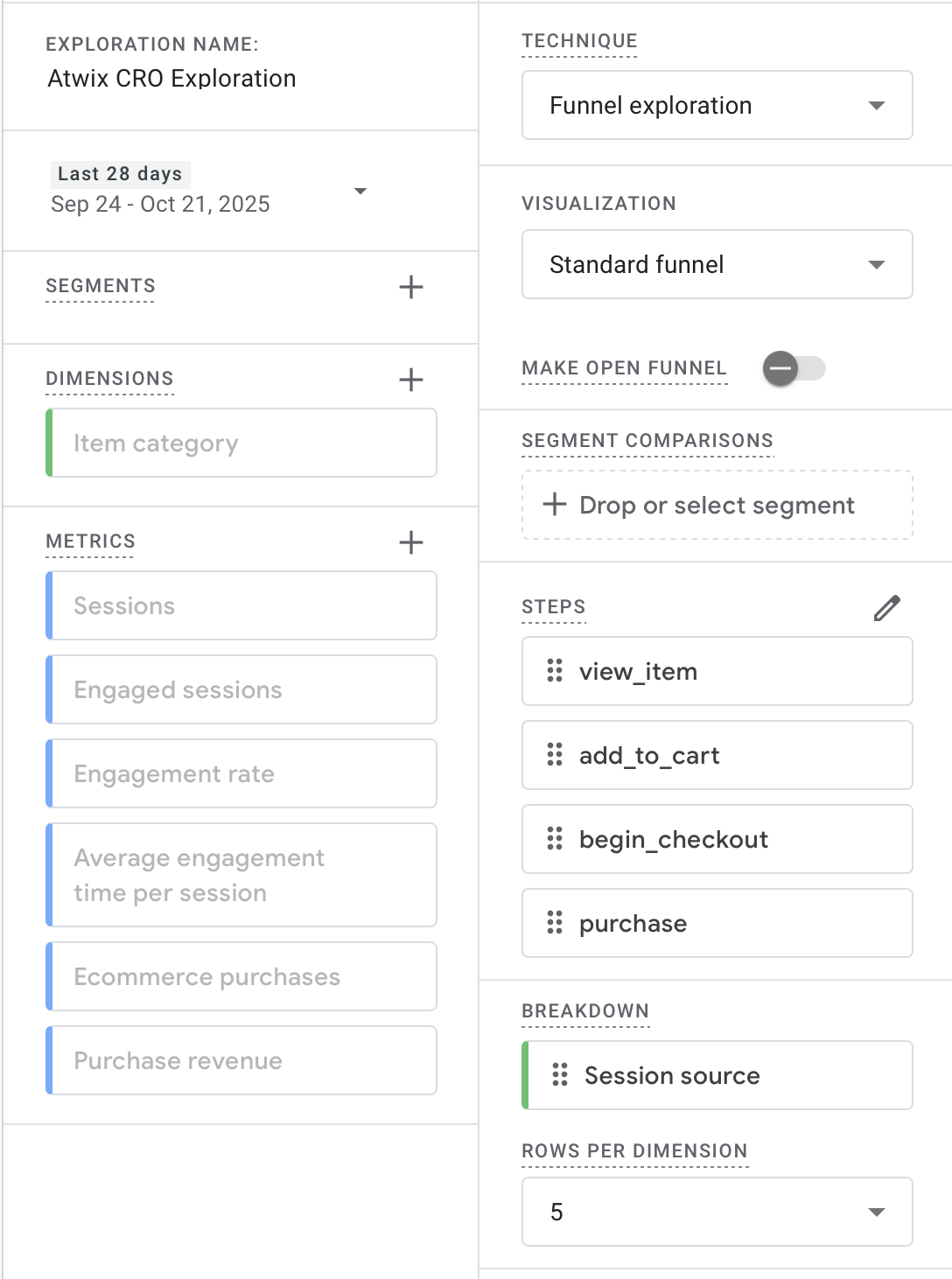
Once it’s ready, you’ll see a funnel graph on the right and a table below it showing which traffic sources perform best at each stage. You can also break the data down by device to see how conversion patterns differ between desktop and mobile. It’s not unusual to find that checkout abandonment is higher on phones – smaller screens, tricky forms, or slow payments can all be the culprits.

These insights help you pinpoint exactly where customers drop off and why. Maybe your checkout form feels too long, or maybe your mobile layout hides an important button. Once you know what’s happening, fixing it gets much simpler.
Wrapping It Up
Optimising conversion rate isn’t about guessing what might work – it’s about paying attention to what your real visitors are doing and removing obstacles step by step. GA4 gives you enough power to uncover most of those insights without buying extra tools.
If you’d like a deeper CRO audit or help setting up smarter reports, our team is always happy to jump in. We can help you make sense of your analytics, find friction points, and design clear, data-backed actions that actually move the numbers.