


Every October, Magento teams have about six weeks to find out whether their store holds up under Black Friday and Cyber Monday traffic. This year the list is longer than usual: the newest Adobe Commerce patches drop Redis support for cache, MySQL 8.0 and Elasticsearch 7.17 are past end of support, and Adobe Commerce Cloud starts suspending traffic to environments on outdated services on October 30. This Magento performance optimization checklist puts the work in priority order, shows how to check each item in a few minutes, and marks what to finish before your code freeze and what to plan for January.
The checklist at a glance
P1 items are high impact and low risk: finish them before your code freeze. P2 items help if you have the time and a staging environment to test them. P3 items are structural changes to plan for after peak.
| Priority | Area | Check | Passing looks like |
|---|---|---|---|
| P1 | Full page cache | Varnish (or Fastly on Adobe Commerce Cloud) serves anonymous pages; no cacheable=”false” blocks on cacheable layouts | X-Magento-Cache-Debug: HIT (on Fastly, X-Cache containing HIT) on the second request for category, product and CMS pages |
| P1 | Patch level | Latest security patch applied, with Valkey if the patch requires it | Patch and cache backend change tested on staging and live before November |
| P1 | Adobe Commerce Cloud services | No Elasticsearch, MariaDB 10.5 or earlier, or RabbitMQ 3.9 or earlier | Upgrades done before October 30, 2026 |
| P1 | Deploy mode | Production mode, static content deployed | bin/magento deploy:mode:show returns production |
| P1 | Indexers and cron | All indexers on Update by Schedule; cron running every minute on one node | indexer:status backlog drains within minutes; no pile of pending or missed jobs |
| P1 | Cache and sessions | Cache and sessions in Redis or Valkey, on separate instances or databases | Sessions not on disk; backend matches what your version supports |
| P1 | Hosting | Load test the uncached paths at your expected peak plus headroom | Search, add to cart and checkout stay fast at target orders per minute |
| P1 | Adobe Commerce Cloud capacity | Surge capacity requested | Ticket filed with dates and expected capacity |
| P2 | Database | Slow query log reviewed; bloated tables trimmed | No query in the top 10 scanning a full large table |
| P2 | PHP | Supported PHP version, OPcache tuned, PHP-FPM sized to memory | No pm.max_children warnings under load |
| P2 | Images | Modern formats from the CDN, LCP image not lazy-loaded | Mobile LCP at or under 2.5 seconds at the 75th percentile |
| P2 | Third-party JS | Every tag has an owner and a reason; non-critical tags deferred | Tag list reviewed in the last 30 days; INP at or under 200 ms |
| P3 | Platform | Version and service stack inside Adobe’s support window | Upgrade plan for PHP, database, search and Varnish |
| P3 | Frontend | Theme architecture fits your performance targets | A decision on Luma tuning vs a lighter theme |
Before you start: take a baseline
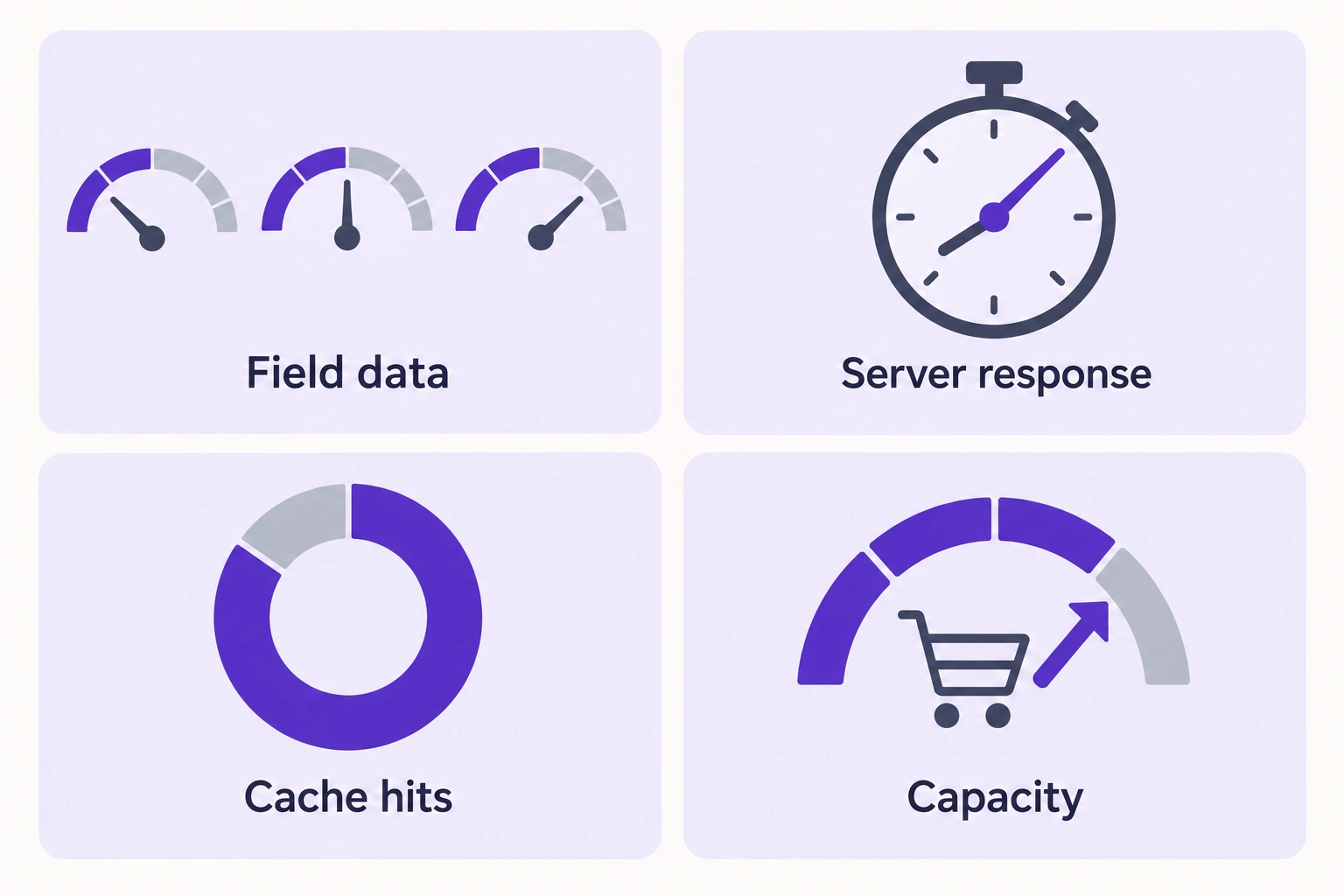
Spend the first day measuring, so every change has a before number:
- Field data. Pull Core Web Vitals for home, category, product and cart templates from Search Console or PageSpeed Insights. Google’s thresholds for a good experience are LCP within 2.5 seconds, INP of 200 milliseconds or less, and CLS of 0.1 or less, measured at the 75th percentile of page loads.
- Server response. Record time to first byte for a cached and an uncached request on each template. The cached number reflects Varnish; the uncached number reflects PHP, the database and your extensions.
- Cache behavior. Record Varnish hit and miss counts over a normal trading hour.
- Capacity. Find the orders per minute and concurrent sessions your store handles before errors start.
1. Magento full page cache: confirm Varnish is serving hits
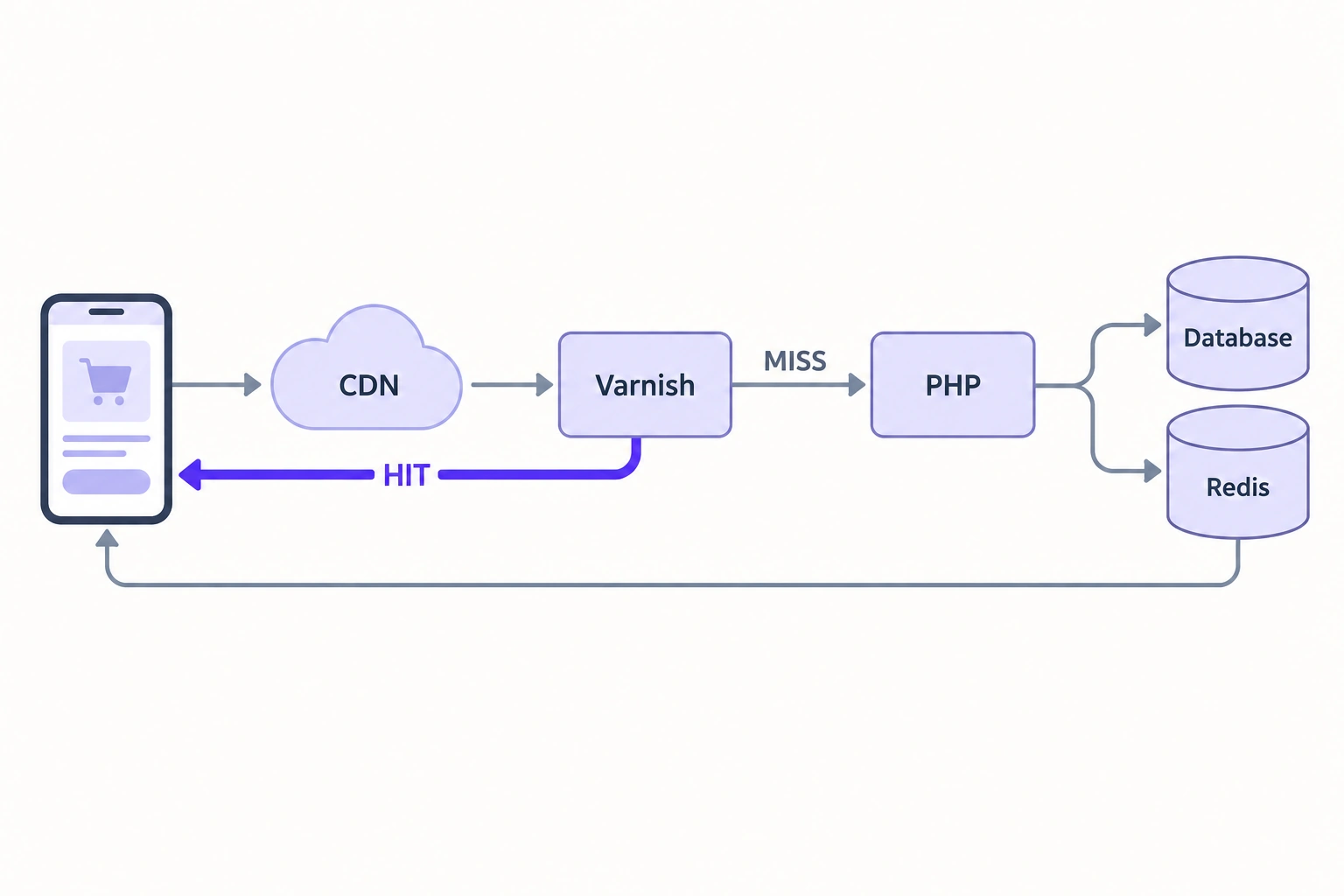
The full page cache decides whether a shopper’s request touches PHP at all, so verify it first. When it stops working, every page view becomes a full PHP and database request, and the store falls over at 9 a.m. on Black Friday.
Use Varnish in production
Adobe recommends Varnish for production and describes the built-in file system and database cache as much slower (Adobe Commerce Varnish configuration guide). On Adobe Commerce on cloud infrastructure, Fastly, a Varnish-based CDN, does this job. The causes of a low hit rate below are the same on both.
Measure the hit rate
Request a category page twice with curl -I and read the X-Magento-Cache-Debug header. The VCL that Magento 2.4 exports sets it to HIT, MISS or UNCACHEABLE (Magento source, varnish7.vcl). A missing header means your VCL is old or heavily customized. On Adobe Commerce Cloud, run curl -vo /dev/null -H Fastly-Debug:1 against the page URL instead, and look for X-Cache containing HIT and a Fastly-Magento-VCL-Uploaded header (Adobe Fastly troubleshooting).
For the store-wide view, run varnishstat and compare MAIN.cache_hit with MAIN.cache_miss. If MAIN.n_lru_nuked keeps rising, Varnish is evicting pages to make room for new ones and needs more memory (Varnish counters reference).
Find what makes pages uncacheable
These are common causes of UNCACHEABLE responses and low hit rates:
- A cacheable=”false” block. Magento disables page caching for any page whose layout contains at least one non-cacheable block (Adobe public content docs). One extension adding a non-cacheable block to default.xml switches off caching for the whole storefront.
- Too many page variations. Every context value (store, currency, customer group, plus any an extension adds) multiplies the copies Varnish stores. Our guide to cache context and page variations in Magento 2 shows how to add one without flooding the cache.
- Campaign URLs. The stock 2.4 VCL strips tracking parameters such as gclid, fbclid and utm_* before the cache lookup. A custom VCL without this rule stores a separate copy of the page for every ad click, during the same weeks paid traffic peaks.
- Filter and sort URLs crawled by bots. Every combination of layered navigation filters and sort orders is a separate cache entry, so the hit rate drops even when every page is cacheable. Keep crawlers out of these combinations with robots.txt rules and canonical tags.
Private content can also defeat the cache. Magento’s customer-data library refreshes private sections after POST or PUT requests (Adobe private content docs) through an uncached GET call to customer/section/load. An extension that forces that reload on every page view turns each view into a PHP request, so check the browser network panel for a section load on every navigation.
Plan cache invalidation for peak
Magento purges Varnish automatically when you add or edit categories, prices, products or price rules (Adobe Varnish cache docs), and that purge clears only the pages tagged with the changed entities. A custom import or reindex script that runs a full cache flush empties the whole cache instead, so check yours before peak. Then:
- Schedule bulk imports and price syncs for low-traffic hours.
- After any deploy or full flush, crawl your top category and product URLs to warm the cache.
- Keep grace mode in any custom VCL, so Varnish serves a stale copy while it fetches a fresh one.
2. Redis or Valkey for cache and sessions
Your exact version decides the cache backend. Adobe states: “Redis cache is not supported for Adobe Commerce 2.4.9, or for patch releases later than 2.4.5-p16, 2.4.6-p14, 2.4.7-p9, and 2.4.8-p4,” and says to use Valkey where Redis is not supported (Adobe best practices for Valkey and Redis).
| Your version | Cache backend |
|---|---|
| 2.4.9 | Valkey |
| Later 2.4.8, 2.4.7 and 2.4.6 patches | Valkey |
| 2.4.8-p4, 2.4.7-p9, 2.4.6-p14 or earlier | Redis still supported, but staying there means skipping every later security patch |
If your next security patch requires Valkey, do both in October. Valkey is a drop-in replacement for Redis, but test it on staging together with the patch, and don’t change either in November. We have moved several client stores from Redis to Valkey, including stores running on Amazon ElastiCache. Our Magento upgrade services team handles this kind of dependency change as part of a patch upgrade.
The same patches raise the listed Varnish version from 7.7 to 8. Magento doesn’t ship a Varnish 8 template yet: export the Varnish 7 VCL with bin/magento varnish:vcl:generate –export-version=7 and test it against Varnish 8 on staging. The command exports a Varnish 6 template unless you pass the version.
Whichever backend you run, check two settings:
- Separate cache from sessions. Adobe recommends separate instances, so cache traffic doesn’t compete with session traffic. At minimum, use separate databases for default cache, page cache and sessions.
- Get sessions off the file system. When we audited Dive Gear Express, the folder holding session data contained over 27,000 files, and we recommended Redis as session storage to speed up session reads and writes and reduce session locks (Dive Gear Express case study).
3. Indexers and cron: keep the backlog near zero
Indexers build the tables the storefront reads, and cron runs them. If either falls behind, shoppers see stale prices and stock.
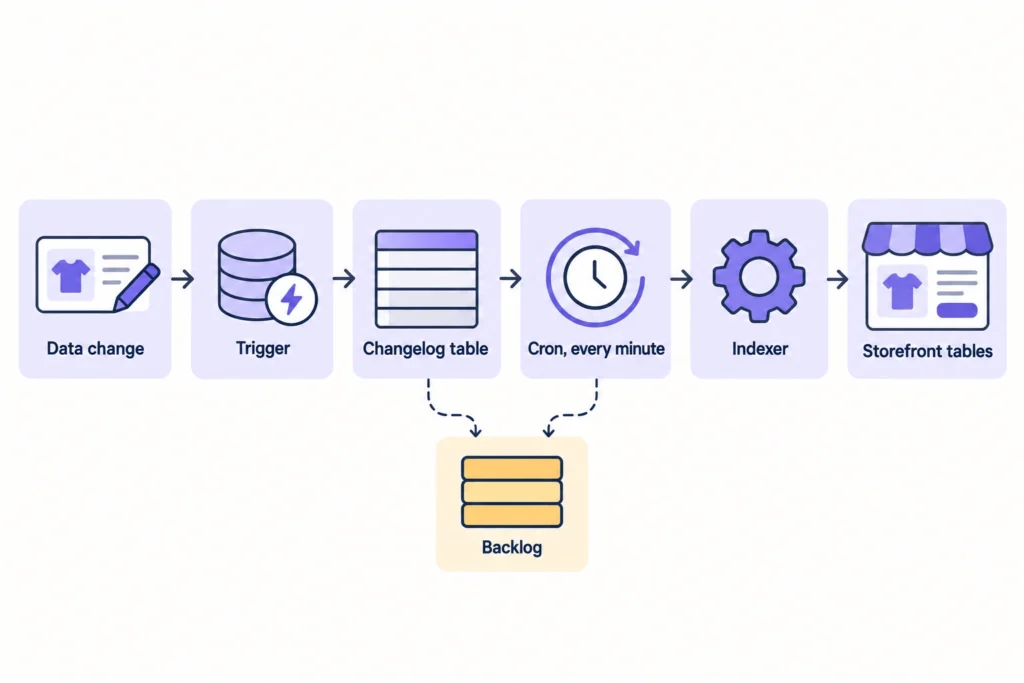
- Set every indexer to Update by Schedule. In Update on Save mode, frequent reindexing slows the database and the storefront, especially on large stores (Adobe indexer configuration best practices). Run bin/magento indexer:set-mode schedule. Put the store in maintenance mode and disable cron before you switch modes to avoid database locks.
- Read the backlog. In schedule mode, database triggers write changed entity IDs into changelog tables that cron processes (Adobe indexing docs). bin/magento indexer:status prints each pending count as idle (N in backlog); a count that grows through the day means cron can’t keep up.
- Check that cron runs. Confirm the crontab entry exists on exactly one node, runs every minute, and that jobs in cron_schedule move from pending to success.
- Turn off the flat catalog. Adobe no longer recommends it and lists it as a known cause of slowdowns and indexing issues (Adobe flat catalog docs). Some extensions only work with flat tables, so check with your extension vendors first.
- Move work out of checkout. Adobe’s configuration best practices recommend asynchronous email notifications and asynchronous grid indexing, which take work off the order placement request.
4. Database and search: supported versions, slow queries, bloated tables
Slow uncached requests usually end in the database. Check versions, the costliest queries and the tables that grow without limit.
Supported versions. Adobe’s system requirements list this stack for the latest on-premises patches:
| Latest patch | PHP | MySQL | MariaDB | Valkey | Varnish |
|---|---|---|---|---|---|
| 2.4.9 | 8.5 (8.4 for upgrades only) | 8.4 | 12.3 | 9 | 8 |
| 2.4.8-p5 | 8.4, 8.3 | 8.4 | 11.4, 11.8 | 8.1 | 8 |
| 2.4.7-p10 | 8.3, 8.2 | Not supported | 10.11, 11.8 | 8.1 | 8 |
| 2.4.6-p15 | 8.2, 8.1 | Not supported | 10.11 | 8.1 | 8 |
MySQL 8.0 reached end of support on April 30, 2026, and Adobe advises on-premises customers on 2.4.7 and earlier to move to a compatible MariaDB version. Elasticsearch 7.17 reached end of support on January 15, 2026, and Adobe advises customers on 2.4.6 and earlier to move to OpenSearch. Adobe Commerce 2.4.6 left standard support on August 11, 2026, with extended support for Adobe Commerce customers until August 31, 2027 (Adobe lifecycle policy).
On self-hosted stores, a database, search engine or Varnish migration is a P3 item: plan it now, run it after peak. Adobe Commerce Cloud is the exception. Adobe’s security enforcement policy sets an October 30, 2026 deadline for Elasticsearch, MariaDB 10.5 or earlier and RabbitMQ 3.9 or earlier, and suspends inbound traffic to environments that miss it. On Cloud, those upgrades are P1: deferring them past peak takes the store offline.
Slow query log. Enable the MySQL slow query log for a trading day and summarize it with mysqldumpslow. The default threshold, long_query_time, is 10 seconds, so lower it to catch slow storefront queries (MySQL 8.4 reference manual). Sort by total time: a 200 ms query on every product page costs more than a 30-second report that runs once a night. Set max_connections in line with your PHP worker count, as Adobe’s software recommendations advise.
Tables that grow without limit:
| Table | What fills it | What cleans it | What to check |
|---|---|---|---|
| quote | Every cart, guest or logged in | Daily sales_clean_quotes job deletes quotes older than Quote Lifetime (days), default 30, under Stores > Configuration > Sales > Checkout > Shopping Cart | Raising the lifetime to keep B2B carts alive makes the table grow; move long-lived lists into wish lists or, with Adobe Commerce B2B, requisition lists |
| cron_schedule | One row per scheduled job run | History cleanup every 10 minutes; success history kept 60 minutes and failures 4,320 minutes by default | Millions of rows mean cleanup isn’t running or jobs are stuck |
| Extension log tables | Third-party logging | Usually nothing, unless the extension ships a cleanup job | Row counts and size of any *_log table |
Teams most often forget the extension logs. For Coyuchi, we added a cron job to clean a log table that had grown too heavy, as part of stabilizing the store for peak seasons (Coyuchi case study). For Dive Gear Express, we recommended removing heavy logging records that were no longer needed and configuring automatic log clearing for a few heavy third-party extensions.
5. Hosting: PHP, OPcache, PHP-FPM, CDN and scaling
Hosting sets the ceiling for every request the cache doesn’t serve: search, cart, checkout, login and B2B pages priced per account.
Run a supported PHP version with OPcache tuned
Check your PHP version against the table in section 4, then apply the OPcache values from Adobe’s software recommendations:
opcache.memory_consumption=512
opcache.max_accelerated_files=60000
opcache.consistency_checks=0
opcache.validate_timestamps=0
opcache.enable_cli=1
With validate_timestamps=0, PHP never rechecks files on disk, so your deploy script has to reload PHP-FPM or reset OPcache, or shoppers keep getting the old code.
Size PHP-FPM to memory, then test
pm.max_children sets how many requests PHP-FPM serves at once (PHP manual). Derive it from the memory a worker uses under real traffic and the memory the node has left for PHP, then load test, because CPU may run out first. Enable pm.status_path and request_slowlog_timeout to see queueing and slow-request stack traces.
Put static and media files on a CDN
Static assets and product images shouldn’t reach your web nodes. Fastly handles this on Adobe Commerce Cloud. On self-hosted stores, put a CDN such as Amazon CloudFront in front of static and media files and point Magento’s base URLs for static and media content at it.
Magento AWS hosting: make web nodes stateless before you autoscale
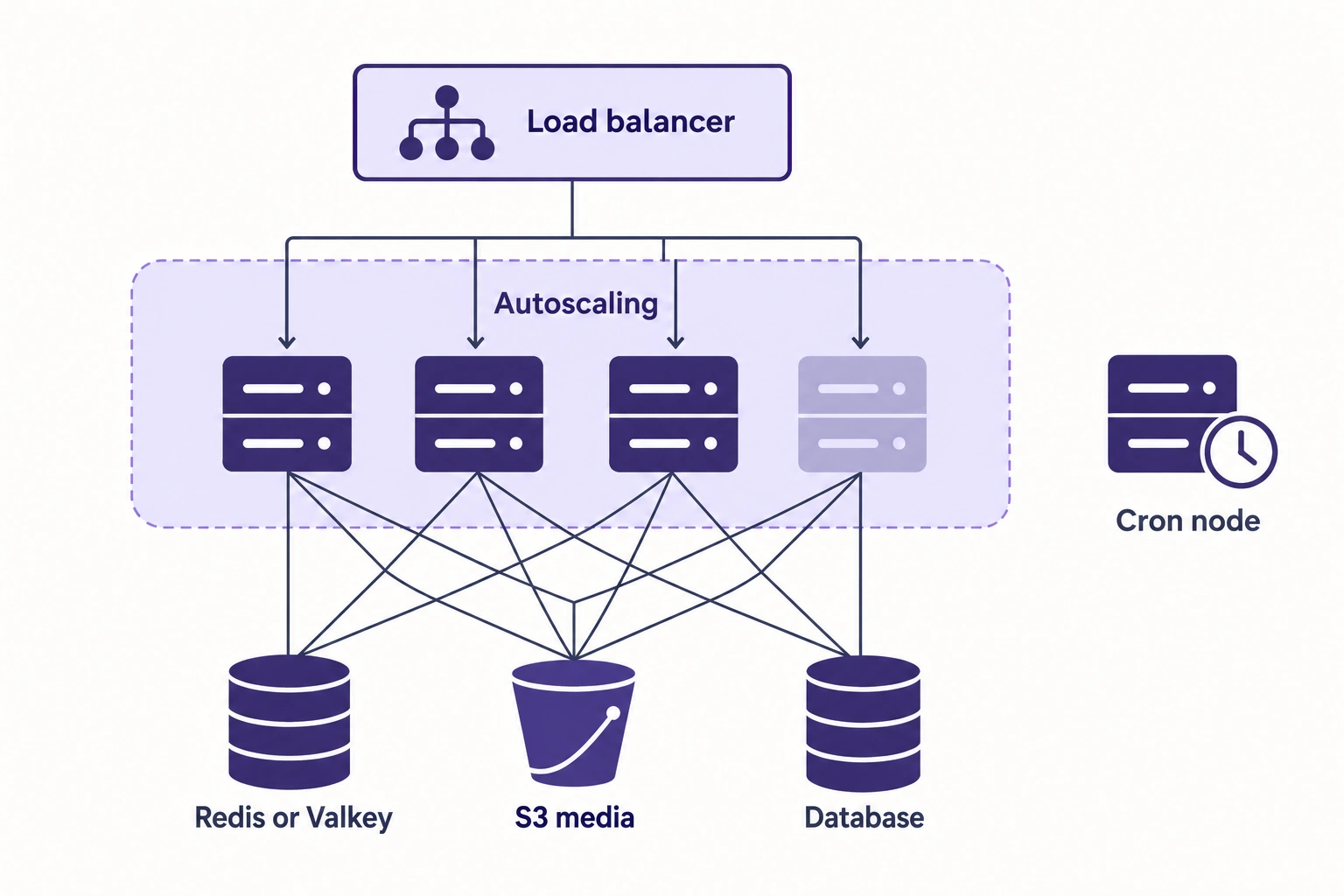
Autoscaling helps only if a new web node can serve traffic the moment it starts. On self-managed AWS:
- Sessions and cache live in Redis or Valkey.
- Media sits in shared storage. Magento’s remote storage module can store media in S3 with bin/magento setup:config:set –remote-storage-driver=”aws-s3″ and bucket and region options (Adobe remote storage docs).
- Cron runs on one designated node.
- Code is in place before the node joins the load balancer, followed by a warm-up request so shoppers don’t hit a cold OPcache.
- Scaling triggers watch request queueing or CPU, with a minimum node count that covers the first spike.
On Adobe Commerce on cloud infrastructure, Pro production runs on three nodes on AWS or Azure (Adobe Pro architecture), and extra capacity is a support request. Adobe requires 48 business hours’ notice for non-emergency upsizes and asks for Black Friday and Cyber Monday requests as early as possible, because capacity in that period is limited. File the ticket in October.
Load test the uncached paths
A load test of cached category pages proves only that Varnish works. Script the journeys that reach PHP: search, filtered category pages, add to cart, customer login, checkout and, for B2B stores, account-priced catalog views and quick order. We script these journeys in k6. Magento ships fixture profiles for test data from 800 up to 600,000 simple products (Adobe data generation docs) if your staging catalog is smaller than production. Run the test on staging sized like production.
Measure capacity in orders per minute. When we rebuilt Wyze on Magento Commerce Cloud, the old store could handle 20 orders per minute; the new platform supported 850 orders per minute with no errors and served 70,000 visitors on launch day (Wyze case study).
6. Images: modern formats, correct sizes, careful lazy loading
Magento speed optimization usually starts with images, where the LCP mistakes are easy to find.
- Serve WebP or AVIF from the edge. Core Magento’s product gallery uploader accepts JPG, JPEG, GIF and PNG, so modern formats usually come from an image service or CDN that converts on the fly. On Adobe Commerce Cloud, Fastly Image Optimization converts images to WebP for browsers that support it, once you enable and configure it.
- Don’t lazy-load the LCP image. Magento’s product listing template adds loading=”lazy” to product images (Magento source, image_with_borders.phtml). That suits row five, but on a mobile category page the first product image is often the LCP element. Hero banners come from Page Builder or CMS blocks, so check those separately. Google’s guidance is never to lazy-load the LCP image and to give the likely LCP element fetchpriority=”high” (web.dev, Optimize LCP).
- Send the size the layout needs. Resize images per breakpoint and keep width and height attributes so the browser reserves space and CLS stays low.
- Fix the source files. Our Magento image optimization guide covers compression, formats and bulk optimization from the command line.
7. Third-party JavaScript: audit every tag before peak
Third-party scripts often explain why a store passes lab tests and fails INP in the field, because campaign tags pile up and rarely come out.
- Inventory every tag. List each script on the storefront and in your tag manager with its owner, purpose and last-used date. Anything without an owner goes.
- Remove dead code. Uninstalled extensions and expired campaigns leave scripts and pixels behind in templates and the tag manager. Search for them and remove them.
- Load the rest later. Google recommends async for scripts that must run early and defer for less critical ones (web.dev, third-party JavaScript). Chat widgets, reviews and carousels below the fold can load on interaction or scroll.
- Check consent behavior. Tags that need consent should wait for it, and the banner shouldn’t block rendering. Test as a first-time visitor who hasn’t clicked it.
- Freeze the tag list. Agree with marketing on a date after which no new tag goes live without a performance check.
8. Production mode, static content and JavaScript bundling
- Run production mode. bin/magento deploy:mode:show should return production. In production mode, Magento serves static view files from the cache only and logs errors instead of displaying them (Adobe application modes docs). Developer mode on a live store is a quick check with outsized damage. Deploy static content during the build.
- Turn off legacy JS and CSS merging. Adobe advises against the deprecated merging settings, describes the built-in bundling as a fallback, and names HTTP/2 as a better alternative (Adobe configuration best practices).
- Count your extensions. Every module adds observers, plugins and layout updates to each request. At Magnanni, a technical audit, fewer third-party dependencies and changes to how the system managed requests raised performance efficiency by as much as 40% in some areas (Magnanni case study).
If a tuned Luma frontend still misses your Core Web Vitals targets, plan a structural fix for after peak: a lighter theme through our Hyvä theme development service, or a decoupled storefront. Wilson Sporting Goods took the second route with Adobe’s Edge Delivery Services and Luma Bridge, and its Lighthouse scores went from 10-20 to 90+ without a full replatform (Wilson Sporting Goods case study).
During peak: what to watch
After code freeze, track these signals in near real time:
- Varnish hit and miss counts, and any spike in UNCACHEABLE responses after a deploy
- Indexer backlog and cron job status
- PHP-FPM queue length and max_children warnings
- Database connections and slow queries
- Checkout errors and payment failures, measured as business signals as well as HTTP status codes
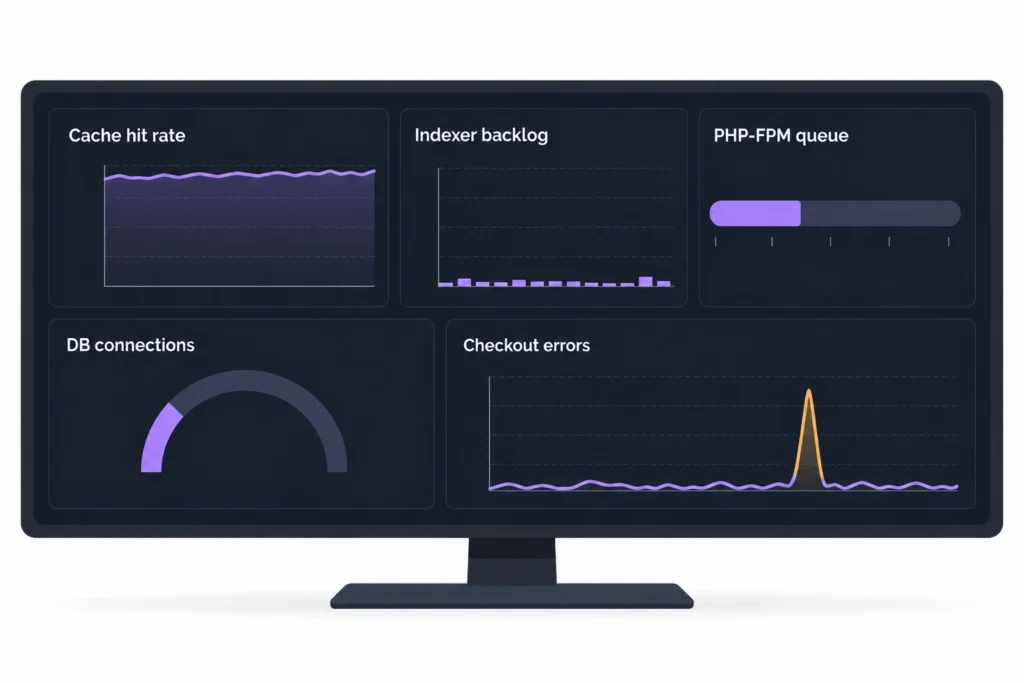
On stores under our managed services, monitoring runs synthetic journeys through key shopping flows, compares orders with expected levels and alerts when they drop, and watches indexer and queue backlog, the cron heartbeat, error rates and slow checkout transactions. A broken add-to-cart raises an alert before it shows up in the revenue report.
Results from Atwix projects
Published Atwix case studies show what individual items on this list have delivered:
| Store | What we changed | Published result |
|---|---|---|
| Wilson Sporting Goods | Edge Delivery Services frontend, phased with Luma Bridge | Lighthouse scores from 10-20 to 90+ |
| Coyuchi | Fixed Varnish configuration; cron cleanup for a heavy log table | Page load times from 600-700 ms to 180-200 ms; no performance issues through Black Friday 2018 |
| Comdiel | Redis for backend cache and sessions; menu and frontend fixes | Category pages more than twice as fast |
| Magnanni | Technical audit; reduced third-party dependencies | Performance efficiency up by as much as 40% in some areas |
| Wyze | Rebuilt on Magento Commerce Cloud | Load time from 8 seconds to under 2; 850 orders per minute |
More projects are in the Atwix portfolio.
FAQ
How do I check if Magento full page cache is working?
Request the same page twice with curl -I and read the X-Magento-Cache-Debug header. HIT on the second request means Varnish served it; UNCACHEABLE usually means a cacheable=”false” block is in the layout. On Adobe Commerce Cloud, send the request with a Fastly-Debug:1 header and look for HIT in X-Cache.
Do I need to switch from Redis to Valkey?
Yes, if you want current security patches. Adobe does not support Redis cache on 2.4.9 or on patches later than 2.4.5-p16, 2.4.6-p14, 2.4.7-p9 and 2.4.8-p4. Apply the latest patch and move to Valkey together in October, test both on staging, and change neither in November.
Does Magento support Varnish 8?
The latest patches list Varnish 8, but Magento doesn’t ship a Varnish 8 VCL template yet. Export the Varnish 7 template with bin/magento varnish:vcl:generate –export-version=7 and test it against Varnish 8 on staging before you switch.
What page speed should a Magento store aim for?
Google’s Core Web Vitals thresholds: LCP within 2.5 seconds, INP of 200 ms or less and CLS of 0.1 or less, at the 75th percentile of real page loads. Lighthouse helps you debug; field data decides whether you pass.
How long before Black Friday should I stop making changes?
Set a code and infrastructure freeze two to four weeks before Black Friday, and finish load testing before it starts. Our clients’ 2025 freezes started between November 1 and November 18. After the freeze, allow only security patches and incident fixes, deployed with the merchant’s approval; a new PHP version, database version or theme goes on the January plan.
When to call in an audit
Bring in outside help when a check fails and your team can’t trace the cause in the time left:
- Pages come back UNCACHEABLE or the hit rate drops after deploys, and nobody can find the block or extension responsible.
- The load test fails below your expected peak, and the bottleneck moves every time you fix one.
- The indexer backlog grows through the day even with cron healthy.
- Your PHP, database, search, cache backend or Varnish version sits outside Adobe’s support window, and you need to know what’s safe before peak.
- The store runs dozens of third-party extensions and no one can say which ones cost the most.
A Magento performance audit from our team reviews page load speed, server performance, the database, code quality and frontend performance, and ends with a report of prioritized fixes your developers or ours can work through. The audit takes one to two weeks. Add a two-week fix sprint and a week of regression testing, and the full cycle needs about six weeks before your code freeze. If your freeze is closer than that, the audit still tells you which P1 items to fix now and which belong on the January plan. Request your audit now.