


Before peak season or a replatform, most ecommerce teams check their store in silos: developers look at speed, marketing at rankings, finance at PCI, and nobody compares the findings. An ecommerce site audit run that way produces four reports and no fix order. This checklist runs the audit in one pass: 43 checks across performance, SEO, conversion, security, accessibility and analytics, each with a pass standard from Google, the PCI Security Standards Council, W3C or the platform vendor. A scoring rubric turns the results into a ranked fix list, and a printable version sits at the end.
How to run an ecommerce site audit in one pass
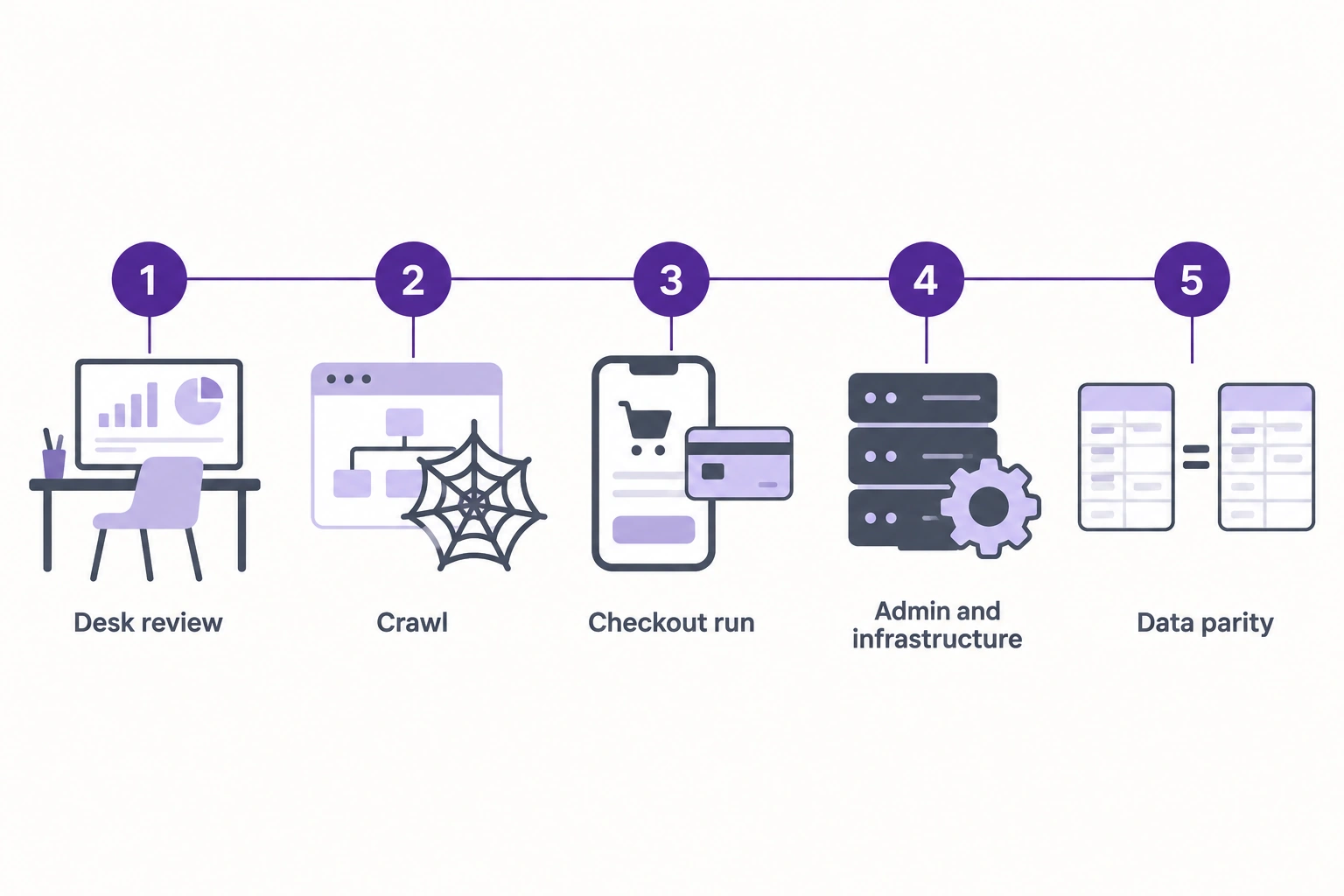
Group the checks by the working session that collects the evidence. Five sessions cover all 43 checks, and one checkout test run alone produces evidence for four areas.
Before you start, collect:
- Read access to Search Console, analytics and the tag manager
- A read-only platform admin account, plus hosting, CDN and error logs
- The payment provider’s dashboard and test cards for approvals and declines
- At least four weeks of real-user performance data (Search Console, PageSpeed Insights or Shopify’s web performance dashboard)
- Last peak season’s traffic and orders-per-minute figures
| Session | What you do | Checks it covers |
|---|---|---|
| 1. Desk review | Search Console, PageSpeed Insights field data, analytics revenue against the platform’s order export | P1, S1, S5, S8, D1 |
| 2. Crawl | Crawl the storefront with a mobile user agent and export canonicals, status codes and redirects | P5, P7, S2, S3, S4, S6, S7, X9, A5 |
| 3. Checkout run | Place real test orders across the device, payment method and customer-type matrix, then refund them | C1 to C7, X2, X8, A1 to A4, D2, D3, D4 |
| 4. Admin and infrastructure | Versions, patches, user accounts, extensions, cache, cron, backups, load test | P2, P3, P4, P6, P8, X1, X3 to X7, D6 |
| 5. Data parity | Compare storefront price, stock and specs with the ERP or PIM for a sample of SKUs | D5 |
Give each area one owner, and have one person score everything so a “1” means the same everywhere. If you want a second team on any area, our ecommerce audit and optimization services cover the same ground on Adobe Commerce, Magento Open Source, Shopify Plus, Shopware and BigCommerce.
How to score an ecommerce audit checklist
Score every check 0, 1 or 2, convert each area’s total into a percentage, let gate checks override the percentage, then order the fixes by severity and effort. Set up the scoring sheet before session 1.
Step 1: Score each check
| Score | Meaning |
|---|---|
| 2 | Meets the pass standard, with evidence someone else could check (report, screenshot, export) |
| 1 | Partly meets it: passes on desktop but not mobile, on some templates but not all, or passed once with no check since |
| 0 | Fails, or nobody can produce evidence |
Unknown scores 0. If nobody can produce the payment page script inventory, score it as missing, as a PCI assessor would.
Step 2: Rate each area
Area score = points earned ÷ (2 × number of checks in the area) × 100.
| Area score | Status | What to do |
|---|---|---|
| 80% or higher | Green | Maintain. Fix the remaining 0s and 1s in normal sprints. |
| 50% to 79% | Amber | Build a fix plan this quarter; before peak, clear every severity 3 item before code freeze. |
| Below 50% | Red | Treat the area as a structural problem and get a specialist audit before patching items one by one. |
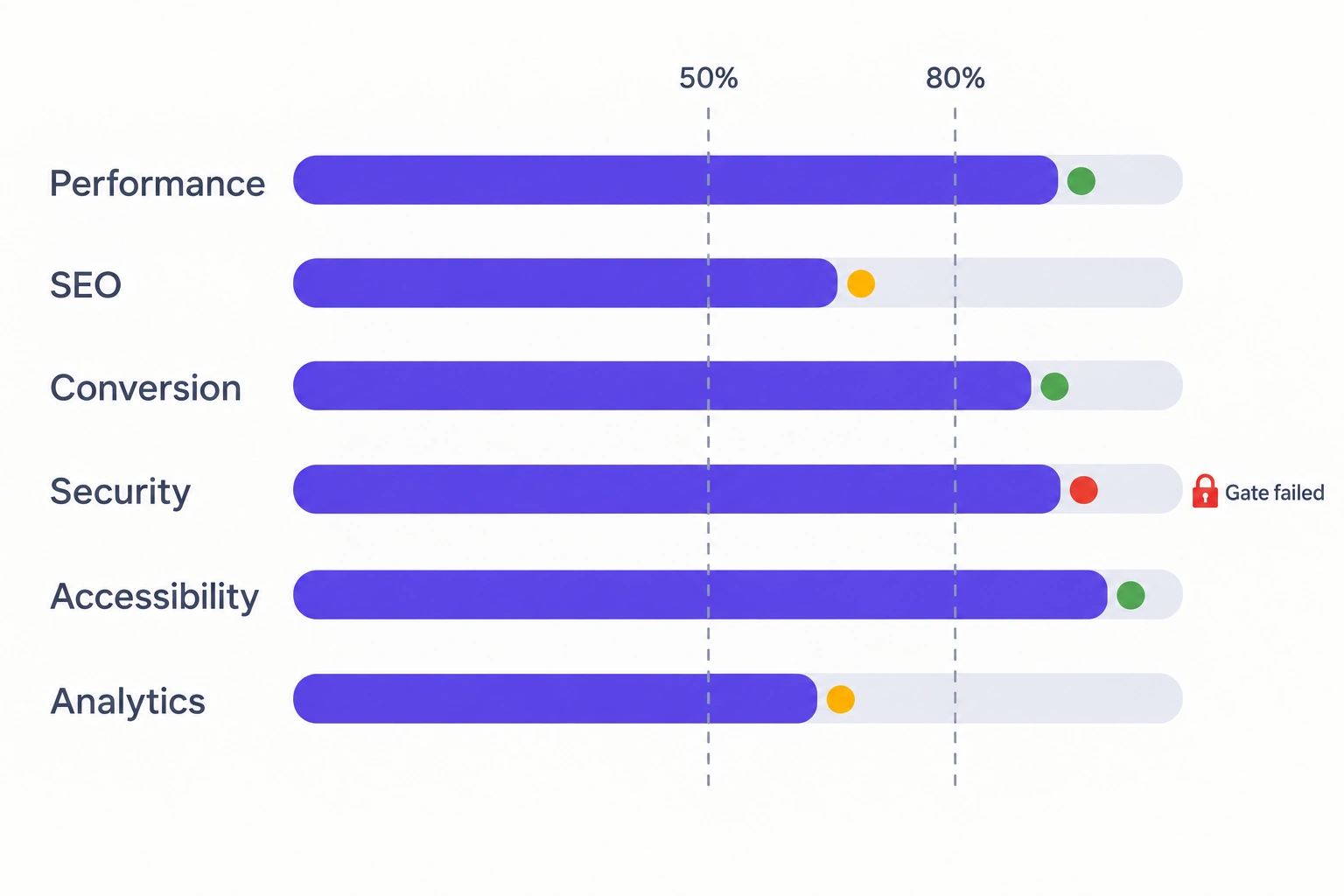
Seven checks are gates: P6, S1, C1, X1, X2, A1 and D1. A gate scored 0 turns its area Red whatever the percentage, because each of those failures can stop orders, expose card data or pull pages out of Google on its own. Tighten the thresholds if your store carries more risk.
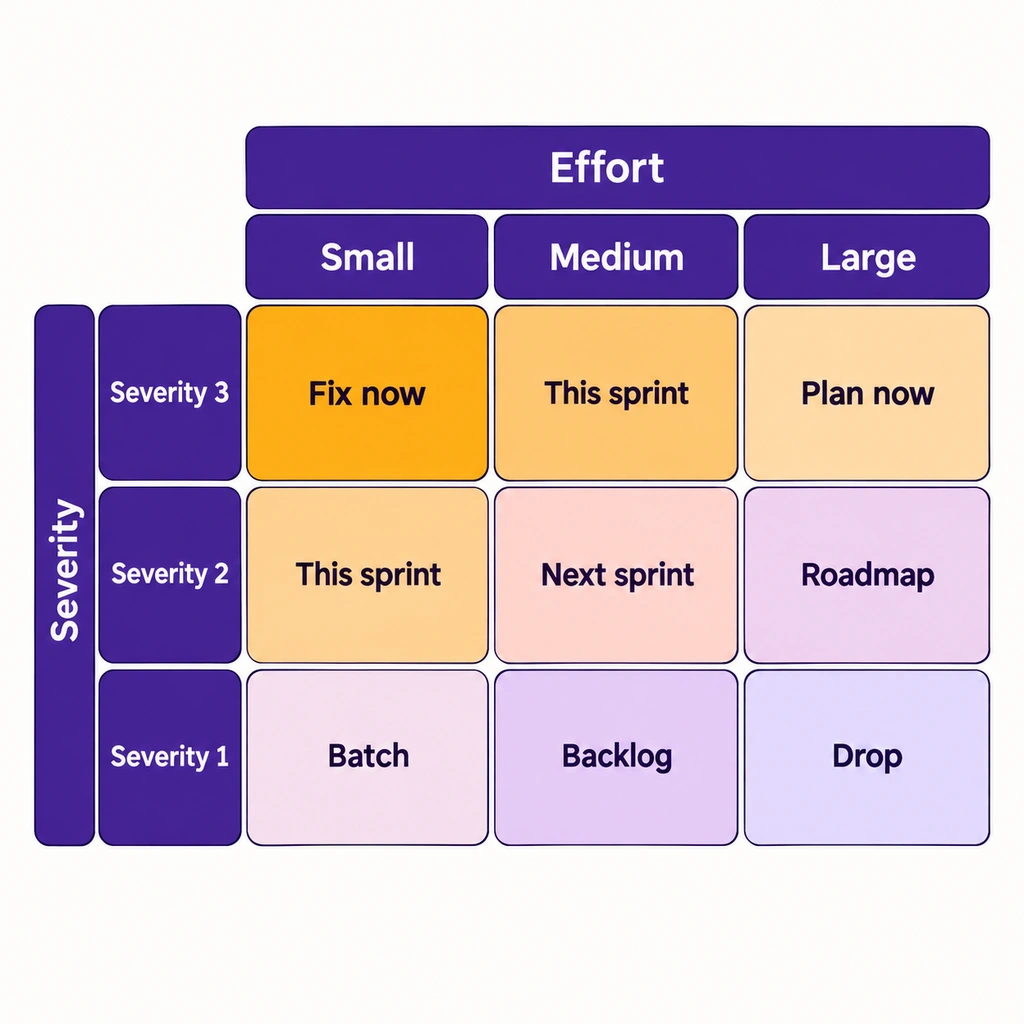
Step 3: Order the fixes
For every check scored 0 or 1, assign a severity and an effort:
- Severity 3: revenue, card data or compliance exposed now. Severity 2: measurable loss in conversion, crawl coverage or speed. Severity 1: hygiene.
- Effort S: a configuration change or under a day. Effort M: fits in one sprint. Effort L: a project with its own plan.
| Effort S | Effort M | Effort L | |
|---|---|---|---|
| Severity 3 | Fix now | This sprint | Start planning now and put an interim control in place this week |
| Severity 2 | This sprint | Next sprint | Roadmap |
| Severity 1 | Batch with related work | Backlog | Drop, or fold into the next rebuild |
Inside a peak-season code freeze, ship only severity 3 fixes and configuration changes you can roll back in minutes.
Take a store that scores 12 of 16 on performance (75%, Amber) but has never load-tested checkout. P6 is a gate scored 0, so performance is Red, and the first fix becomes a load test at forecast peak (severity 3, effort M) ahead of the image compression (severity 2, effort S) the percentage alone would have pointed to.
If you later compare your scores with an Atwix audit report, the vocabulary maps directly: our reports rate each finding High, Medium or Low importance (severity 3, 2 and 1 here), estimate the effort, and mark each area as no issues found, attention required or critical issue detected.
Performance checks
Performance passes when real-user Core Web Vitals are good on the templates that make money and the stack holds at peak load. Lab scores such as Lighthouse measure one simulated load and don’t count as P1 evidence. Google assesses the “good” thresholds below at the 75th percentile of page loads, split by mobile and desktop.
| ID | Check | Pass standard | How to verify |
|---|---|---|---|
| P1 | Core Web Vitals on home, category, product and cart templates, mobile first | LCP ≤ 2.5 s, INP ≤ 200 ms, CLS ≤ 0.1 at the 75th percentile of real page loads | Search Console Core Web Vitals report; PageSpeed Insights field data |
| P2 | Server response on uncached category and product pages | TTFB ≤ 0.8 s, web.dev’s good TTFB threshold | Time the first request after a cache purge, then repeat warm |
| P3 | Full-page cache hits and invalidation | Repeat anonymous views of category and product pages come from cache; routine price and stock imports purge only the affected pages | Cache server statistics during an import window |
| P4 | Third-party script inventory | Every tag and app script has an owner, a purpose and a last-review date; nothing loads from removed apps or finished campaigns | Tag manager export plus a network waterfall of home, product and checkout |
| P5 | LCP element | The LCP image is in the initial HTML, is not lazy-loaded, and is sized for the viewport | PageSpeed Insights LCP element diagnostic |
| P6 (gate) | Load test at forecast peak | Search, add-to-cart and checkout hold at forecast peak, plus the headroom your team agreed in advance, with no errors | Load test against a production-like environment |
| P7 | Back/forward cache | Category and product pages are eligible for bfcache, or the blocker is documented | Chrome DevTools, Application, Back-forward cache, Run test |
| P8 | Background jobs | Cron and queue workers run on schedule with no growing backlog | Platform notes below |
On B2B stores, check P3 during an ERP or catalog import window. An import that flushes the whole page cache instead of purging the changed products shows up straight away in P2.
Platform notes
- Adobe Commerce and Magento Open Source: On self-hosted stores, Adobe recommends Varnish in production because the built-in file or database page cache is much slower. On Adobe Commerce on cloud infrastructure, the page cache is Fastly, a Varnish-based service Adobe requires on Production and Staging for PCI compliance, so read P3 from Fastly’s cache statistics. Adobe’s playbook says to set indexers to Update on Schedule; run bin/magento indexer:status and treat any indexer stuck in “Invalid” as a P8 failure. For configuration detail, see our 25 tips to improve Magento site performance.
- Shopify: Shopify runs the hosting and cache, so your levers are theme code and app scripts. Uninstalled apps can leave snippets and script tags behind in the theme, so search the theme code for app names you no longer use under P4. Shopify’s web performance dashboard reports LCP, INP and CLS from real user data over the past 30 days, which counts as evidence for P1.
- Shopware: For P8, Shopware advises against the admin worker in production (Shopware message queue docs), so set enable_admin_worker: false and run CLI workers with messenger:consume under systemd or supervisor. For P3, Shopware supports a reverse HTTP cache such as Varnish or Fastly with tag-based invalidation.
SEO checks
SEO passes when every product and category page you want found is indexable, resolves to one canonical URL, and filters don’t generate an endless supply of crawlable URLs. The checks cover crawl, indexing and duplication; content quality belongs in your content plan.
| ID | Check | Pass standard | How to verify |
|---|---|---|---|
| S1 (gate) | Money pages indexable | No noindex, robots.txt block or off-page canonical on category and product pages; staging and test domains not indexed | Search Console Page indexing report; URL Inspection on your top 10 revenue URLs |
| S2 | Faceted navigation | Filter URLs are either blocked from crawling or deliberately indexable with fixed rules; filter combinations with no results return 404 | Crawl plus robots.txt review against Google’s faceted navigation guidance |
| S3 | Canonicals | Each product resolves to one canonical URL whether reached through a category path or directly | Crawl canonical report |
| S4 | Pagination | Each paginated page has its own URL and its own canonical, and pages link to each other with plain <a href> links | Crawl; view source on page 2 of a large category (Google pagination guidance) |
| S5 | Product structured data | Product markup includes offers with price and priceCurrency that match the visible price; availability, shippingDetails and hasMerchantReturnPolicy added where they apply | Rich Results Test on a product sample; Google merchant listing requirements |
| S6 | Out-of-stock and discontinued products | Temporarily unavailable products stay live with accurate availability; permanently discontinued products redirect to the closest replacement or their category | Crawl a sample of discontinued SKUs |
| S7 | Redirects | No chains longer than one hop, no loops, and internal links point to final URLs | Crawl redirect report |
| S8 | XML sitemap | Lists only canonical, indexable URLs that return 200, and is submitted in Search Console | Search Console Sitemaps report compared with the crawl |
S6 and the one-hop limit in S7 are our house rules, stricter than Google requires: S6 keeps restocked products from losing rankings, and one hop keeps redirects cheap to crawl and easy to audit.
Platform notes
- Adobe Commerce and Magento Open Source: Adobe recommends enabling canonical meta tags for both categories and products, under Catalog, Search Engine Optimization in the store configuration. Layered navigation is the usual source of S2 failures on large Magento catalogs. On one large catalog we audited, bots made up about 93% of traffic, and crawling of faceted navigation was a main cause.
- Shopify: Shopify generates canonical tags, sitemap.xml and robots.txt automatically. Editing robots.txt.liquid is an unsupported customization, and Shopify warns that incorrect use “can result in loss of all traffic”, so review every line of an edited file under S1 and S2.
- Before a replatform: S7 becomes the largest item. Google’s site move guidance says to map every old URL to its destination, use permanent server-side redirects (301 or 308), and keep them as long as possible, generally at least one year. Our ecommerce replatforming guide covers the wider project plan.
Conversion (CRO) checks
These checks confirm that a buyer can find, price and pay for a product on every device and account type. Our CRO audit checklist of 10 conversion killers covers the persuasion side (surprise costs, forced registration, form length, trust signals), and this audit scores it as one item, C7.
| ID | Check | Pass standard | How to verify |
|---|---|---|---|
| C1 (gate) | Checkout test matrix | A real order completes for every payment method, on iOS Safari, Android Chrome and desktop, as a guest, a logged-in customer and (for B2B) a company-account buyer, and the order reaches your order management system or ERP | Test orders, refunded afterward |
| C2 | Payment decline recovery | A declined card shows a plain-language message, keeps the cart and the entered address, and lets the buyer retry or switch method | Your gateway’s test decline cards |
| C3 | Site search | Your top 20 queries return relevant products, SKU and part-number searches find the exact item, and zero-result searches are tracked | Analytics search report; manual tests |
| C4 | Price consistency | Promotions, tier prices and customer-group prices show the same amount on the product page, cart, checkout and confirmation email | One test order per price rule |
| C5 | Stock and delivery messaging | Availability, backorder and delivery-date messages agree across product page, cart and order confirmation | Test an in-stock, a low-stock and a backordered SKU |
| C6 | Transactional email | Order confirmation, shipping and password-reset emails arrive within minutes, land in the inbox and pass SPF, DKIM and DMARC | Send to Gmail and Outlook test inboxes and read the headers |
| C7 | Conversion killers | No severity 3 finding in the 10-point CRO audit | Run the CRO audit checklist |
On B2B storefronts, add quick order, reorder and quote requests to C1, and retest them after any price-rule or ERP change.
Security and compliance checks
Security passes when the platform runs a supported, fully patched release, every script on the payment page is authorized and monitored, and admin access is limited to named people using two-factor authentication.
| ID | Check | Pass standard | How to verify |
|---|---|---|---|
| X1 (gate) | Supported release, latest security patch | Platform release is inside the vendor’s support window and on its latest security patch; critical bulletins are applied within your documented patch window | Version and patch list against vendor bulletins |
| X2 (gate) | Payment page scripts | An inventory of every script on payment pages with a written justification for each, a method to confirm each is authorized, and a method to assure its integrity (PCI DSS 6.4.3); a mechanism that detects and alerts on unauthorized changes to those scripts and to security-impacting HTTP headers (11.6.1) | Script inventory compared with the network waterfall on the payment step; CSP violation reports |
| X3 | Admin and back-office access | Named accounts only, two-factor authentication enforced for every admin user, former staff and former agencies removed, admin not served at a default or guessable path | User list export; admin login URL check |
| X4 | Extensions and apps | Every module or app has an owner and an actively maintained source; unused ones are removed, not only disabled | Module or app list compared with vendor changelogs |
| X5 | Malware and integrity scanning | Server-side scans of files and the database run on a schedule, the latest result is clean, and alerts reach a monitored inbox | Scanner dashboard |
| X6 | Credential rotation | After any critical vulnerability, or staff or agency change: encryption keys, admin passwords, integration tokens and payment API credentials rotated | Rotation log |
| X7 | Backups and restore | A full restore to a separate environment succeeded within the last quarter | Restore log |
| X8 | Abuse protection | Login, account creation and payment are rate-limited or protected by bot checks, and a spike in failed card authorizations raises an alert | WAF or CDN rules; payment gateway alert settings |
| X9 | TLS and headers | HTTPS on every URL with HSTS, and no mixed content | Crawl; response headers |
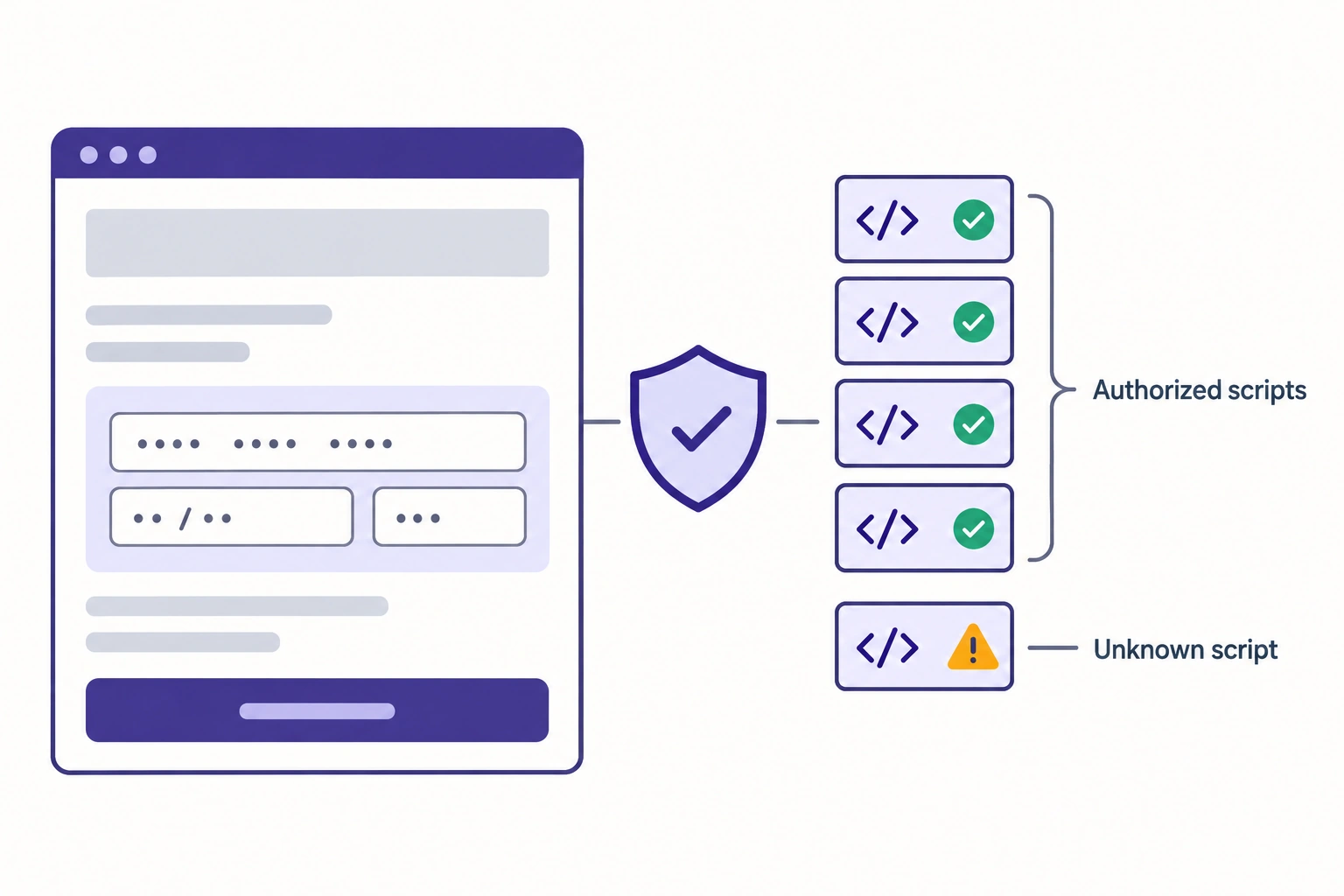
What PCI DSS asks of the payment page in 2026. PCI DSS v4.0.1 has been the only supported version since v4.0 retired on December 31, 2024, and requirements 6.4.3 and 11.6.1 have been mandatory since March 31, 2025. Together they make sure payment page scripts are authorized, checked for integrity and monitored for tampering. Since the January 2025 SAQ A update, SAQ A merchants confirm their site is not susceptible to attacks from scripts instead of answering 6.4.3 and 11.6.1. With an embedded (iframe) payment form, FAQ 1588 lets you meet that criterion with your own controls or with confirmation from your PCI DSS compliant payment provider; it doesn’t apply to full redirects. Either way, name an owner for payment page scripts and record which route you took.
Platform notes
- Adobe Commerce and Magento Open Source: Per Adobe’s lifecycle table, regular support for 2.4.6 ended on August 11, 2026 and runs to May 31, 2027 for 2.4.7, May 31, 2028 for 2.4.8 and May 31, 2029 for 2.4.9. Adobe Commerce customers on 2.4.6 and 2.4.7 get one more year at no extra cost, to August 31, 2027 and May 31, 2028; Magento Open Source does not get this extension, so check the edition before you score X1. The September 7, 2026 bulletin APSB26-146 is Priority 1, CVSS 10.0, and covers Adobe Commerce 2.4.4 through 2.4.9, Magento Open Source 2.4.6 through 2.4.9 and the Adobe Commerce B2B extension 1.3.3 through 1.5.3; Adobe is aware of exploitation in the wild. A second bulletin, APSB26-138 (Priority 2), followed on September 8, and X1 needs both applied. Our APSB26-146 guide for store owners lists the rotation steps for X6. The free Security Scan Tool runs over 21,000 security tests on a schedule, but it scans from outside and can’t see files or database content on the server, where web shells and injected skimmers live. For X5, pair it with a server-side malware scanner. For X2, version 2.4.7 and later run Content Security Policy in restrict mode on payment pages by default, and Subresource Integrity hashes for payment page JavaScript ship in 2.4.4-p9, 2.4.5-p8, 2.4.6-p6, 2.4.7, 2.4.8 and later.
- Adobe Commerce on cloud infrastructure: Adobe’s security enforcement policy set an October 30, 2026 deadline to move off Elasticsearch, MariaDB 10.5 or earlier, and RabbitMQ 3.9 or earlier, with later deadlines for PHP, Redis and Commerce versions. Adobe suspends inbound traffic to environments that miss the dates, which takes the storefront offline. Treat any service on that list still out of date as a severity 3 finding under X1.
- Shopify: Shopify is certified Level 1 PCI DSS compliant, says PCI DSS v4 requirements are built into its checkout with no additional work required, and no longer supports checkout.liquid for the information, shipping and payment steps. X1 and most of X2 sit with Shopify; your share is staff accounts and permissions (X3), installed apps and the data they can reach (X4), and custom pixels (D4).
- Shopware: On self-hosted stores, the Shopware Security Plugin backports security fixes to 6.5, 6.6 and 6.7, but it does not cover vulnerabilities in dependencies such as Symfony or Twig. Our house rule: a store that relies on the plugin alone scores 1 on X1. On Shopware SaaS, software updates are automatic.
Accessibility checks
Use WCAG 2.2 level AA as the pass standard; the W3C Recommendation is dated December 12, 2024. If you sell to consumers in the EU, the European Accessibility Act has applied to e-commerce services since June 28, 2025 (Directive (EU) 2019/882). Microenterprises providing services are exempt.
| ID | Check | Pass standard | How to verify |
|---|---|---|---|
| A1 (gate) | Keyboard-only checkout | A buyer can go from product page to order confirmation using only the keyboard, with visible focus at every step | Manual run of session 3 without a mouse |
| A2 | Form labels and errors | Every field has a programmatic label, and errors are described in text next to the field, not by color alone | Screen reader pass on checkout |
| A3 | Target size | Tap targets are at least 24 by 24 CSS pixels or meet the spacing exception (WCAG 2.5.8) | Mobile inspection of variant selectors, quantity steppers and filters |
| A4 | Re-entry and login | Billing can reuse the shipping address (WCAG 3.3.7), and login allows paste and password managers with no puzzle-only CAPTCHA (WCAG 3.3.8) | Checkout and login test |
| A5 | Images and contrast | Product images carry alt text that describes the product, and body text meets 4.5:1 contrast | Automated scan plus a manual check of product and category templates |
An automated scanner finds some of these issues; A1 and A4 need a person.
Analytics and data checks
These checks confirm that analytics revenue reconciles with real orders and that storefront data matches your systems of record.
| ID | Check | Pass standard | How to verify |
|---|---|---|---|
| D1 (gate) | Revenue reconciliation | Purchase revenue in analytics and order revenue in the platform, for the same 30 days, differ by a gap you can explain (refunds, consent declines, offline or B2B orders) and that stays stable month to month | Analytics export against the platform order report |
| D2 | Ecommerce events | Recommended ecommerce events fire in funnel order, and both purchase and refund events carry a transaction ID, which Google marks as required for purchases and refunds | Tag debugger during session 3 |
| D3 | Consent | Tags respect the visitor’s consent choice, and nothing that needs consent fires before it | Browser network log before and after accepting |
| D4 | Post-purchase tracking | Conversion pixels on confirmation pages still fire after platform changes | Test order in session 3 |
| D5 | Product data parity | For a sample of 50 SKUs, storefront price, stock and key specs match the ERP or PIM, and product feed disapprovals are reviewed | SKU sample compared field by field |
| D6 | Account ownership | The company, not a person or a former agency, owns Search Console, analytics, tag manager, DNS, CDN and payment accounts | Account admin lists |
For distributors, D5 can be the most expensive failure on the list: a storefront that shows stale stock takes orders the warehouse can’t fill. Our analysis of real-time inventory sync for B2B distributors works through what batch sync windows cost.
On Shopify, additional scripts and script tags on the Thank you and Order status pages stopped running on August 28, 2025 for Plus stores. Non-Plus stores had until August 26, 2026 to upgrade those pages, and Shopify upgraded the rest automatically on that date. Any conversion tag that depended on either has stopped firing (a D4 failure) and belongs in a pixel built on customer events, which Shopify runs in a sandbox and loads on checkout, Thank you and Order status pages.
Magento site audit vs Shopify and Shopware: where the checks differ
The 43 checks apply on every platform. Who owns each one depends on the hosting model as much as the platform:
- Adobe Commerce or Magento Open Source, self-hosted: you own the whole stack.
- Adobe Commerce on cloud infrastructure: Adobe manages the infrastructure; you keep the Commerce version and its services supported by the enforcement deadlines above.
- Adobe Commerce as a Cloud Service: Adobe applies feature and security updates to production automatically after a 30-day period for evaluating them in your sandbox instances, so there is no release to check against the lifecycle table. Score X1 on whether you retested extensions and integrations in the sandbox during that window.
- Shopify: Shopify owns hosting, core patching and checkout, so your audit concentrates on themes, apps and data.
- Shopware: on a self-hosted install, including the free Community Edition, you run the stack. The paid Rise, Evolve and Beyond plans also run on Shopware’s PaaS or SaaS; Shopware hosts both and, on SaaS, also handles security and updates.
Adobe’s Site-Wide Analysis Tool serves Adobe Commerce on cloud only; Adobe decommissioned it for on-premises customers on April 23, 2024, so self-hosted stores need another source of evidence for X1 and X4.
When to bring in an external audit
Bring in an external audit when you know where the store fails but need the cause and a fix plan someone will stand behind:
- Two or more areas Red. The problems likely share a root cause, such as an overloaded extension stack.
- A gate fails ahead of peak. Start a single-area audit at least six weeks before your code freeze and a full audit at least eight weeks before: the audit itself, a two-week fix sprint and a week of regression testing.
- A replatform is on the table. Audit the current store first for the baseline the new build must beat and the URL inventory S7 needs.
- After an incident or a critical bulletin such as APSB26-146, when X1, X5 and X6 need someone to confirm the store is clean as well as patched.
- After an agency handover, when nobody can show evidence for X3, X4 and D6.
When we ran a performance audit for Dive Gear Express, a Magento 2.2.3 store, the folder holding customer session data contained over 27,000 files. We recommended moving sessions to Redis, configuring Varnish as the full-page cache, removing logging records the store no longer needed, and setting up automatic log clearing for a few heavy third-party extensions. The Varnish change reduced page response time and TTFB.
At Magnanni, our technical audit of a multi-store Magento installation found that excessive third-party modules were complicating maintenance and degrading performance. Reducing those dependencies and reworking how the system handled requests improved performance by as much as 40% in some areas.
Sometimes the audit’s answer is a rebuild. Coastal Business Supplies runs about 80% of its printer, vinyl and paper sales through its website, which amounts to 65% of company revenue. After a previous agency’s move to an upgraded Magento version left the site with slow load times and frequent crashes, we rebuilt it from the ground up with leaner code.
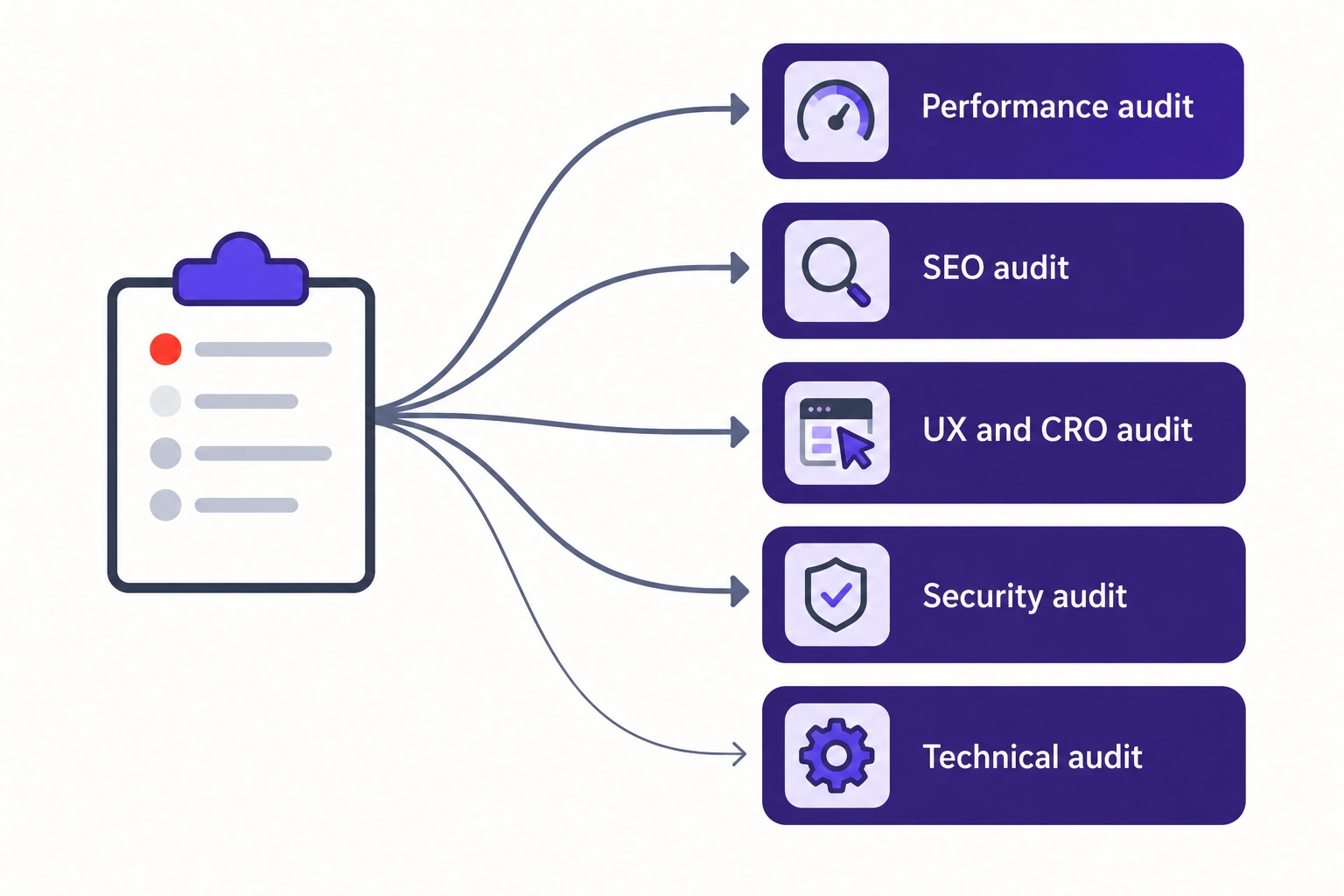
Which audit fits your scorecard
| What your scorecard shows | Audit to request |
|---|---|
| Performance Red, or P6 failed, on any platform | Website performance optimization and audit |
| Performance Red on Adobe Commerce or Magento | Magento performance audit |
| SEO Red on Adobe Commerce or Magento | Magento SEO audit |
| Security Red, or X1 or X2 failed, on Adobe Commerce or Magento | Magento security audit |
| Conversion Red | eCommerce UI and UX audit with CRO recommendations |
| Two or more areas Red, or SEO or security Red on Shopify, Shopware or BigCommerce | Technical website audit |
FAQ
How long does an ecommerce site audit take? In-house, the five sessions go fastest with every login in place before session 1. An external audit takes one to two weeks for a single area and three to four weeks for a full audit, depending on the number of storefronts and integrations in scope.
How much does an ecommerce website audit cost? Cost follows scope: areas, storefronts, integrations (ERP, PIM, payment, search), and whether load or penetration testing is included. Whatever the price, ask for findings ranked by impact and effort.
Can I do my own ecommerce site audit? Yes. Most checks can be scored with free tools: Search Console, PageSpeed Insights, the Rich Results Test, Chrome DevTools and your platform’s admin. The load test (P6) needs a load-testing tool and a production-like environment, and malware scanning (X5) needs a server-side scanner.
How often should you audit an ecommerce site? Run the full pass yearly ahead of peak, and before a replatform or major version upgrade. Re-check X1 and X2 monthly and after every security bulletin, and P1 after every theme or app release.
Can AI tools run an ecommerce audit? AI speeds up every session once it has the evidence: Search Console and analytics access, crawl exports and admin exports. We run our audits with AI assistance, and it has roughly halved the hours each audit takes. AI can’t place test orders, judge a checkout on a real phone or decide which fix matters most to your business, so a person still runs session 3 and signs off the fix order.
Download the printable checklist
All 43 checks, the scoring key, the five-session plan, a scoring sheet and the fix-order grid on five landscape pages, with columns for score, severity, effort and owner. Print it, or fill it in as you work through the sessions.