


As your Shopware store scales, manual processes become bottlenecks. Orders pile up, inventory discrepancies multiply, and your team is overwhelmed with data entry across disconnected systems. Without a clear roadmap, businesses encounter unexpected technical hurdles and workflow disruptions that stall growth for months.
This guide walks you through the strategic framework for a Shopware ERP integration with your ERP system, from planning through deployment.
What you’ll discover:
- Why ERP integration is critical for scaling beyond manual operations
- The four-phase framework for successful integration
- Common challenges and how to prepare for each
- What makes a proven integration partner different from generic development shops
- Decision criteria for choosing between pre-built connectors and custom solutions
The Real Problem: When Growth Outpaces Your Systems
Managing orders in spreadsheets and manually updating inventory feels manageable initially. However, somewhere between 100 and 500 daily orders, the cracks begin to appear.
Your team spends hours reconciling inventory between systems. Customer service can’t provide accurate shipping estimates because order status lives in the ERP while customers check Shopware. Accounting closes each month a week late. These aren’t minor inefficiencies; they’re competitive disadvantages that compound as you scale.
The fundamental challenge is data fragmentation. Your ERP holds the source of truth for inventory, pricing, and customer accounts. Shopware manages the customer experience. Without real-time synchronization, every business process requires human intervention, introducing delays, errors, and costs that grow exponentially with order volume.
An ERP integration establishes automated data flows and unified business logic, transforming your tech stack into an integrated system that scales with your business.
Phase 1: Define Your Integration Objectives
Before evaluating solutions, clarify what problems the integration must solve by mapping pain points to specific capabilities.
Document your most time-intensive manual processes. Which tasks consume disproportionate staff hours? Where do errors occur most frequently? Common answers include inventory synchronization, order processing, and customer data management.
Quantify the impact. If your team spends 20 hours weekly reconciling inventory, that’s 1,040 hours annually, or half an FTE. These numbers establish your ROI baseline.
Identify your growth trajectory. An integration handling today’s 200 daily orders must support the 800 orders you anticipate in 18 months.
| Business Problem | Integration Capability | Success Metric |
|---|---|---|
| Inventory discrepancies | Real-time inventory sync | 100% accuracy across channels |
| Manual order entry (15+ hrs/week) | Automated order processing | 90% time reduction |
| No order status visibility | Bi-directional status updates | Real-time visibility |
| Delayed month-end close | Automated AR invoice generation | Close 5 days faster |
| Manual pricing updates | Automated pricing sync | Zero errors, 1-hour updates |
| Duplicate customer data entry | Automated account creation | Eliminate duplication |
Phase 2: Map Your Integration Architecture
Once you’ve defined objectives, understand how data will flow between systems. This determines whether you’ll use a pre-built connector or custom development.
Shopware’s API-first architecture provides flexibility but introduces decisions. Which system is the source of truth for each data type? How frequently must data synchronize? What happens during conflicts? (For a deep dive into connecting Shopware with a specific ERP, see our Shopware SAP integration guide.)
Successful integrations have transparent data governance. Typically, the ERP is the source of truth for inventory, specifications, and pricing. Shopware manages customer experiences and captures orders, which are then forwarded to the ERP for fulfillment and processing.
Your architecture determines the integration method. Pre-built connectors offer faster deployment but limited customization. Custom integrations require more time but accommodate unique business logic.
Key architectural decisions:
- Source of truth designation for each data entity
- Synchronization frequency based on business impact
- Error handling and conflict resolution protocols
- Security protocols, including authentication and encryption
- Scalability provisions for transaction volume growth
Phase 3: Prepare for Common Integration Challenges
Shopware ERP integrations encounter predictable obstacles. Understanding these before development allows preventive measures.
Data mapping complexity increases when field structures differ. Your ERP may use 12-digit SKUs while Shopware allows 20 characters. Each mismatch requires transformation logic.
Performance bottlenecks emerge when sync processes impact responsiveness. Synchronizing 10,000 SKUs can overwhelm API rate limits. Solutions include intelligent batching, delta syncing, and strategic caching.
Business logic conflicts occur when rules differ. Your ERP might allow backorders, while Shopware prevents overselling. Reconciling these requires business process decisions.
Security vulnerabilities open when systems connect. Credentials, transmission, and access controls must meet enterprise standards.
Your partner should conduct pre-development audits to identify potential conflicts, performance risks, and security gaps, then architect solutions before coding.
Phase 4: Choose Between Pre-Built and Custom Solutions
This decision shapes cost, timeline, and flexibility.
Pre-built connectors offer faster deployment and lower cost. If your processes align with standard workflows and your ERP is widely supported, pre-built options may deliver 80% of functionality in weeks. Gaps often require workarounds.
Custom integrations offer complete control but require a higher investment. The payoff: exact functionality matching requirements, seamless handling of complex data, and flexibility to evolve.
Straightforward workflows often succeed with pre-built connectors. Complex pricing logic, inventory rules, or legacy constraints typically need custom development.
| Evaluation Factor | Pre-Built Connector | Custom Integration |
|---|---|---|
| Timeline | 2-6 weeks | 3-6 months |
| Cost | $5K-$25K | $25K-$150K |
| Customization | Limited | Unlimited |
| Maintenance | Vendor updates | Your team/partner |
| Best For | Standard workflows | Complex processes |
The Value of an Experienced Integration Partner
Generic development shops connect APIs and test functionality, but lack the Shopware knowledge to optimize performance and expertise to architect scalable solutions.
Specialized partners like Atwix bring proven frameworks developed across hundreds of implementations. With 111 Shopware 6 certifications, Atwix has encountered virtually every integration scenario.
This expertise accelerates timelines and reduces risk. Atwix architects for scale during planning, builds proven protocols into deployment, and delivers integrations that work reliably from day one.
What to look for:
- Documented Shopware certifications
- Specific ERP integration case studies in your industry
- Defined methodology addressing planning, architecture, testing, and support
- Experience with both pre-built and custom solutions
- Security and compliance expertise
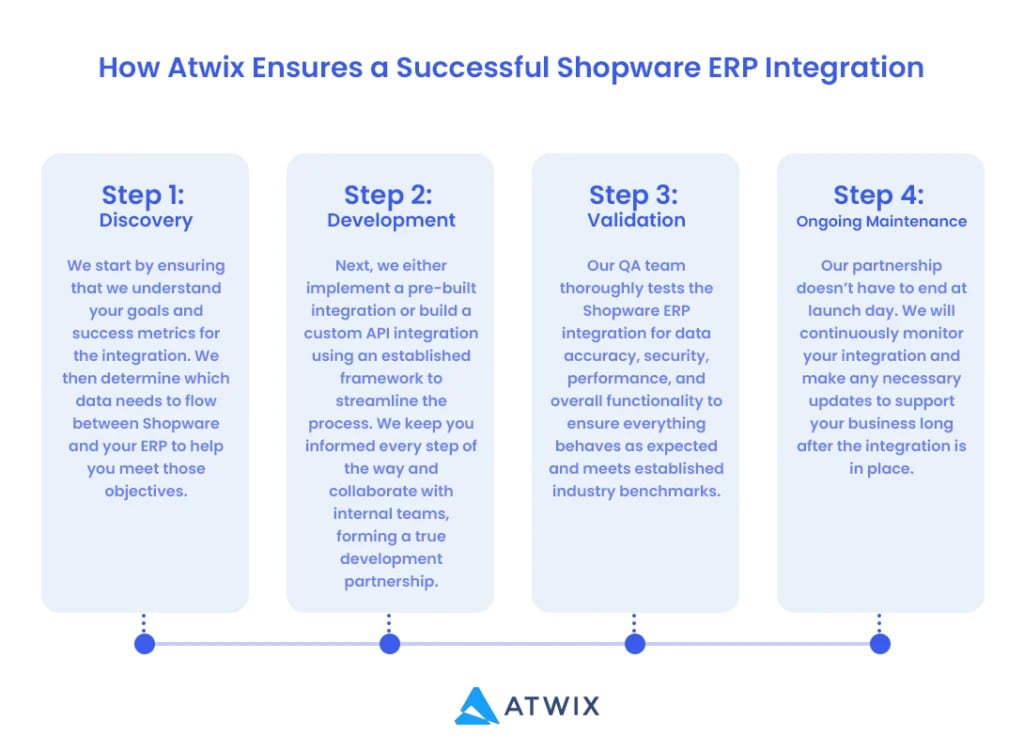
Ensuring Long-Term Integration Success
Shopware ERP integration transforms disconnected systems into a unified platform. Success requires strategic planning, careful architecture, and proven expertise.
The Shopware ERP integration experts at Atwix can help you navigate these decisions and deliver an integration that improves efficiency, reduces errors, and supports sustainable growth. Contact us today to discuss your specific needs.