


If your team freezes code in early November, anything not patched or hardened by then rides through Black Friday as it is. This year it is harder to tell whether a store is fully patched, because Adobe now ships most security fixes as monthly isolated patches instead of new -p versions, and on September 7, 2026 it released an out-of-band hotfix, APSB26-146, for a flaw attackers were already exploiting. This Magento 2 security checklist covers what every 2.4.x store should have done before the freeze: the patch level for your release line, the admin settings to check, the payment-page controls PCI DSS now requires, the signals to watch through peak, and the first day of incident response.
The checklist at a glance
Finish P1 items before your code freeze. Do P2 items if you have a staging environment and a week. Everything applies to Adobe Commerce and Magento Open Source 2.4.6 to 2.4.9 unless the row says otherwise.
| Priority | Area | Check | Done looks like |
|---|---|---|---|
| P1 | Patches | Latest -p release for your line, plus every monthly isolated patch since | php vendor/bin/patch-status reports no missing monthly patch |
| P1 | Hotfix | APSB26-146 hotfix (VULN-39341) applied on every environment | Confirmed applied on production, staging and any copy holding production data |
| P1 | Credentials | Encryption key, admin passwords and integration tokens rotated after the hotfix, unless you can show the store wasn’t exposed | New key in app/etc/env.php, integrations reauthorized |
| P1 | Admin access | 2FA on, custom admin path, reCAPTCHA on admin login, access limited by IP or VPN | Admin login returns 403 from outside your allowlist |
| P1 | Accounts | No unused admin users or integrations; roles use custom resources | Every active admin user logged in within the last 90 days and has a named owner |
| P1 | Payment pages | CSP in restrict mode on checkout, SRI on payment scripts, violation reports collected and filtered | Reports arrive at an endpoint you read, not only the browser console |
| P1 | Adobe Commerce Cloud services | No Elasticsearch, MariaDB 10.5 or earlier, or RabbitMQ 3.9 or earlier | Upgrades done before October 30, 2026 |
| P2 | Deployment | Production mode, write access removed from code directories, unused modules disabled | bin/magento deploy:mode:show returns production |
| P2 | Monitoring | Security Scan Tool scheduled, plus alerts for the signals in the monitoring table below | Someone is named to act on each alert during peak |
| P2 | Incident plan | Written steps, owners and phone numbers for the first 24 hours | Rehearsed once before the freeze |
Where Magento security patches stand for 2.4.6 to 2.4.9
As of October 12, 2026, Adobe still ships security fixes for all four release lines, with two caveats covered below: 2.4.6 is past standard support, and Magento Open Source 2.4.6 got no September monthly patch. The table combines Adobe’s released versions list, the software lifecycle policy, the system requirements and the APSB26-138 bulletin. Support dates are for Adobe Commerce. If Adobe ships an October monthly patch on its usual second Tuesday, apply it after September’s.
| Release line | GA date | Latest -p release | Latest monthly security release | End of standard support | End of extended support | End of security-only period | Supported PHP (latest patch) |
|---|---|---|---|---|---|---|---|
| 2.4.9 | May 12, 2026 | None yet (2.4.9 GA is the base) | 2.4.9-2026-sep (Sep 8, 2026) | May 31, 2029 | TBD | N/A | 8.5 (8.4 for upgrade only) |
| 2.4.8 | Apr 8, 2025 | 2.4.8-p5 (May 12, 2026) | 2.4.8-2026-sep | May 31, 2028 | TBD | N/A | 8.4, 8.3 |
| 2.4.7 | Apr 9, 2024 | 2.4.7-p10 (May 12, 2026) | 2.4.7-2026-sep | May 31, 2027 | May 31, 2028 | N/A | 8.3, 8.2 |
| 2.4.6 | Mar 14, 2023 | 2.4.6-p15 (May 12, 2026) | Adobe Commerce: 2.4.6-2026-sep. Magento Open Source: 2.4.6-2026-aug (no September patch) | Aug 11, 2026 | Aug 31, 2027 | May 31, 2028 | 8.2, 8.1 |
Four things in that table change what you do this quarter:
- PHP runs out before Magento does. PHP 8.1 is already end of life, and PHP 8.2 gets its last security fix on December 31, 2026, according to php.net’s supported versions page. 2.4.6-p15 supports only 8.2 and 8.1, so every 2.4.6 store enters 2027 on an unpatched runtime while Adobe still patches the application. A 2.4.7 store on 8.2 can move to 8.3.
- Adobe Commerce 2.4.6 is in extended support; Magento Open Source 2.4.6 is not. Adobe’s lifecycle policy gives Adobe Commerce 2.4.6 and 2.4.7 a year of quality and security patches at no additional cost, followed by a period of limited isolated security fixes only. The extension does not cover Open Source. On Adobe Commerce 2.4.6, patch for peak and put the upgrade to a supported release line on the Q1 plan.
- Magento Open Source 2.4.6 stopped getting monthly patches. August’s APSB26-92 bulletin included Open Source 2.4.6; September’s APSB26-138 covers Open Source only from 2.4.7, though the APSB26-146 hotfix still covers 2.4.6. Open Source stores on 2.4.6 should make the upgrade the first project after peak, starting in December.
- Adobe Commerce on cloud infrastructure has service deadlines too. Adobe’s security enforcement policy sets an October 30, 2026 deadline for Elasticsearch, MariaDB 10.5 or earlier and RabbitMQ 3.9 or earlier, and suspends inbound traffic to environments that miss it. Treat those upgrades as P1.
How Adobe ships security fixes in 2026
Adobe now uses three delivery vehicles, and a store is current only when it has applied all three:
- Security patch releases (-pN). Full Composer releases such as 2.4.8-p5. In 2026 they shipped on March 10 and May 12, the day 2.4.9 reached general availability. Adobe’s patch release schedule commits to at least one security patch release a year for every supported line.
- Monthly isolated security patches. Since July, fixes arrive as patch files named by month, such as 2.4.8-2026-sep: July 14 (APSB26-73), August 11 (APSB26-92) and September 8 (APSB26-138), each the second Tuesday. Adobe’s APSB26-138 release article states that you “must be on the latest security-only patch release (the latest -p version)” and that each monthly patch builds on the ones before it and must be applied cumulatively, in release order.
- Hotfixes. For a single critical flaw, Adobe ships a hotfix for the version you already run, two Septembers in a row now. APSB25-88 (September 9, 2025, CVE-2025-54236) was confirmed exploited in the wild six weeks later. APSB26-146 (Monday, September 7, 2026, CVE-2026-75650, CVSS 10.0, code execution without authentication) was already being exploited. It came as Composer patch files, a day before the scheduled release, and the September isolated patch does not include it. Our APSB26-146 update for store owners covers that hotfix in detail.
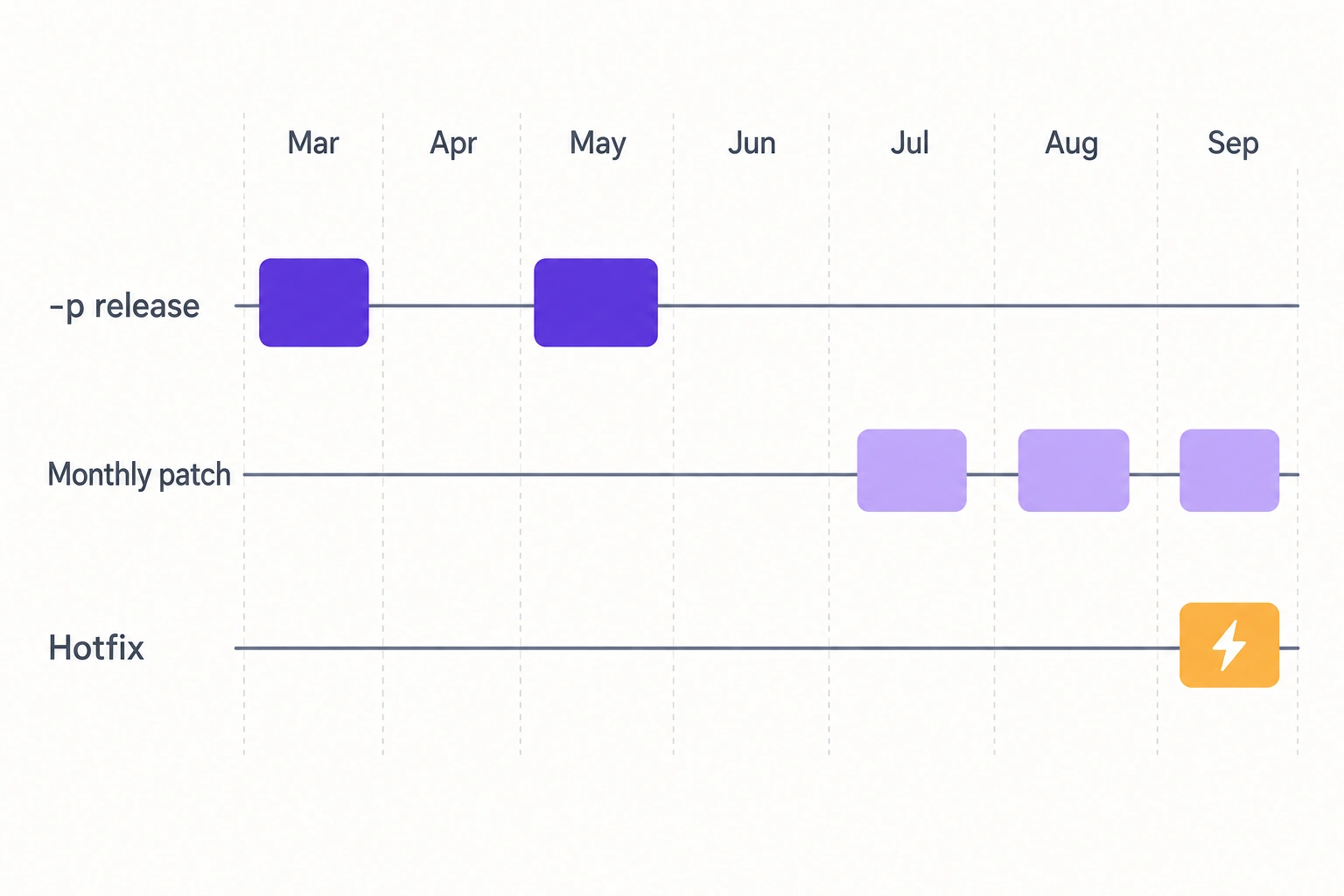
Adobe’s schedule page shows upcoming dates only in an image. The monthly patches have followed the second Tuesday, which puts the November release on November 10, likely inside your freeze, so book a patch window for it now.
Patch before the freeze: the order that works
Get to the latest -p release, stack the monthly patches, then confirm the hotfixes. Adobe tests the monthly patches only against the latest -p version, so a store on an older -p release gets rejected hunks.
When we rolled out the APSB26-146 hotfix across the stores we maintain, these were the problems we had to work through:
- An existing patch that changed the same files.
- A custom DI preference overriding the patched class. The patch applies cleanly, but the store stays exploitable, which makes this the most dangerous case.
- Patched files living in
magento2-baseand being overwritten at build. - A mismatched patch level producing rejected hunks.
- Virtual types breaking admin grids.
- Build steps that had to run under PHP CLI.
The steps below cover each of them.
- Find your exact level. Run
bin/magento --versionfor the base version,php vendor/bin/patch-status(Commerce Version Tool, installed with the monthly patches) for monthly patches, and./vendor/bin/magento-patches status(Quality Patches Tool) for the rest. Record all three for the incident plan. - Move to the latest -p release for your line: 2.4.8-p5, 2.4.7-p10 or 2.4.6-p15. It is a Composer update with a full regression test, so schedule it now, at least two weeks before your freeze. These releases also require Valkey instead of Redis and list Varnish 8; our Magento performance optimization checklist covers both changes.
- Apply the monthly isolated patches in order: July, August, September, then any later release. Skipping one breaks the cumulative chain. On Adobe Commerce on Cloud, the same fixes come through Magento Cloud Patches.
- Apply and confirm the APSB26-146 hotfix separately. Adobe’s APSB26-146 announcement maps patch files to versions and notes that it isn’t easy to tell whether a store is patched. Its check is written for Cloud: install the Quality Patches Tool and run
vendor/bin/magento-patches -n status | grep "39341\|Status". Run it on every Cloud environment, including the ones you assume were patched, and on self-hosted stores keep a record of the patch files applied to each environment. - Test against your customizations. Patches touch core modules that custom checkout code often overrides. Search your code for DI preferences and plugins on the classes each patch changes: if a custom class replaces a patched one, the patch applies but the fix never runs. When we moved Final Draft to Magento 2, the checkout carried many customizations and custom modules, and the release went out with no downtime ahead of their September sale. Give every custom checkout, payment and shipping path its own test case.
- Decide now how you will patch during the freeze. Write down who approves an emergency hotfix, which tests run first, and who can deploy on a weekend. On the stores we maintain, critical and actively exploited fixes start the same day. For APSB26-146, our team had mitigation steps ready on September 7, before Adobe’s fix was available, deployed the hotfix to the first seven stores on September 8, and finished most maintained stores by September 12, with some waiting on client approval. During a code freeze, emergency security fixes are the agreed exception, deployed after the merchant approves.
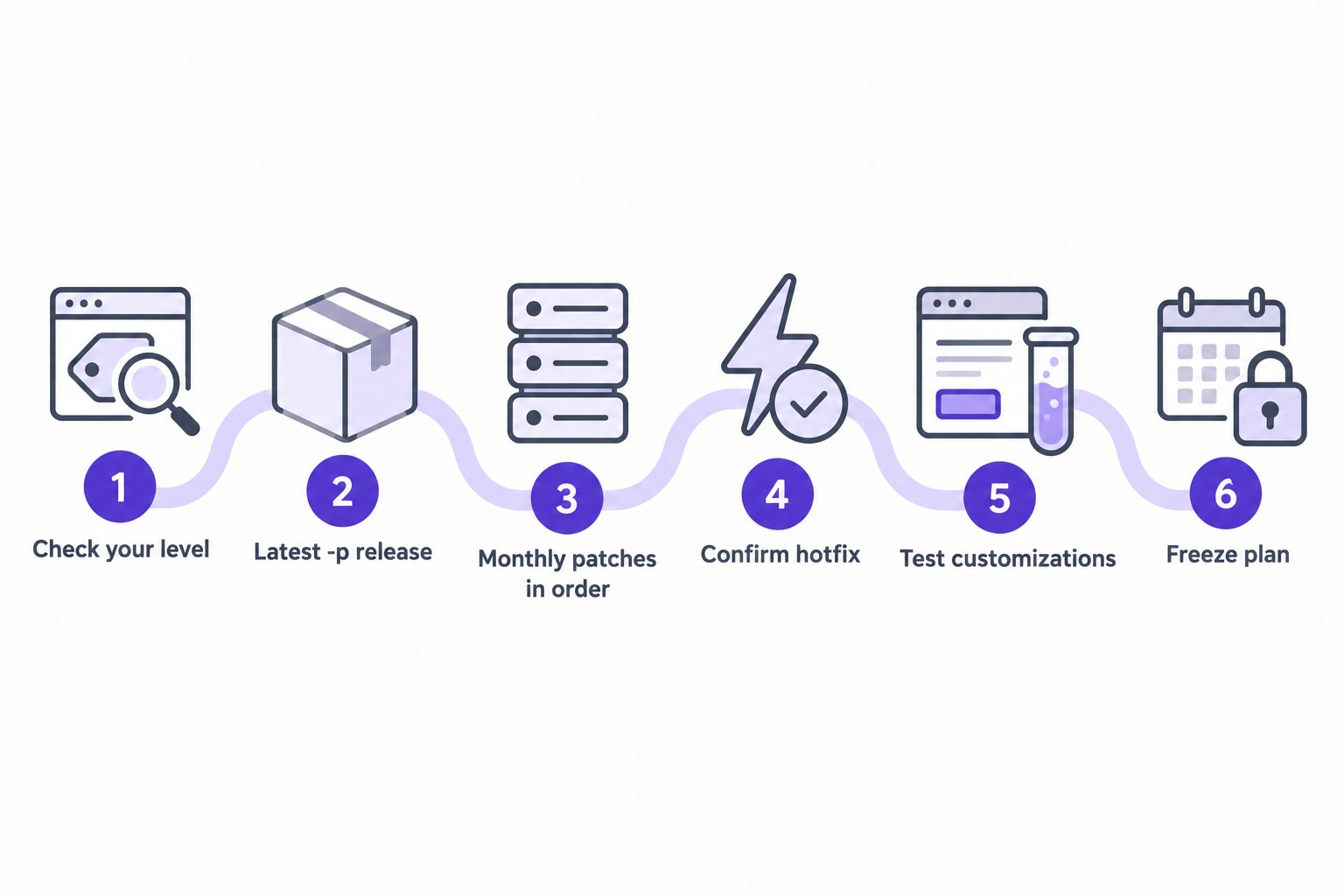
Adobe warns that applying large numbers of patches with the Quality Patches Tool makes your code more complex and future upgrades harder, so record every patch you apply, monthly ones included, for the next upgrade to remove cleanly. Our Quality Patches Tool overview walks through the commands. If your team can’t take this on before the freeze, our managed services team can.
Admin hardening: what to check this week
Anyone with Admin access can add scripts to checkout, create integrations and export customer data, so every setting below is a P1. Adobe’s security best practices cover the same ground.
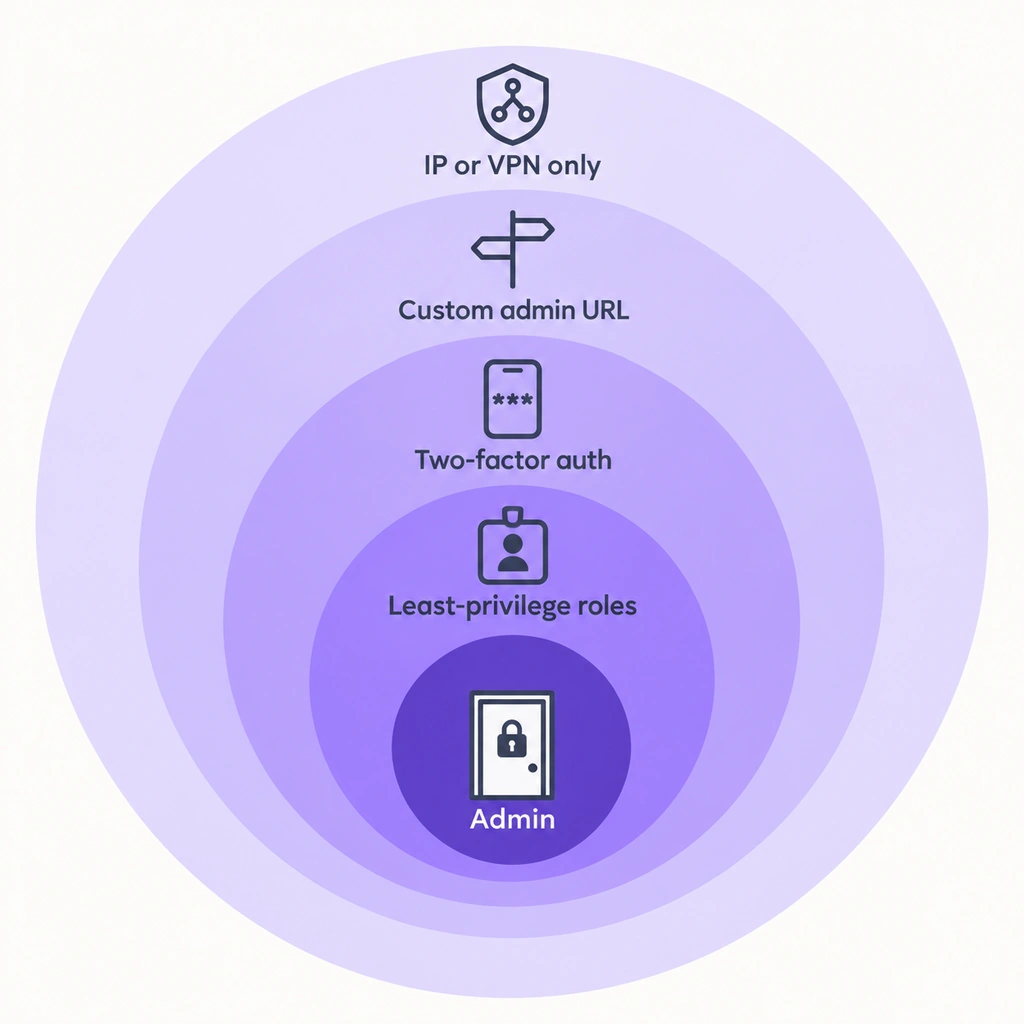
| Setting | Where | Default | Before peak |
|---|---|---|---|
| Admin path | app/etc/env.php > backend > frontName, or bin/magento setup:config:set --backend-frontname= | admin in many installs | Custom, lowercase, not guessable |
| Two-factor authentication | Stores > Settings > Configuration > Security > 2FA | Required since 2.4.0 | On for every admin user; module never disabled |
| Maximum Login Failures to Lockout Account | Stores > Settings > Configuration > Advanced > Admin > Security | 6 | Keep a number; never leave it empty (empty means unlimited) |
| Lockout Time (minutes) | Same | 30 | 30 or longer |
| Admin Session Lifetime (seconds) | Same | 900 | 900 or lower |
| Admin Account Sharing | Same | No | No |
| Add Secret Key to URLs | Same | Yes | Yes |
| Login is Case Sensitive | Same | No | Yes |
| Password Lifetime (days) / Password Change | Same | 90 / Forced | Keep both |
| Minimum Admin Password Length (2.4.9) | Same | 7 | Raise it to your password policy’s minimum |
| reCAPTCHA | Stores > Configuration > Security > Google reCAPTCHA Admin Panel, and Google reCAPTCHA Storefront | Off | Admin Panel: on for sign-in and password reset (v2 is fine there). Storefront: invisible reCAPTCHA v3 for login, account creation and checkout, so shoppers never get a puzzle |
Defaults are from the Magento source (Security module config, User module config, admin reCAPTCHA config) and the Admin security settings reference. The recommended values line up with PCI DSS v4.0.1: re-authentication after 15 idle minutes (requirement 8.2.8), lockout after no more than 10 failed attempts for at least 30 minutes (8.3.4), and inactive accounts disabled within 90 days (8.2.6).
A visible reCAPTCHA puzzle on the storefront costs conversions and fails WCAG 2.2 success criterion 3.3.8, which bans puzzle-only authentication challenges. The invisible version scores visitors in the background instead.
Move the Admin off /admin, then restrict it
A custom admin path cuts down automated login attempts but won’t stop someone who finds the path. In 2019 we documented a way a Magento 2 back-end URL could be disclosed even when the path was changed. Adobe also warns in its custom Admin URL guide that a mistake here locks you out of the Admin until someone fixes it on the server, so change it through env.php or the CLI with server access ready.
Restricting the Admin by network does far more. Adobe recommends a VPN tunnel with your host or an IP allowlist. On Adobe Commerce on Cloud, Adobe’s Fastly allowlist guide uses an Edge ACL named allowlist and a recv snippet at priority 5:
if ((req.url ~ "^/admin") && !(client.ip ~ allowlist) && !req.http.Fastly-FF) {
  error 403 "Forbidden";
}
Replace /admin with your custom path. On self-hosted stores, put the same rule in the web server or load balancer. Before peak, add the IPs of every agency, fulfillment and support team that needs the Admin, then test from outside the list.
Keep 2FA on and make it easier to live with
Adobe’s 2.4.0 release notes made two-factor authentication required for the Admin and strongly recommend against disabling the module. The feature ships as the Magento_TwoFactorAuth module. Supported providers are Google Authenticator, Duo, Authy and U2F devices such as YubiKey (2FA guide). 2.4.9 reduces the friction: per the 2.4.9 release notes, admin users now set up one of the merchant’s enabled 2FA providers instead of all of them.
Remove admin users and integrations nobody owns
Every active admin account and integration is a credential that can leak. List admin users by last login under System > Permissions > All Users, or with SQL:
SELECT user_id, username, email, is_active, created, logdate
FROM admin_user
ORDER BY logdate ASC;
Deactivate anyone who hasn’t signed in for 90 days or has no named owner, check System > Permissions > Locked Users for accounts under attack, and give each remaining user a role with custom resources, following the principle of least privilege that Adobe’s best-practices page recommends.
Integrations live under System > Extensions > Integrations. Delete the ones no current system uses, and switch any integration set to “All” API resources to “Custom” with only what it needs (integrations guide). Also confirm that Stores > Configuration > Services > OAuth > Consumer Settings > “Allow OAuth Access Tokens to be used as standalone Bearer tokens” is set to No. Adobe disabled that behavior by default because the access tokens never expire (token authentication docs). Admin tokens expire after 4 hours and customer tokens after 1 hour by default; leave them there.
Lock down the file system and the deployment
Run production mode, where Magento logs errors and exceptions to the file system and never shows them to the shopper (application modes guide). Then remove write access from code, as Adobe’s file system permissions guide recommends for production:
find app/code lib pub/static app/etc generated/code generated/metadata var/view_preprocessed \( -type d -or -type f \) -exec chmod g-w {} + && chmod o-rwx app/etc/env.php
Restore write access only for deployments. Read-only code turns a dropped web shell into a failed write and makes unexpected file changes stand out.
Disable modules you don’t use with bin/magento module:disable -c <Module_Name> (module management guide). Do this in October, because a disabled module can break a dependency you didn’t know about, and Adobe warns that the --force option can disable your store and lock you out of the Admin.
Payment page scripts: CSP, SRI and PCI DSS 6.4.3 and 11.6.1
Magento 2.4.7 and later give you much of the tooling for PCI DSS v4.0.1 requirement 6.4.3 and part of 11.6.1, provided you configure reporting and read the reports. Both requirements took effect on March 31, 2025, as the PCI Security Standards Council confirmed. Requirement 6.4.3 asks you to authorize every script that runs on the payment page, assure its integrity and keep an inventory with a reason for each script. 11.6.1 asks for a mechanism that detects unauthorized changes to the payment page’s scripts and security-impacting HTTP headers and alerts someone.
What Magento provides:
- Content Security Policy. Per Adobe’s CSP developer docs, from 2.4.7 CSP runs in restrict mode by default on payment pages in the storefront and Admin, and in report-only mode everywhere else. Earlier versions run report-only everywhere. Allowed domains go in each module’s
csp_whitelist.xml, and inline scripts need a nonce fromMagento\Csp\Helper\CspNonceProvideror a SHA-256 hash. - Violation reporting. By default, CSP violations only reach the browser console. Set
csp/mode/storefront/report_uri(and the checkout-specificstorefront_checkout_index_indexpath) to an endpoint you monitor. Expect noise: browser extensions, translation tools and ad blockers trigger violations too, so filter those out before you alert on anything. Once filtered, a new blocked domain on checkout is a strong skimming signal. - Subresource Integrity. Per Adobe’s SRI docs, 2.4.4-p9, 2.4.5-p8, 2.4.6-p6, 2.4.7 and later add integrity hashes to scripts on payment pages to meet PCI 4.0’s script integrity requirement. From 2.4.9, hashes also cover JavaScript that is minified, bundled or merged. Custom remote scripts need a hash you generate yourself.
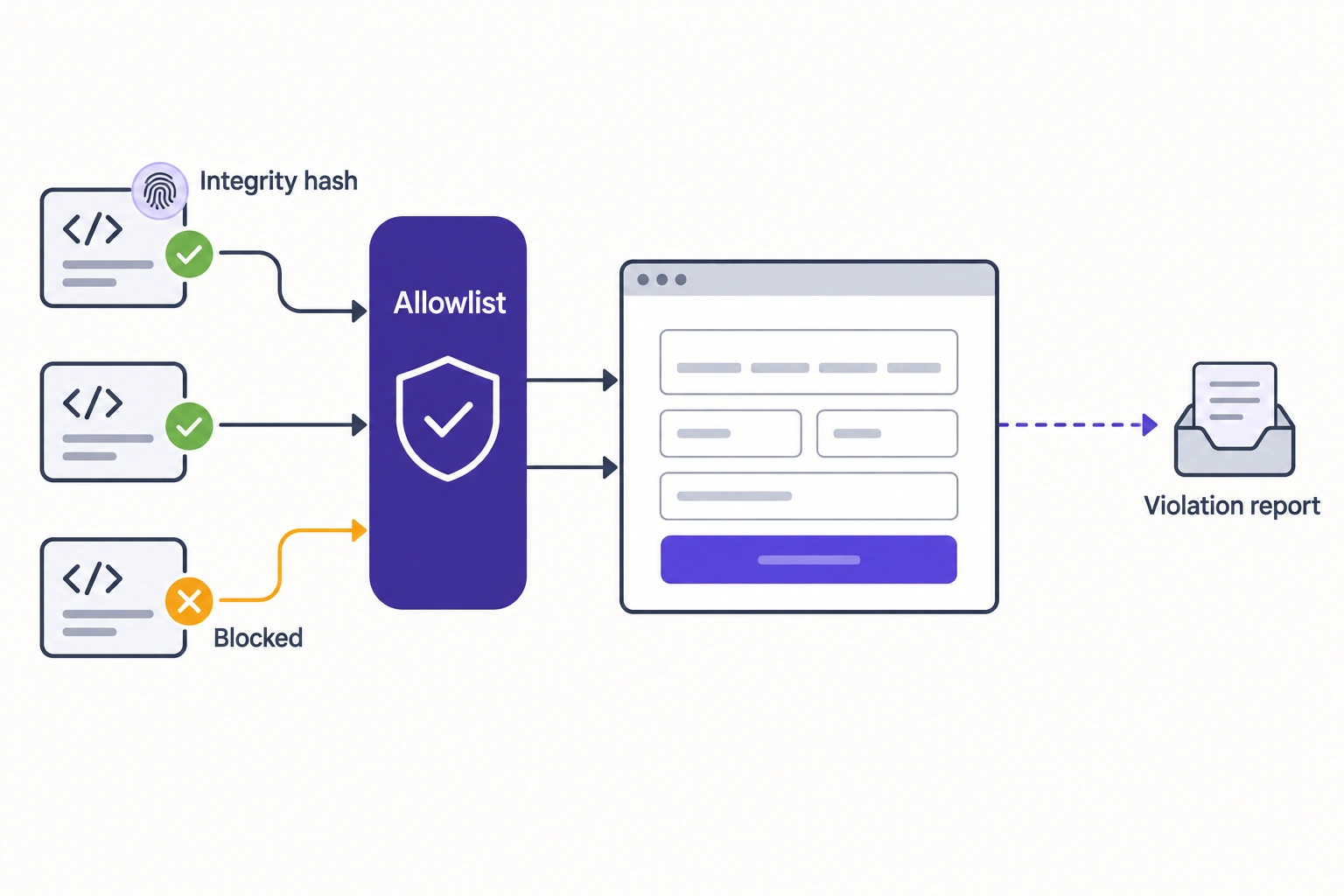
Magento leaves three gaps. It doesn’t detect changes to security-impacting HTTP headers, which 11.6.1 requires. It doesn’t build the script inventory with a business justification for each script; that stays manual. And restrict mode blocks Google Tag Manager Custom HTML tags and new vendor domains on payment pages unless they are listed in csp_whitelist.xml, which ships as code, so a tag added through the tag manager during peak can break checkout. Freeze payment-page tag changes along with code.
PCI’s January 2025 SAQ A update removed 6.4.3 and 11.6.1 from SAQ A and replaced them with an eligibility criterion that the merchant confirm their site is not susceptible to attacks from scripts. Your payment integration and validation type decide which requirements apply, so confirm scope with your QSA or acquirer.
Monitoring signals to watch through peak
Peak monitoring should tell you fast when something changed that nobody on the team changed. Put an alert or a daily check on each of these:
| Signal | Where to look | Why it matters |
|---|---|---|
| New or reactivated admin users | admin_user.created, is_active; the Admin Actions Log (Adobe Commerce only) | A rogue admin keeps access after the entry point is patched |
| New integrations or integration tokens | integration.created_at; oauth_token rows with revoked = 0 (integration tokens only: admin and customer tokens have been JWTs since 2.4.4 and don’t appear there) | An integration with “All” resources is a quiet backdoor |
| Failed admin logins and locked users | System > Permissions > Locked Users; web server logs for the admin path | Brute force or credential stuffing in progress |
File changes in pub/ and app/ | File integrity check against your release artifact; any new .php file under pub/media or pub/static | A PHP file in a web-served directory can run as a web shell |
Polyglot images in pub/media | A malware scanner that inspects image contents, not only file extensions | A file that is both a valid image and executable code passes upload checks |
| Config and content changes that add scripts | core_config_data.updated_at for design/head/includes and design/footer/absolute_footer; recently edited CMS blocks | Scripts added through Admin-editable HTML never reach your repository |
| Database triggers you don’t recognize | SHOW TRIGGERS compared with the triggers your indexers create | A malicious trigger can re-inject a skimmer every time an order or config row changes |
| CSP violation reports from checkout | Your report_uri endpoint, filtered for browser-extension noise | A new external domain on the payment page needs an answer the same day |
| Cron jobs you don’t recognize | SELECT DISTINCT job_code FROM cron_schedule compared with your module list | A rogue cron entry can re-infect a store after cleanup |
| WAF and CDN alerts | WAF or CDN dashboard; spikes on REST and GraphQL endpoints | Exploit attempts against a new flaw appear here first |
| Outbound connections from web nodes | Firewall or egress logs | Exfiltration and command-and-control traffic go to unfamiliar hosts |
| Security Scan Tool results | Commerce account > Security Scan | Adobe’s free scan runs over 21,000 security tests weekly, daily or on demand (Security Scan Tool docs) |
The Security Scan Tool scans from outside the store, so it can’t see files or database content on the server. Pair it with a server-side scanner. The Admin Actions Log records enabled Admin actions with IP address and username, but it exists only in Adobe Commerce (Action Logs report), so Open Source stores need the SQL checks or an extension.
On stores under our managed services, monitoring flags unexpected admin accounts, scans files for web shells, backdoors and polyglot images, checks the database for injected JavaScript, skimmers and malicious triggers, and confirms cron is running. WAF and CDN alerting is set up per store through Fastly or Cloudflare. If you’d rather not staff this through November, see how ongoing managed services for your store handle it.
Incident checklist: the first 24 hours
If you find a skimmer, an unknown admin or a web shell, contain first, copy the evidence second, and clean third. Cleaning first destroys the evidence you need to find the entry point and meet card-brand and legal obligations.
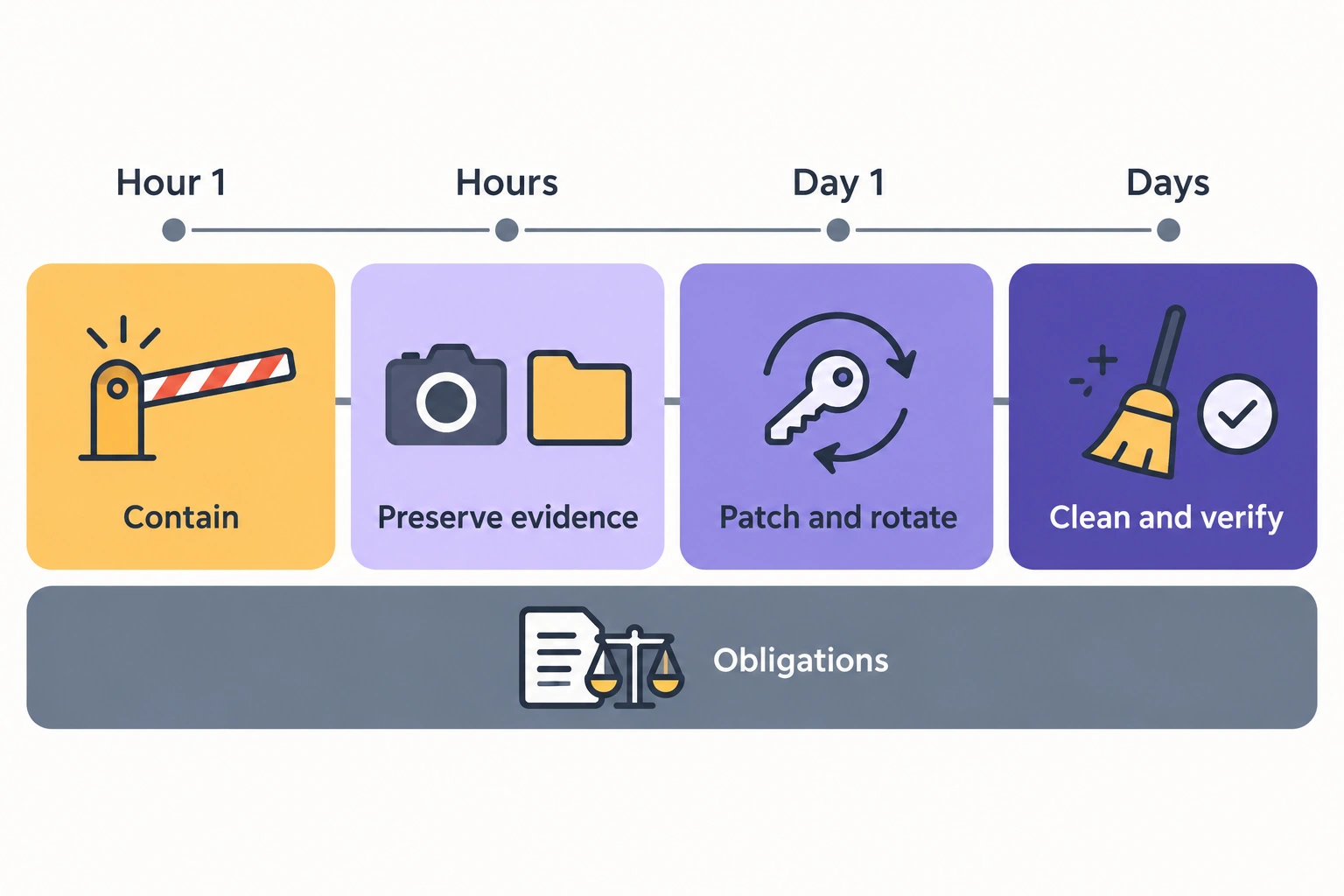
Contain (first hour)
- Block the Admin at the edge to your own IPs if it isn’t already, and deactivate any admin user or integration you don’t recognize. Don’t delete them yet.
- If a skimmer is live on checkout, copy it, then remove it (disable the CMS block or config value, or put checkout behind maintenance).
- Open an incident log: who found what, when, and every action taken.
Preserve evidence (first hours)
- Snapshot disks or containers, dump the database, and copy web server, PHP, Magento (
var/log) and CDN or WAF logs before log rotation removes them. - Save copies of every suspicious file, database value and trigger with timestamps.
Patch and rotate (same day)
- Apply any missing patches and hotfixes, starting with APSB26-146 if it isn’t on.
- Rotate what an attacker could have read. Adobe’s APSB26-146 guidance lists the encryption key, all Admin passwords, REST, SOAP and GraphQL integration tokens, OAuth client secrets, payment gateway API credentials at the provider, database and Fastly credentials, SSH and deploy keys, and third-party extension API keys. The encryption key protects integration tokens, payment gateway credentials and system automation tokens, so a new key alone doesn’t invalidate credentials an attacker already copied.
- Rotate the key with
bin/magento encryption:key:changein maintenance mode with cron stopped. The Admin screen for it was removed in 2.4.8 (encryption key guide). Confirm the command exists first withbin/magento list | grep encryption:key:change; on earlier releases without it, use the Admin screen. Make sureapp/etc/env.phpis writable, since the new key is written there. Afterward, flush the cache, re-enable cron, leave maintenance mode and store the new key somewhere safe. Expect every admin and customer session to end (integration users excepted).
Clean and verify (first days)
- Compare deployed code with your repository and Composer lock, and redeploy from a clean build rather than editing files in place.
- Re-run every check in the monitoring table: admin users, integrations, tokens, database triggers, cron jobs,
core_config_datascript paths, CMS blocks.
Obligations (start the same day, run in parallel)
- PCI. If cardholder data may have been exposed, contact your acquirer or payment processor before you publish anything, ask what investigation they require, and keep the evidence intact until they answer.
- Customer and regulator notification. Rules depend on where your customers live and what data was exposed. For example, the EU GDPR expects notification to the supervisory authority without undue delay and, where feasible, within 72 hours of becoming aware of a breach (GDPR, Regulation (EU) 2016/679). US state laws differ. Involve legal counsel early; this checklist is not legal advice.
Common mistakes in the weeks before peak
- Patching production only. Staging and old environments holding production data stay exploitable.
- Patching without rotating. If a store ran unpatched after September 7, 2026, the patch closes the hole but leaves any stolen keys and tokens valid.
- Trusting a clean patch apply. A custom class that overrides a patched one keeps the vulnerability alive even when the patch reports success.
- Turning on CSP restrict mode for the whole storefront in November. Do it on staging, read a week of filtered reports, then decide.
- Leaving agency and ex-staff admin accounts active. Review the admin user list before the freeze.
FAQ
Is Magento 2 secure?
Magento 2 is as secure as its patch level and configuration. Adobe ships security fixes monthly and hotfixes for critical flaws, but a store that misses them, runs an unsupported PHP version or leaves the Admin open to the internet is exposed regardless of the platform.
What is the latest Magento security patch?
As of October 12, 2026, the latest monthly release is the September 8 isolated patch from APSB26-138 (for example 2.4.8-2026-sep), plus the APSB26-146 hotfix for CVE-2026-75650 from September 7, which you apply separately. The latest full -p releases are 2.4.8-p5, 2.4.7-p10 and 2.4.6-p15, all from May 12, 2026. Check Adobe’s security bulletins for any monthly patch released since.
How often does Adobe release Magento security patches?
In 2026, Adobe released full -p releases in March and May, monthly isolated patches on the second Tuesday of each month from July, and one hotfix, on September 7, the day before the September release. Its schedule commits to at least one security patch release a year per supported line.
Is Magento 2.4.6 end of life?
Not yet for Adobe Commerce: extended support runs to August 31, 2027, and a security-only period runs to May 31, 2028. Magento Open Source 2.4.6 has no extended support, got the APSB26-146 hotfix but no September monthly patch, and its PHP versions (8.1 and 8.2) are end of life or reach it on December 31, 2026. Open Source stores should start the upgrade in December.
Is changing the Magento admin URL enough?
No. A custom path cuts automated login attempts, so combine it with 2FA, reCAPTCHA on the login form, account lockout and an IP allowlist or VPN in front of the Admin.
Do Magento Open Source stores get the same security patches as Adobe Commerce?
Mostly. Both editions got the APSB26-146 hotfix, and Open Source got monthly patches for 2.4.6 to 2.4.9 through August 2026, but September’s covered Open Source only from 2.4.7. The Security Scan Tool works for both; the Admin Actions Log exists only in Adobe Commerce.
When to bring in a security audit
Work through this list with your team first. Bring in outside help if you find patches that won’t apply cleanly because of custom code, admin users or integrations nobody can explain, PHP files under pub/ that aren’t in your repository, database triggers or CSP reports from checkout you can’t trace, or a release line and PHP version combination that falls out of support before your next planned upgrade.
A Magento security audit from our team covers patch levels, admin access, file system and permissions, payment and user data security and malicious content detection over 10 to 14 business days, and ends with a remediation plan. Book it now: findings that can land before your code freeze go in first, and the rest go on the January plan.