

Last checked against Shopify’s Help Center and developer docs: October 2026.
If your team last reviewed the Shopify checkout in spring, the platform has changed since: Shopify Scripts stopped running, script tags left the Thank you page for non-Plus stores, and checkout A/B testing arrived natively. Shopify checkout optimization before peak means finding what breaks on a phone and fixing it in ways you can undo in minutes. This guide gives retail and DTC ecommerce managers a plan-by-plan view of what you can change, a test matrix for shipping costs, discounts, payment failures, wallets, mobile UX and analytics, and a way to measure results during peak traffic.
Phones carry most of the risk. Adobe Analytics reported that smartphones handled 56.4% of US online transactions in the 2025 holiday season (November 1 to December 31, 2025), and its 2026 forecast predicts mobile will account for 57.4% of overall spend from November 1 to December 31, 2026 (forecast published September 28, 2026).
What can you change in Shopify checkout on each plan?
Every plan can change the settings behind common mobile friction, including form fields, layout, wallets, discounts and delivery option names. Shopify Plus adds code-level control of the information, shipping and payment steps. Basic, Grow and Advanced get the same checkout tools with one exception: checkout A/B tests (Rollouts experiments) need Grow or higher. Current US prices on the Shopify pricing page are Basic $39/month, Grow $105/month and Advanced $399/month on monthly billing ($29, $79 and $299 on yearly billing), and Plus from $2,300/month.
| Capability | Basic, Grow and Advanced | Plus |
|---|---|---|
| Checkout editor branding: logo, colors, fonts, background | Yes | Yes |
| Checkout Branding API (deeper styling) | No | Yes |
| One-page or three-page layout (one-page is the default) | Yes | Yes |
| Form options: full name, company, address line 2, shipping phone | Yes | Yes, plus fields that vary by country through a checkout app |
| Address autocomplete (on by default, listed countries only) | Shopify’s built-in service | Built-in service or a third-party app |
| Draft checkout configurations to prepare and preview changes | Up to 20 | Up to 99 |
| Checkout UI extensions in the information, shipping and payment steps | No | Yes |
| Apps and pixels on the Thank you and Order status pages | Yes | Yes |
| Public apps using Shopify Functions (hide, rename or reorder payment and delivery options; discounts; validation) | Yes; no credit card customizations in the US and Canada | Yes |
| Custom apps using Shopify Functions | No | Yes |
| Hide accelerated checkout options with a custom app | No | Yes |
| Checkout Blocks (Shopify’s no-code app) | Content blocks on Thank you and Order status pages | Full app |
| Stack several product discounts on one line item (discount combinations) | No | Yes |
| Schedule launch and event rollouts of themes and checkout configurations | Yes | Yes |
| A/B test checkout configurations with Rollouts experiments | Grow and Advanced only | Yes |
| Checkout bot protection, which you can schedule for launches | No | Yes |
![Line Chart on a Blue Display Comparing Mobile and Desktop Trends from Baseline Through Peak Weeks, with a Vertical Change Marker in the Middle and a Highlighted Peak-right Region.] ,](https://www.atwix.com/wp-content/uploads/2026/10/Mobile-vs-desktop-trend-chart-5.webp "Mobile Vs Desktop Trend Chart-5 | Atwix")
Three settings and plan details catch teams out:
- Card payments in the US and Canada. Shopify’s payment and delivery customization page limits payment customization apps on non-Plus plans to non-card methods in those two countries. Card field customizations there require Plus.
- Requiring customers to sign in. If you turn on “Require customers to sign in to their account before checkout”, Shopify hides accelerated checkout options such as Apple Pay in the online store cart, so no one can skip the sign-in. A required company name doesn’t hide wallets, but it makes Apple Pay and Google Pay buyers type a company name when their wallet doesn’t hold one.
- Stacking product discounts on the same item. Shopify’s discount combinations page requires Shopify Plus to combine several product discounts on one line item. Plan promotions on other plans around that limit.
If you also sell to business buyers, our guide to Shopify Plus checkout customization for B2B merchants covers payment terms, PO fields and approval logic. This article stays with retail and DTC checkout.
Deadlines that already passed, and what to check because of them
Three platform changes since August 2025 can break a checkout without anyone touching it:
- checkout.liquid is gone. Shopify’s checkout.liquid documentation lists it as unsupported for the information, shipping and payment steps, and it was retired for the Thank you and Order status pages on August 28, 2025.
- Script tags on the Thank you and Order status pages stopped working for non-Plus stores on August 26, 2026 (Plus stores lost them on August 28, 2025). If a conversion tag, affiliate pixel or survey widget depended on them, it stopped firing on that date.
- Shopify Scripts stopped running on June 30, 2026, per the Shopify developer changelog. Any discount, shipping or payment rule that lived in a Script needs to exist as a Shopify Function now, or it no longer runs.
Put a check for each of these at the top of your audit.
Set the rules before you test: reversible changes first
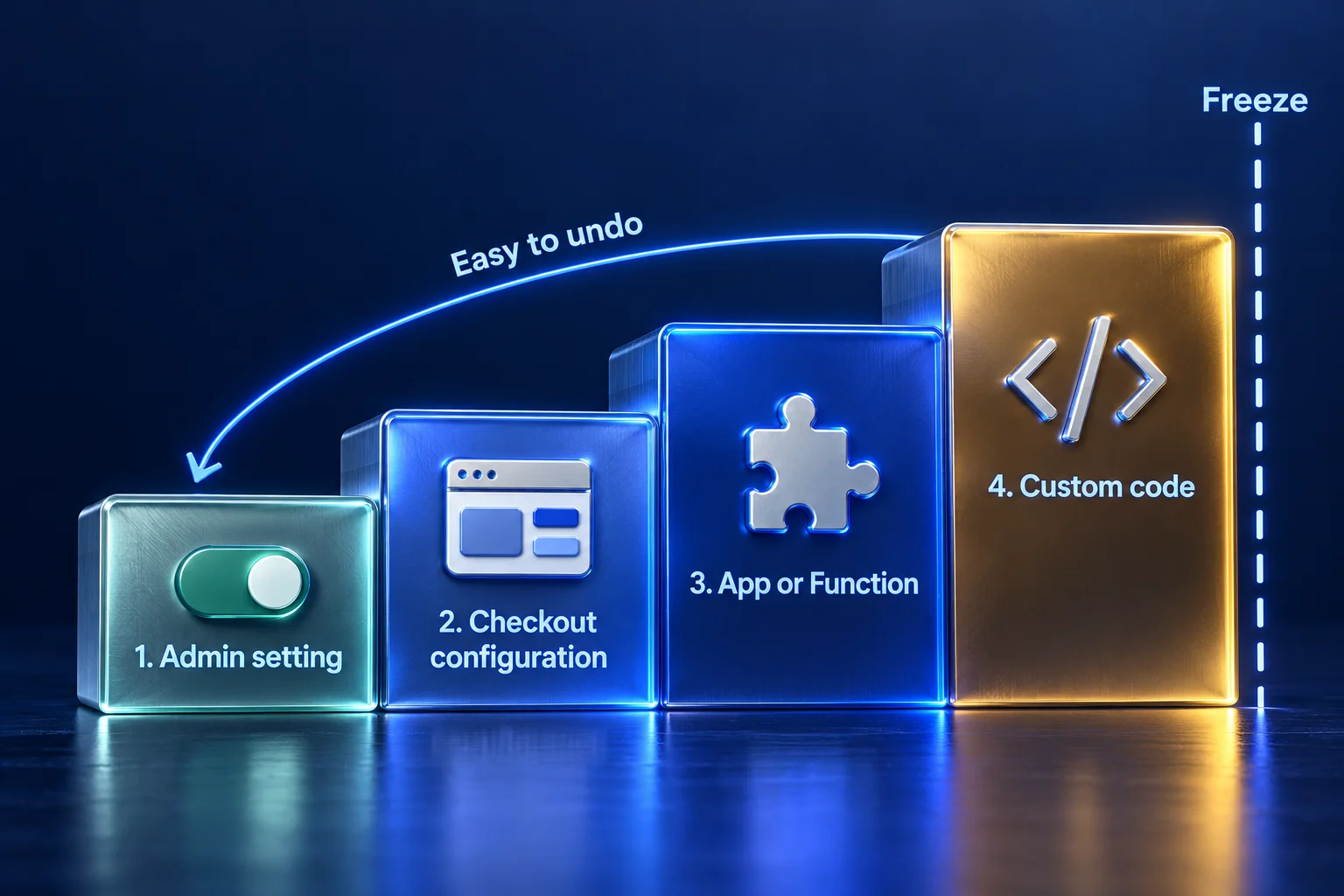
The safest pre-peak changes are the ones you can undo from the admin in minutes. Agree on a code-freeze date, then sort every candidate change into one of four levels, from easiest to hardest to undo.
| Level | Examples | How you undo it | Before or after freeze |
|---|---|---|---|
| 1. Admin setting | Form field options, address autocomplete, wallet activation, discount settings, accelerated checkout buttons in the theme editor | Change the setting back; form options take up to 30 seconds to apply | Allowed after freeze, with an owner and a written rollback step |
| 2. Checkout configuration | Layout, branding, app blocks, Thank you page content | Republish the previous configuration; publishing a new one turns the old one into a draft you can republish | Before freeze; ship as a Rollouts event if timed to a promotion |
| 3. App or Function | A public app that hides or reorders payment and delivery options, discount apps | Turn off the customization or uninstall the app, then retest checkout | Before freeze, tested on a draft configuration |
| 4. Custom code | Plus checkout UI extensions, custom Functions, pixel code | Deploy the previous app version | Before freeze only |
Rollouts helps with timed changes. An event rollout publishes changes for a set period and rolls them back when it ends, which fits a Black Friday banner or a temporary free-shipping message in checkout. Shopify’s managing rollouts page warns that you can’t revert a rollout after you apply it, so check the end state first.
How do you diagnose mobile checkout friction on Shopify?
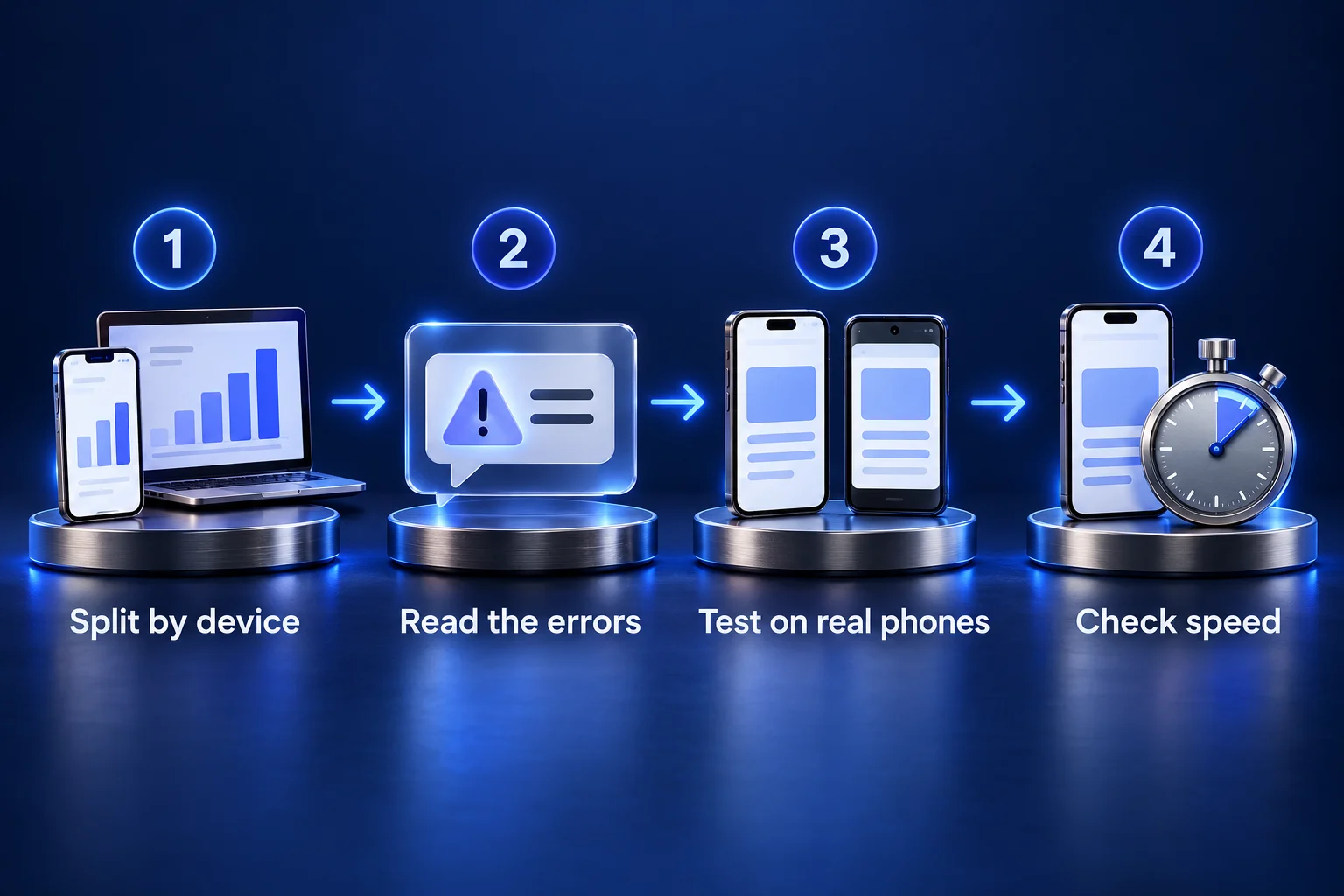
Start with your own data, then reproduce what it shows on real phones. The four steps below tell you which rows of the test matrix to run first.
1. Split the funnel by device
Open the Conversion rate breakdown and Sessions by device reports in Shopify Analytics. Compare “Sessions that reached checkout” with “Sessions that completed checkout” for mobile and desktop over the same period. A mobile gap that opens after checkout starts points at the checkout itself; a gap before checkout points at the cart, product pages or speed.
2. Read the errors customers see
Shopify can report every error message a shopper sees at checkout. Its alert_displayed event fires whenever checkout shows an inline error or warning, and records the type (for example PAYMENT_ERROR, DISCOUNT_ERROR or INPUT_INVALID) and the message. Send it to your analytics tool through a pixel and you get a count of payment errors, rejected codes and form errors per checkout, by device. The related ui_extension_errored event tells you when a checkout app failed to load.
Then read a sample of abandoned checkouts (Orders > Abandoned checkouts). Shopify counts a checkout as abandoned when it stays incomplete for more than ten minutes after the customer gave an email. Look for patterns in cart value, shipping country and discount codes.
3. Walk the checkout on real devices
Desktop device emulation doesn’t reproduce wallets, autofill or mobile keyboards. Use at least an iPhone with Safari and an Android phone with Chrome, and run each path as a new visitor, a returning Shop Pay user and a shopper with a discount code. Use a real address in each shipping zone you sell to, including one outside the address autocomplete countries.
4. Check speed where the checkout starts
Mobile checkout friction can start before checkout, on the product or cart page. Shopify’s web performance reports show loading, responsiveness and layout-shift scores (LCP, INP and CLS) for mobile and desktop separately, with data delayed by up to 36 hours and kept for 90 days. Scripts left behind by uninstalled apps can slow these pages; our article on removing ghost code from Shopify Plus stores walks through finding and removing it safely.
The pre-peak Shopify checkout test matrix
Run every row on at least one iPhone and one Android phone. “Plan that can change it” shows the lowest Shopify plan that can make the fix, and “Level” uses the reversibility levels from the table above.
| Area | What to check | How to test | Plan that can change it | Level |
|---|---|---|---|---|
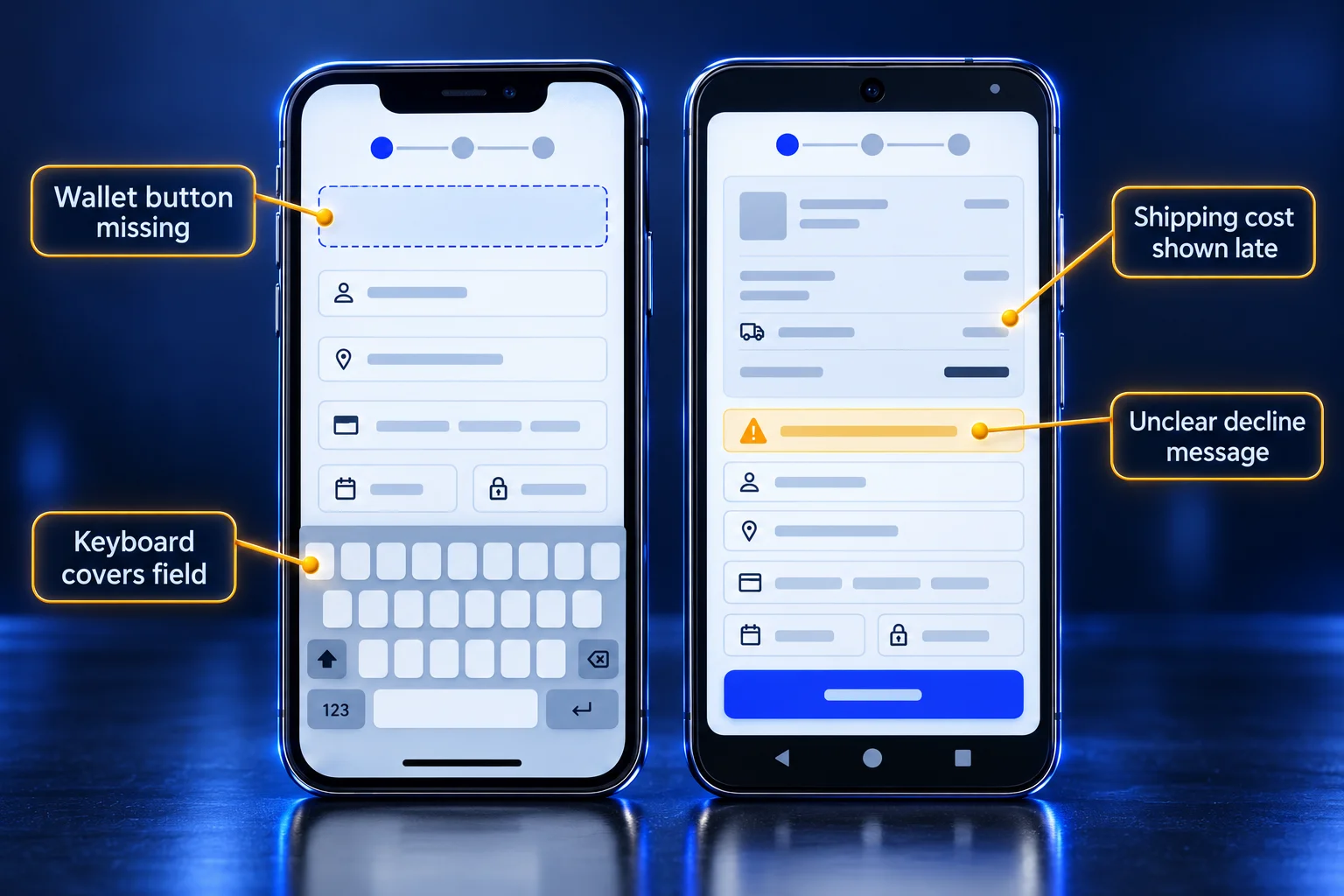
| Shipping cost | Shoppers see a shipping cost or free-shipping threshold before they reach payment | Build carts just below and just above your threshold; note where shipping first appears on mobile (product page, cart, checkout) | Theme text and cart messaging: any plan | 1 to 2 |
| Shipping cost | Delivery option names, order and prices match what your promotions say | Enter an address in every shipping zone; compare the options shown with your campaign copy | Rename, hide or reorder options with a public Functions app: any plan; custom app: Plus | 3 |
| Discounts | Every campaign code applies, combines as intended and shows a clear error when it doesn’t | Test each code alone, with an automatic discount, and stacked; customers can enter up to 5 product or order codes and 1 shipping code | Combinations: any plan; several product discounts on one line item: Plus only | 1 |
| Discounts | Codes still work through wallets and accelerated buttons | Apply a code, then pay with Shop Pay, Apple Pay and Google Pay. Apple Pay takes a code only if the shopper enters it on the checkout page before tapping the Apple Pay button, and Google Pay won’t apply discounts to products that don’t need shipping | Any plan | 1 |
| Payment failures | Declines show a message the shopper can act on, and checkout keeps their details | In Shopify Payments test mode, use the generic decline (4000000000000002), insufficient funds (4000000000009995), expired card (4000000000000069) and incorrect CVC (4000000000000127) test cards | Decline messages: set by Shopify. Payment method order and visibility: public Functions app on any plan (US and Canada card fields: Plus) | Testing only |
| Payment failures | Your real decline and error rate before peak | Count PAYMENT_ERROR alerts per checkout started, by device, from the alert_displayed event | Any plan | 4 if you add pixel code |
| Wallets | Shop Pay, Apple Pay, Google Pay and PayPal all appear where expected | Check the product page, cart and the checkout’s express section on each device; Apple Pay needs Safari on a compatible device | Activation: any plan; hiding accelerated options at checkout: Plus custom app | 1 |
| Wallets | Nothing in your settings hides a wallet | Check whether “Require customers to sign in to their account before checkout” is on, which hides accelerated buttons in the cart, and that the store uses the payment setup each wallet needs (see the notes below the table) | Any plan | 1 |
| Mobile UX | The form asks only for what you need | Review full name, company, address line 2 and shipping phone in checkout form options; a required company name adds a field for wallet buyers. Complete checkout one-handed on a small phone with autofill. If the Checkout settings page shows recommended field settings, review each before you apply it, since some add fields | Any plan | 1 |
| Mobile UX | Checkout apps load and don’t block the pay button | Check each checkout app block on a draft configuration preview, then on the live store; watch ui_extension_errored | Information, shipping and payment steps: Plus; Thank you and Order status pages: any plan | 2 to 4 |
| Analytics | The purchase event fires once per order, from customer events and not from removed script tags | Test orders don’t show in reports, so place one low-value live order, check each destination (GA4, ad platforms), then cancel and refund it (your payment processor may charge a fee) | Any plan (pixels load on checkout and Thank you pages) | 1 to 4 |
| Analytics | Shopify Analytics, GA4 and ad platforms agree within a gap you accept | Compare one week of orders across all three before peak; write down the normal gap so you don’t chase it in November | Any plan | Testing only |
Notes on wallets. Shop Pay is part of Shopify Payments, and Shopify Payments is available only in the countries on Shopify’s supported list. A store on a third-party payment gateway can still activate Shop Pay if it’s located in Australia, France or the United States and meets the Shopify Payments requirements there. Google Pay works with Shopify Payments in all regions except France. PayPal Express Checkout isn’t available to merchants in the United States or France, who use PayPal Wallet through Shopify Payments instead.
At checkout, Shopify orders accelerated options dynamically to show each customer the fastest method. On product pages, accelerated checkout buttons buy a single variant only, so a shopper can’t mix sizes through them. If you sell in the US, Canada or the UK, check Shop Pay Installments eligibility: US orders qualify from $35 to $30,000.
Two cautions on testing payments. Shopify warns that customers can’t place live orders while your payment provider is in test mode, so run decline tests on a development store or in a short, announced window. And don’t fulfill test orders, because you pay for any shipping labels you buy.
For local payment methods, Shopify Payments supports options such as iDEAL | Wero, Bancontact, BLIK, Klarna and TWINT, each only for customers in a supported country paying in an eligible currency. Shopify’s local payment methods page also notes you must turn off conflicting third-party gateways first, so schedule it before the freeze.
What to change before the freeze, and what to hold until January
Change now anything at Level 1 or 2 that your diagnosis tied to a specific drop-off and that you can test on a draft configuration. Hold anything that changes how payments are processed or adds new code to checkout, unless it fixes a broken flow.
Good pre-freeze candidates
- Remove or make optional form fields you don’t use (company name, address line 2, shipping phone).
- Turn address autocomplete back on if someone disabled it.
- Fix a missing wallet or a hidden accelerated checkout button, including a sign-in requirement you don’t need.
- Rename delivery options so they match your promotion copy, and show your free-shipping threshold in the cart.
- Rewrite unclear checkout wording in the Checkout & system section of the theme content editor, where one-page checkout added new customizable text.
- Rebuild any purchase tracking that relied on Thank you page script tags.
Hold until after peak
- Switching payment gateways, or activating local methods that require turning off another gateway.
- New checkout UI extensions or custom Functions that haven’t run through a full sales cycle.
- Switching between one-page and three-page checkout, unless you can test it as a Rollouts experiment well before your first peak promotion.
- Any change you can’t measure against a clean baseline (next section).
How do you measure a checkout change during peak season?
Measure against a baseline you captured before the change, on the same device split and traffic mix, and expect peak weeks to make simple before-and-after comparisons unreliable. No checkout change guarantees a conversion lift, and a single week of November data can’t prove one.
Capture the baseline now
Record these per device, per week, for at least the four weeks before any change:
| Metric | Where it comes from |
|---|---|
| Reached checkout rate (sessions that reached checkout / sessions) | Shopify Analytics conversion rate breakdown |
| Checkout completion rate (sessions that completed checkout / sessions that reached checkout) | Same report |
| Payment errors per checkout started | alert_displayed PAYMENT_ERROR count / checkout_started count |
| Discount errors per checkout started | alert_displayed DISCOUNT_ERROR count / checkout_started count |
| Share of orders by payment method (Shop Pay, Apple Pay, Google Pay, PayPal, cards) | Your payments and orders data |
| Mobile INP and LCP on cart and product pages | Web performance reports |
Shopify’s checkout_started, checkout_completed and step events (contact, address, shipping and payment info submitted) let you rebuild the step-by-step funnel in GA4. Our guide to conversion rate optimisation with GA4 funnel exploration shows how to set that up.
Use a control group when your plan allows it
On Grow, Advanced and Plus, a Rollouts experiment compares a new checkout configuration with the live one on split traffic. Shopify’s rollout types page sets a 50/50 split and a 90-day duration by default. A control group running at the same time absorbs peak effects that a before-and-after comparison can’t. Checkout experiments report checkout conversion rate only, and the Help Center doesn’t describe a significance test, so decide your sample size and success threshold before you start.
Without a control group, compare like with like
On Basic, which can schedule rollouts but not run experiments, or for changes outside what Rollouts covers (such as a payment gateway setting), use a before-and-after comparison with guardrails:
- Compare matched windows of at least two full weeks, so each includes the same weekdays and weekends.
- Exclude promotion days, email send days and paid campaign spikes from both windows, or compare them only against each other.
- Segment by device and channel; a shift in traffic mix changes conversion without any checkout change.
- Log every change with the date and time in a shared changelog, and don’t ship two checkout changes in the same window.
- Read the error metrics alongside conversion. A drop in PAYMENT_ERROR alerts per checkout is evidence a fix worked even when conversion moves for other reasons.
For changes shipped in late October, write the readout in January, when you can compare full periods, and state these limits in it.
When does a checkout audit need a developer?
You need development help when the fix sits at Level 3 or 4: a Plus checkout UI extension, a custom Function to replace retired Shopify Scripts, a pixel setup that rebuilds Thank you page tracking, or a validation rule that blocks bad addresses before payment. Our Shopify development team builds custom checkout, cart and discount logic for Shopify and Shopify Plus stores, and can take these fixes from draft configuration to release.
FAQ
Do I need Shopify Plus to optimize my checkout?
No. Form fields, layout, address autocomplete, branding, wallets, discount settings and public apps that customize payment and delivery options work on every plan. Plus adds checkout UI extensions in the information, shipping and payment steps, custom apps with Shopify Functions, the Checkout Branding API, the full Checkout Blocks app, checkout bot protection, and stacking several product discounts on one line item.
Can you A/B test the Shopify checkout?
Yes, on the Grow plan or higher. Shopify Rollouts experiments compare a checkout configuration with your live one on split traffic and report checkout conversion rate. Basic stores can schedule launch and event rollouts but can’t run experiments, so they measure changes with before-and-after comparisons.
Is one-page checkout better than three-page checkout on Shopify?
Shopify sets one-page checkout as the default and says it collects the same information and supports the same customizations as three-page checkout. Whether it converts better for your store depends on your customers, so test it with a Rollouts experiment instead of switching during peak.
Why don’t Apple Pay or Google Pay show at my checkout?
Common causes are a payment setup that doesn’t support the wallet, a device or browser that doesn’t (Apple Pay needs Safari on a compatible device), a store location where the method isn’t available, or a store that requires customers to sign in before checkout, which hides accelerated buttons in the cart. Apple Pay also isn’t offered through the Buy Button sales channel. Check each on a real phone.
Can I still edit checkout.liquid?
No. checkout.liquid is unsupported for the information, shipping and payment steps and was retired on the Thank you and Order status pages on August 28, 2025. Customizations now use checkout UI extensions, Shopify Functions and pixels.
How long should a checkout test run?
Long enough to cover at least two full weekly cycles and the sample size you set in advance. Rollouts experiments default to 90 days. Avoid starting or ending a test inside a major promotion, because the traffic mix changes.
Questions about your checkout before peak?
If you’d like to talk any of this through with a Shopify expert, get in touch with our team.