

Adobe now offers Adobe Commerce in three deployment models: SaaS, PaaS (Adobe Commerce on Cloud), and on-premises. Owners of the PaaS version are getting two different signals. Adobe’s lifecycle policy calls Adobe Commerce as a Cloud Service (ACCS) the “recommended long-term destination” for Adobe Commerce on Cloud customers, while a March 2026 Adobe blog post says there are no end-of-support or end-of-life plans for the PaaS product. If you run Adobe Commerce on Cloud or on-premises, this guide lays out the dates Adobe has committed to, what changes on ACCS, and a decision matrix for staying, migrating, or re-evaluating.
The short answer
Most merchants should get onto Adobe Commerce 2.4.9 first and evaluate ACCS in 2027 to 2028. It is not a 2026 emergency, and it is not a required next step after 2.4.9. Move sooner if you already plan to rebuild your storefront, have few customizations built inside Magento, or want to stop funding upgrade projects. Wait if you depend on a Luma theme, custom database tables, heavy ERP logic inside Magento, or HIPAA-regulated data.
What Adobe has committed to
Adobe supports each Adobe Commerce release for three years of standard support, and from June 2027 it will enforce upgrades on its own cloud. The table below comes from the Adobe Commerce lifecycle policy, last updated September 18, 2026.
| Release | General availability | End of standard support | End of extended support | Cloud enforcement date |
|---|---|---|---|---|
| 2.4.9 | May 12, 2026 | May 31, 2029 | To be announced | To be announced |
| 2.4.8 | April 8, 2025 | May 31, 2028 | To be announced | To be announced |
| 2.4.7 | April 9, 2024 | May 31, 2027 | May 31, 2028 | June 1, 2028 |
| 2.4.6 | March 14, 2023 | August 11, 2026 | August 31, 2027 (security-only fixes to May 31, 2028) | June 1, 2028 |
| 2.4.5 | August 9, 2022 | August 12, 2025 | August 11, 2026 (security-only fixes to May 31, 2027) | June 1, 2027 |
| 2.4.4 | April 12, 2022 | April 12, 2025 | April 14, 2026 (security-only fixes to May 31, 2027) | June 1, 2027 |
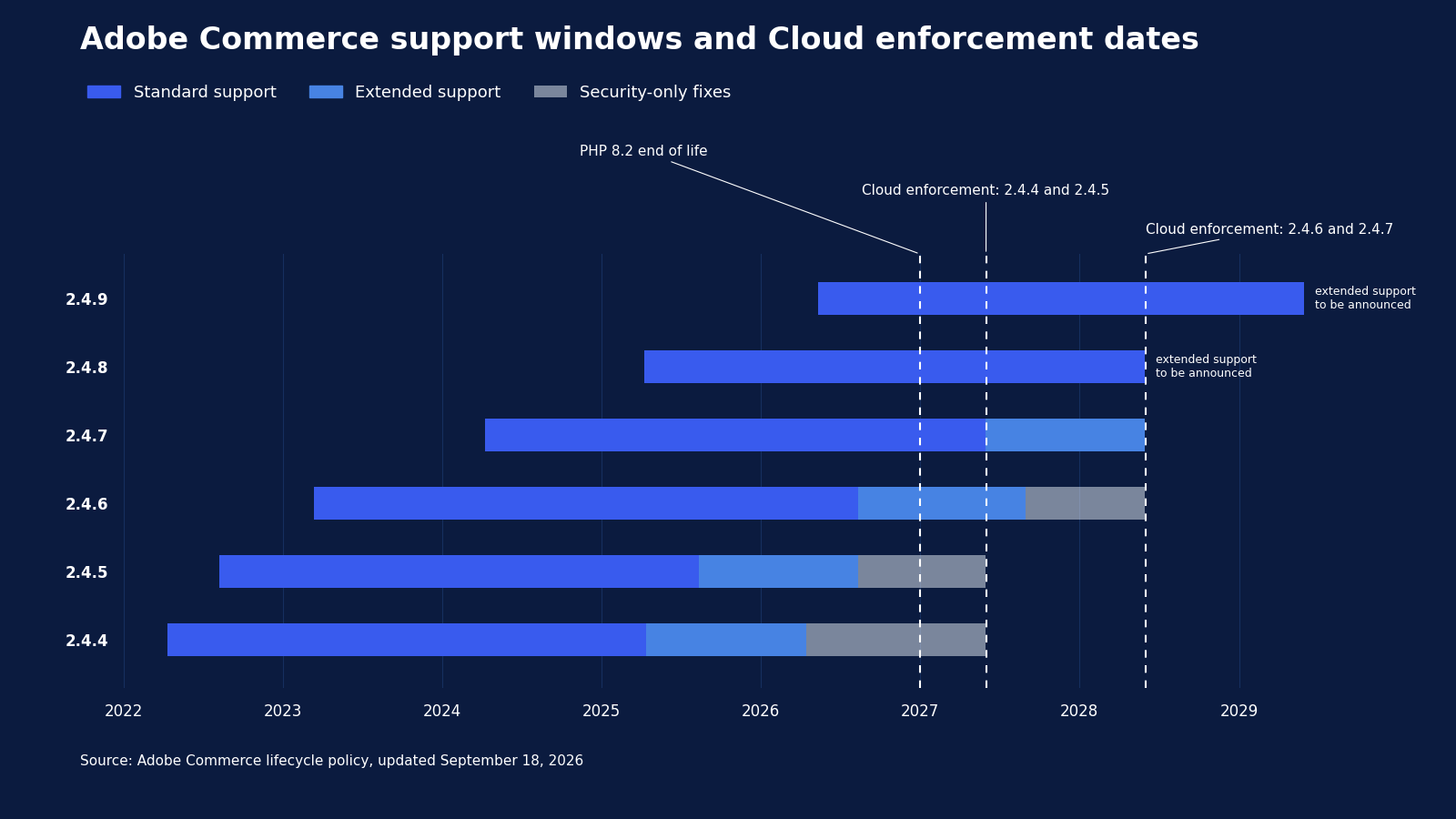
Three details in that policy change the math for 2027:
- Enforcement on Adobe Commerce on Cloud. Starting June 1, 2027, Adobe will stop maintaining Cloud environments that run unsupported versions and may suspend traffic, which takes the storefront offline. This applies to Adobe-hosted PaaS, not to self-hosted on-premises stores.
- Dependencies have their own deadlines. Adobe does not patch PHP, MariaDB, OpenSearch, Redis, Valkey, or RabbitMQ when they reach end of life during your support window. On Adobe’s cloud, the security enforcement policy set deadlines of October 30, 2026 and May 31, 2027 for moving them to supported versions, depending on the service. Adobe performs these upgrades when you open a support ticket at least 30 days ahead. On self-hosted stores, keeping them supported is entirely your job.
- PHP 8.2 ends December 31, 2026. Adobe flags PCI compliance as at risk for 2.4.6 stores still running PHP 8.2 after that date.
On the PaaS side, Adobe’s March 30, 2026 post commits to continued security and quality updates on its published release schedule and new beta capabilities for Adobe Commerce on Cloud. So PaaS stays, but its upgrade cycle now comes with a hard deadline. ACCS removes the upgrade cycle and changes how you build everything around the core.
What changes on Adobe Commerce as a Cloud Service
Adobe Commerce as a Cloud Service is Adobe’s multi-tenant SaaS edition of Adobe Commerce: Adobe runs and updates the core application, and you extend it only from the outside. Adobe’s own SaaS vs PaaS comparison lists the differences that matter most for an existing store. In plain terms: on PaaS your developers can change Adobe Commerce itself; on ACCS they can only build next to it.
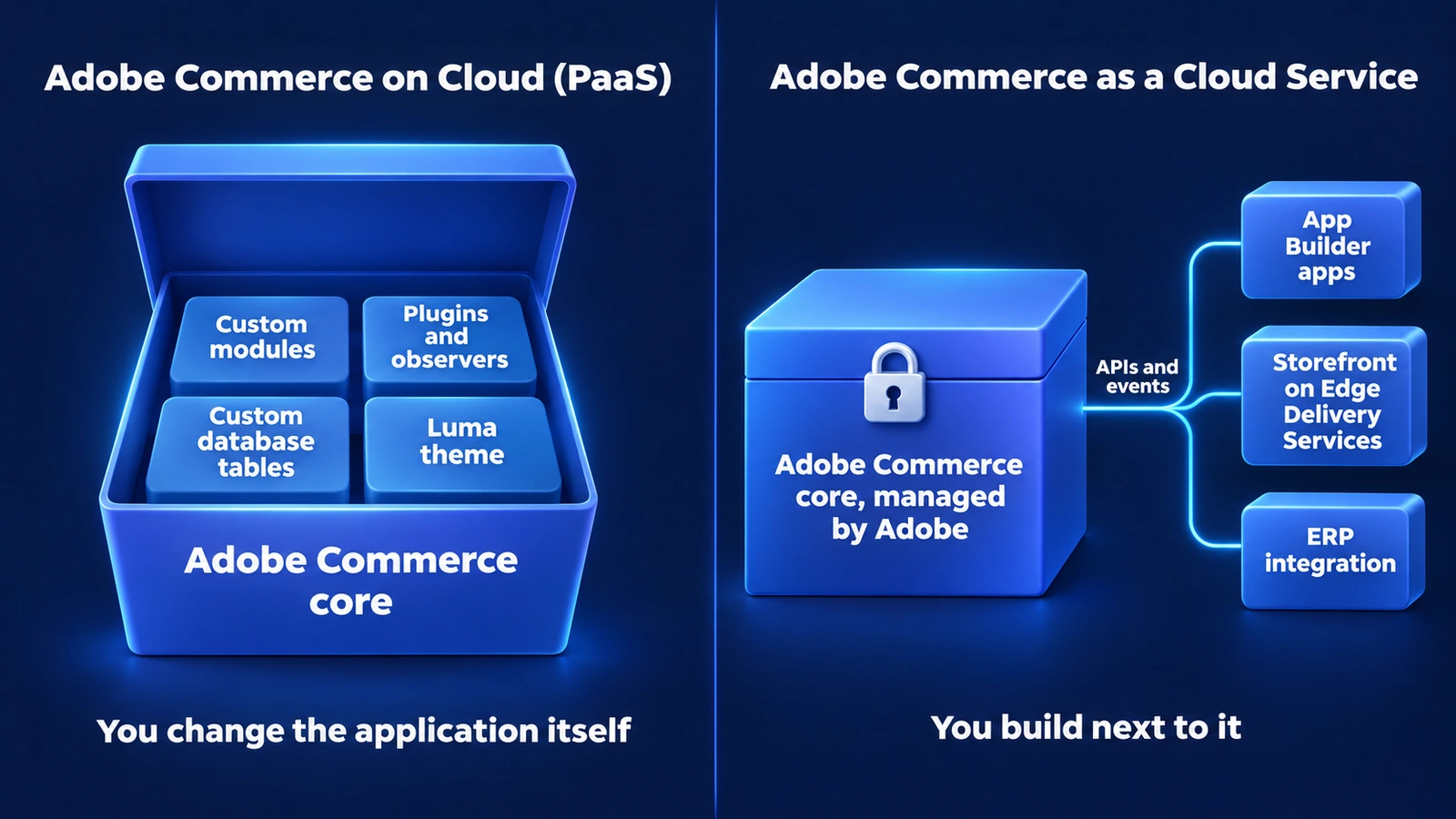
On Adobe Commerce on Cloud, custom modules, plugins, custom tables and the Luma theme sit inside the application; on Adobe Commerce as a Cloud Service, App Builder apps, the storefront and the ERP integration connect to a sealed core through APIs
| Area | Adobe Commerce on Cloud (PaaS) | Adobe Commerce as a Cloud Service |
|---|---|---|
| Updates | You apply patches and upgrades | Adobe updates automatically, with a 30-day sandbox window before production |
| How you customize | Change the application code, or build separate apps | Separate apps only, built on Adobe App Builder and connected through APIs |
| Core code | You can modify it | You cannot modify it |
| Storefront | Luma, PWA, or headless | Commerce Storefront on Edge Delivery Services or headless; Luma not supported |
| Custom data storage | Database, files, cache, queue | App Builder file storage; database storage in early access |
| Transactional email | Full customization | Standard templates only |
| Search customization | Native | Requires third-party solutions |
| Hosting | Single-tenant | Multi-tenant |
| Availability | 99.99% infrastructure, 99.9% application (Managed Services) | 99.9% infrastructure and application |
| Compliance | SOC 2, PCI, ISO, HIPAA | SOC 2, PCI, ISO, GDPR; HIPAA not available |
| B2B | Separate B2B extension, included in the Adobe Commerce license | Core B2B features, such as company accounts and quoting, pre-installed |
| Monitoring | New Relic included | Managed by Adobe; New Relic not included |
The row that drives cost is how you customize. Adobe guarantees backward compatibility only for customizations that follow its API-first extensibility model. Code that runs inside Magento today, such as a plugin that rewrites price calculation or an observer that pushes orders to the ERP, has to become an external App Builder application before it can run on ACCS.
Adobe’s migration guide says it plainly: customizations get rebuilt as App Builder apps, storefronts get rebuilt on Edge Delivery Services, data moves into a new tenant, and integrations get re-established. That is a replatform-sized project that happens to stay with the same vendor, and even a simple setup needs significant development work.
Adobe ships three tools for it:
- Migration Assessment Tool: an AI scan that inventories custom modules, third-party extensions, custom tables, integrations, and storefront code, then scores the effort.
- Commerce Developer Agent and Commerce Developer MCP: AI-assisted conversion of PHP customizations into App Builder apps, with engineers reviewing every result.
- Commerce Data Migration Service: moves catalog, customer, and order data and verifies it. It covers first-party core data only, so tables created by third-party extensions need custom extraction work.
Stay, migrate, or re-evaluate: a decision matrix
The right move depends less on revenue than on where your custom logic lives and whether your storefront is due for a rebuild anyway. In our own Adobe Commerce portfolio, nearly every store has at least one ACCS blocker today, most often ERP or pricing logic built as Magento modules. Use this matrix to place your store.
| Your situation | Recommendation | Why |
|---|---|---|
| On 2.4.7 or earlier | Upgrade to 2.4.9 now; assess ACCS in parallel | Your release line has left standard support or leaves it on May 31, 2027 (2.4.7), and an ACCS migration takes longer than the support time you have left; Magento Open Source gets no extended support |
| On 2.4.8 or 2.4.9 with a Luma theme and many customizations built inside Magento | Stay on PaaS through 2027 and start rebuilding customizations as separate App Builder apps | Every customization you move to App Builder works on PaaS today and shrinks a later ACCS project |
| Already headless, or planning a storefront rebuild, with light customization | Run the ACCS assessment now | You will rebuild the storefront either way, and ACCS ends your upgrade projects |
| Backend works, but storefront speed and merchandising lag | Evaluate Adobe Commerce Optimizer | Optimizer adds a SaaS storefront, search, and merchandising layer on top of your current Adobe Commerce backend, so you modernize the front end without migrating the core; ACCS already includes these services |
| HIPAA-regulated data, a heavy custom data model, or custom search | Stay on PaaS or on-premises for now | HIPAA is not available on ACCS, database storage for apps is in early access, and search changes need third parties |
| The assessment shows you would rebuild most of the store | Re-evaluate the platform | A near-total rebuild is a replatform in all but name, so compare ACCS against other platforms, such as Salesforce Commerce Cloud, Shopify Plus, and Shopware, before you commit |
Self-hosted on-premises stores face the same lifecycle dates but not the Cloud enforcement date. Once support ends, you stop receiving patches either way.
What happens to B2B modules and ERP integrations
Core B2B features come pre-installed on ACCS, but your industry-specific B2B logic and ERP integrations need rebuilding outside the application. Adobe notes that industry-specific customizations “may require additional implementation considerations” and that dealer-specific data models could need extra architecture work.
For a distributor, the effort concentrates in four places:
- Pricing. Contract and customer-specific prices calculated by a PHP plugin move to an App Builder service or to the ERP itself. A typical example is a module that replaces Magento’s price with the customer’s live contract price from the ERP every time a buyer opens a product page.
- Inventory and availability. Multi-warehouse stock sync built on Magento cron jobs and message queues moves to events, webhooks, or an external integration layer.
- Order and invoice flow. Order export, status updates, and invoice history get re-established through APIs.
- Custom tables. Anything a module stores in its own database tables needs a new home and a custom migration path.
An integration layer that keeps ERP logic outside the commerce application, such as the Sirius ERP connector, shortens that list: the pricing and sync logic stays in place, and only the Magento-side connection that calls it for prices, availability, and orders needs rebuilding for ACCS. Today Sirius connects to Adobe Commerce on Cloud and on-premises stores. Before you scope anything, list every integration touchpoint and mark which ones run inside Magento today. That list predicts most of your migration budget.
The case for waiting
Waiting is a defensible choice for many B2B stores, and Adobe’s own statements support it. Adobe launched ACCS in June 2025, and some pieces a complex store needs, such as database storage for App Builder apps, are still in early access. Adobe has said publicly that it has no end-of-life plans for PaaS, and 2.4.9 is supported until May 31, 2029.
Waiting has a cost too. Every release line on PaaS still ends, and from June 2027 Adobe enforces that on its cloud. Each minor upgrade is a project with extension testing, dependency changes, and regression testing, and you pay for it at least once in every three-year support window. A merchant who waits until 2028 to evaluate ACCS will likely fund one more full upgrade first.
Adobe’s own guidance in the 2.4.8 release notes is a useful middle path: if you plan to adopt ACCS within 12 to 16 months, apply the latest security patch now and plan your upgrade as part of the move. This works only if your release line stays supported for the whole migration. On Adobe’s cloud, 2.4.4 and 2.4.5 must be upgraded or migrated by June 1, 2027, so for those versions the upgrade comes first.
What to do in the next 90 days
You can make this decision with evidence in one quarter. Work through these steps in order.
- Confirm your starting point. Record your Adobe Commerce version; the versions of PHP, MariaDB or MySQL, OpenSearch or Elasticsearch, Redis or Valkey, and RabbitMQ; your hosting model (Adobe Cloud or self-hosted); and your storefront type.
- Get onto a supported line. If you run 2.4.7 or earlier, schedule the upgrade to 2.4.9 now. Our 2.4.8 upgrade planning guide covers what changed and what to check.
- Inventory your customizations. Split them into two groups: code that runs inside Magento (custom modules that change pricing, checkout, or order flow, plus any custom database tables) and code that runs outside it (separate services that talk to Magento through APIs). Note whether your storefront depends on Luma.
- Run an assessment. Use Adobe’s Migration Assessment Tool or an independent assessment, and compare the rebuild scope against the cost of your next two upgrades.
- Decide and budget. Place your store in the matrix above and put the next 24 months of platform work into one plan.
If AI-driven discovery is part of your reason to move, read what Adobe announced at Summit 2026 for its new AI features.
Frequently Asked Questions
Got some questions? We’re here to answer. If you don’t see your question here, drop us a line using our Contact form.
Is Magento end of life?
No. Adobe Commerce 2.4.9, released May 12, 2026, has standard support until May 31, 2029. Individual release lines reach end of support on fixed dates, and the lifecycle policy covers Adobe Commerce, so Magento Open Source users should check their support terms separately.
Is Adobe discontinuing Adobe Commerce on Cloud (PaaS)?
No. Adobe stated in March 2026 that there are no end-of-support or end-of-life plans for Adobe Commerce on Cloud. Adobe does recommend Adobe Commerce as a Cloud Service (ACCS) as the long-term destination and will enforce upgrades on Cloud from June 1, 2027.
Is Adobe Commerce as a Cloud Service the same as Adobe Commerce Cloud?
No. “Adobe Commerce on Cloud” is the PaaS product, where you control the code and run upgrades. Adobe Commerce as a Cloud Service is the SaaS product, where Adobe runs the core and you extend it from outside.
Can I keep my Luma theme on ACCS?
No. Adobe Commerce as a Cloud Service (ACCS) does not support Luma storefronts. You rebuild the storefront on Adobe’s Commerce Storefront powered by Edge Delivery Services or on your own headless frontend.
Will my Magento extensions work on Adobe Commerce as a Cloud Service?
Not as they are. Extensions that run inside Magento must be rebuilt as separate App Builder applications that run outside it. Check Adobe Exchange for App Builder versions of the extensions you use before you budget custom work.
What is Adobe Commerce Optimizer?
Adobe Commerce Optimizer is a SaaS layer for storefront, catalog, search, and merchandising that runs on top of an existing commerce backend, including Adobe Commerce on Cloud. It lets you modernize the shopping experience without replacing the system that handles transactions.
Plan your next 24 months on Adobe Commerce
Whether you stay on PaaS or move to Adobe Commerce as a Cloud Service, the next decision depends on where your custom logic lives today. Atwix was the #1 global Magento code contributor from 2018 to 2025 and runs Adobe Commerce upgrades for B2B merchants with heavy ERP integration. Get a stay, migrate, or re-evaluate recommendation based on your actual codebase.