
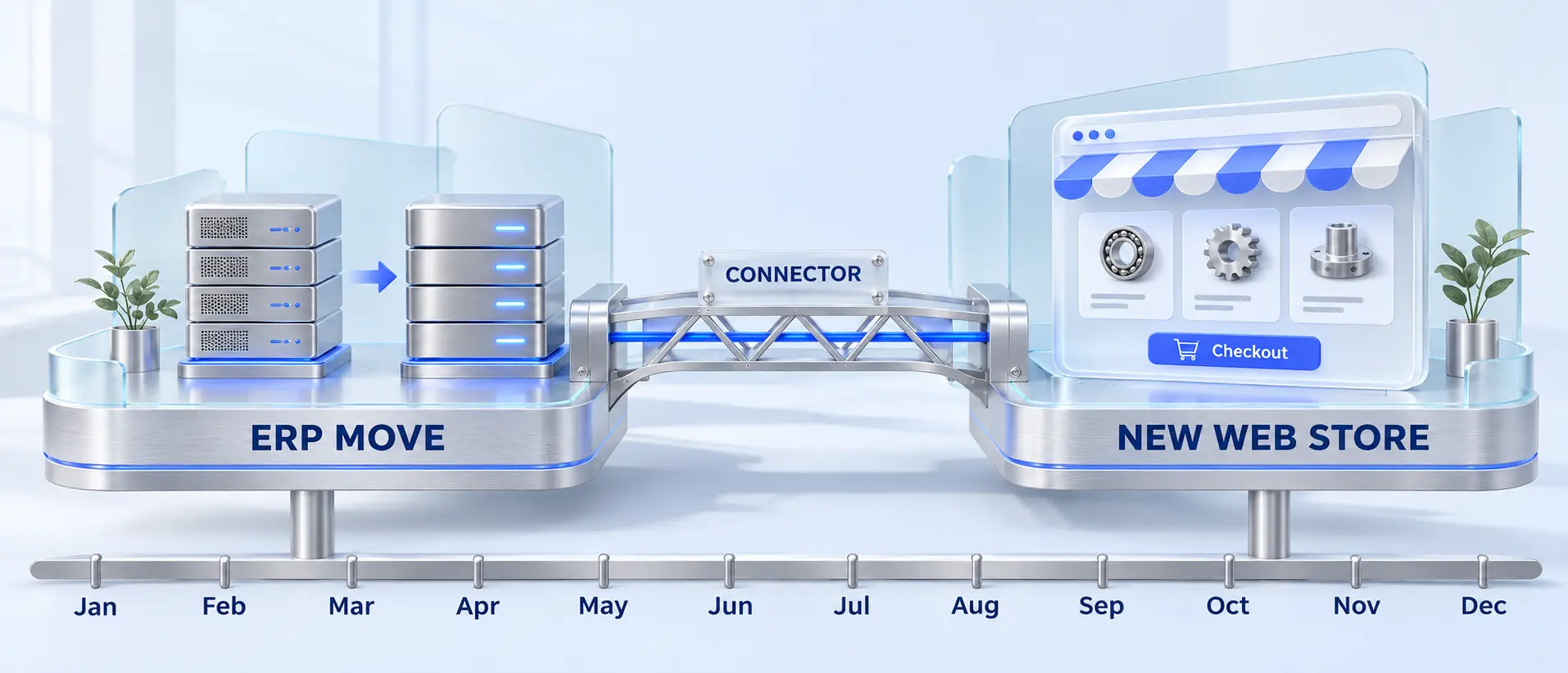

A lot of distributors are going into 2027 planning with two large projects on the same slide: moving the ERP (Prophet 21 to the Epicor Cloud, Infor CloudSuite Distribution to multi-tenant, or a move to NetSuite) and replacing a storefront their customers already work around. The board wants both inside one budget year, and each vendor argues its project should go first. In my experience, calendar convenience often sets the order, and the bill arrives later as an integration built twice. Here is how to sequence an ERP migration and eCommerce replatform in the same year, the decision tree behind it, and what a connector layer changes.
This is part two of our series on distributor commerce. Part one, why your best customers still order by phone, argued that B2B buyers leave the portal when they stop trusting the price and stock it shows. Sequencing decides whether that trust survives the two projects, because on a distributor site both numbers come from the ERP.
Which should go first, the ERP or the storefront?
Sequence by data ownership. If the ERP project changes how prices, customers or items are structured, do the ERP first and keep the current storefront running on a stable integration until the new ERP settles. If the ERP project changes only where the ERP runs and how it receives updates, replatform commerce first, behind a connector that can talk to both the old and the new ERP. Run the two in parallel only when both teams agree on one integration contract before either build starts, and the go-lives are at least two months apart, so the ERP closes a full month and settles before the storefront launches. Keep both go-lives out of peak season.
The connector strategy decides whether you are running one project or two. With point-to-point integration, the storefront is wired to one ERP version, so the projects are linked whether the plan admits it or not, and you pay for the integration twice. With a connector layer that owns the mapping, and that supports both the old and the new ERP, you remap once and run two projects that share one dependency.
Why the ERP move sets the order for most distributors
On a distributor storefront, the ERP makes the decisions and the storefront displays them. Contract price, customer-specific catalogs, availability by warehouse, credit status and ship-to accounts all come from the ERP, so a change to how the ERP structures its data is a change to the storefront’s requirements.
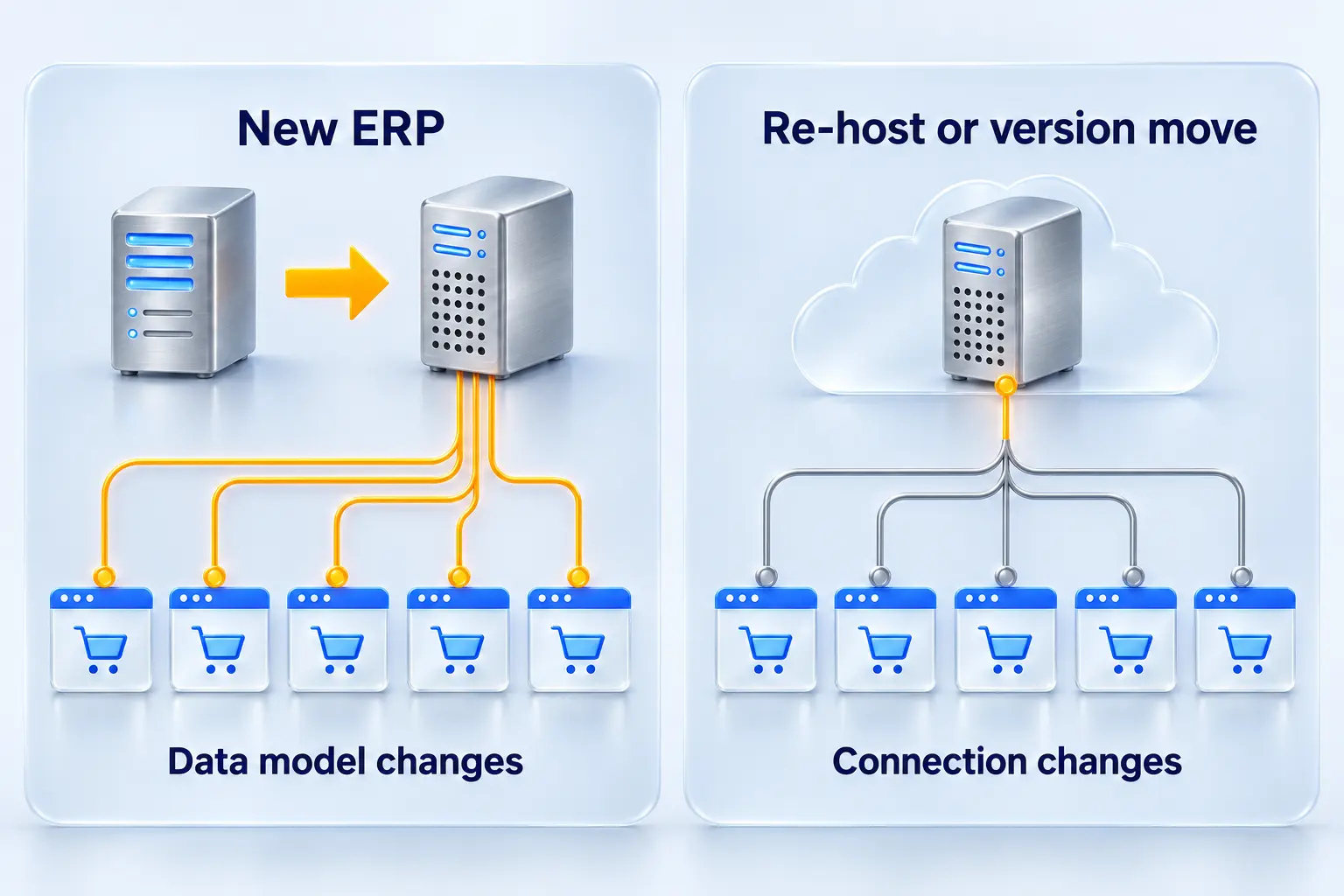
That makes the type of ERP move the first thing to pin down. There are two, and they affect commerce in different ways.
| ERP move | What changes | Effect on the storefront |
|---|---|---|
| Re-implementation or new ERP (for example, moving to NetSuite from another system) | Item master, pricing logic, customer hierarchy, order types, sometimes customer and item numbers | Every integration mapping, and often storefront features such as price display and account structure |
| Re-host or version move on the same product (for example, Prophet 21 on-premises to the Epicor Cloud, or Infor CSD to multi-tenant CloudSuite) | Hosting, API access, sign-in method, update schedule; customizations reworked as configuration or extensions | The connection and its endpoints (a rebuild if the old integration writes straight to the database), plus testing after each ERP release; the data model mostly stays the same |
The vendor calendars add pressure, but less than the sales conversation suggests:
- Epicor Prophet 21. Epicor announced on January 6, 2026 that the final on-premises feature release of Prophet 21 is 2028.1, tentatively scheduled for May 2028, with Active Support for that release through June 30, 2029. With support running to mid-2029, an on-premises P21 distributor has time to sequence the two projects properly.
- Infor CloudSuite Distribution. Infor delivers multi-tenant CloudSuite Distribution by subscription, and in a multi-tenant cloud Infor sets the update schedule. Infor steers customers toward configuration and APIs instead of custom code, so expect to rework any on-premises customizations that feed the storefront.
- NetSuite. Oracle states that NetSuite has two major releases each year, with customers upgraded in phases over a few months, and offers a Release Preview account for testing against the new release.
In the cloud, the ERP updates often, and on Infor and NetSuite the vendor picks the dates. Your storefront integration has to absorb those changes, which argues for a connector layer whichever project goes first.
Each of these ERP vendors also sells a storefront, so expect one in the ERP proposal. Epicor Commerce (formerly Commerce Connect), built on Magento, works with Prophet 21, Kinetic, BisTrack and Eclipse. Infor sells Infor Rhythm for Commerce for select Infor ERPs; ask Infor which versions it supports today. NetSuite’s SuiteCommerce runs natively on NetSuite.
Infor and NetSuite also publish connectors to third-party platforms. Infor’s eCommerce Connector on the Shopify App Store covers Infor M3; its Shopify page announced a CloudSuite Distribution version for early 2022, so ask Infor whether one is available for your tenant. NetSuite Connector supports Shopify, BigCommerce, Magento 2 and WooCommerce, among others.
If you take the ERP vendor’s storefront, you are buying one program from one vendor, and its plan sets the order. If you choose an independent platform such as Adobe Commerce, Shopify or Shopware, the sequence and the integration stay your decision.
Decide who owns each piece of data before you pick a sequence
Write down which system owns each type of data and whether the ERP project changes it. For most distributors we talk to, this one page answers the sequencing question.
| Data | Typical owner | Storefront’s role | If the ERP project changes it |
|---|---|---|---|
| Contract and customer-specific pricing | ERP | Display, never recalculate | ERP first. The storefront’s price logic depends on it. |
| Customer accounts, ship-tos, credit status | ERP | Match web buyers to ERP accounts | Plan an ID crosswalk, or order history and reorder lists break |
| Item master (SKU, unit of measure, status) | ERP | Display, search, filter | ERP first if SKUs or units of measure are renumbered or restructured |
| Inventory and availability by warehouse | ERP | Display | Remap availability rules and test by branch |
| Orders and order status | Storefront captures; ERP owns after submission | Send, then track | Remap order types and number formats |
| Marketing content, images, extended attributes | Commerce platform or PIM | Owns | Independent of the ERP. Can move first. |
If two or more of the ERP-owned rows change, the storefront’s requirements aren’t final until the ERP design is. Building the storefront first means building to a moving specification.
Identifiers deserve their own line in the plan. Mismatched customer and item IDs between the ERP and the storefront already cause broken reorders in everyday integration work, and a re-implementation that assigns new numbers multiplies them: saved lists, reorder history and any URLs built on SKUs stop matching. Buyers notice on day one, and it is a fast way to send them back to the phone. An ID crosswalk, a table that maps each old number to its new one, prevents it.
If you are not sure your data is ready for either project, our ERP integration readiness assessment covers data quality, team capacity and timeline in one pass.
The decision tree: ERP first, commerce first or parallel
Answer three questions in order and stop at the first answer that names a sequence.
- Does the ERP project change the pricing, customer or item data model?
- Yes: ERP first. Keep the current storefront, stabilize its integration, and start the replatform build once the new ERP has completed two month-end closes.
- No: go to question 2.
- Is the current storefront failing now? Failing means an unsupported or closed platform, security exposure, outages, or buyers routing orders to the phone because they can’t trust the site.
- Yes: Commerce first, built on a connector that supports both the old and the new ERP.
- No: go to question 3.
- Can one team own a single integration contract (data model and API) for both projects, agreed before either build starts?
- Yes: Parallel is defensible. Keep go-lives at least two months apart and both out of peak season.
- No: ERP first, commerce second.
The same logic as a comparison:
| Sequence | Choose it when | What you give up |
|---|---|---|
| ERP first | The ERP project changes pricing, customer or item structure, and the storefront can survive another year | Storefront improvements wait, and buyer workarounds continue meanwhile |
| Commerce first | The ERP move is a re-host or version move, the storefront is failing, and a connector that supports both ERP versions sits between them | Integration testing against two ERP versions; features that depend on the new ERP are deferred |
| Parallel | One integration contract, one program owner, go-lives at least two months apart | The heaviest load on the ERP experts, who answer both teams |
Parallel programs fail on people more often than on technology. The pricing analyst, the customer service lead and the warehouse manager who know how the ERP behaves are the people both project teams need, in the same months.
What a connector layer changes
A connector layer turns two linked projects into two projects with one agreed interface. The storefront talks to the connector, the connector talks to the ERP, and each side can change without rewriting the other, as long as the connector supports both the old and the new ERP version. That changes three things.
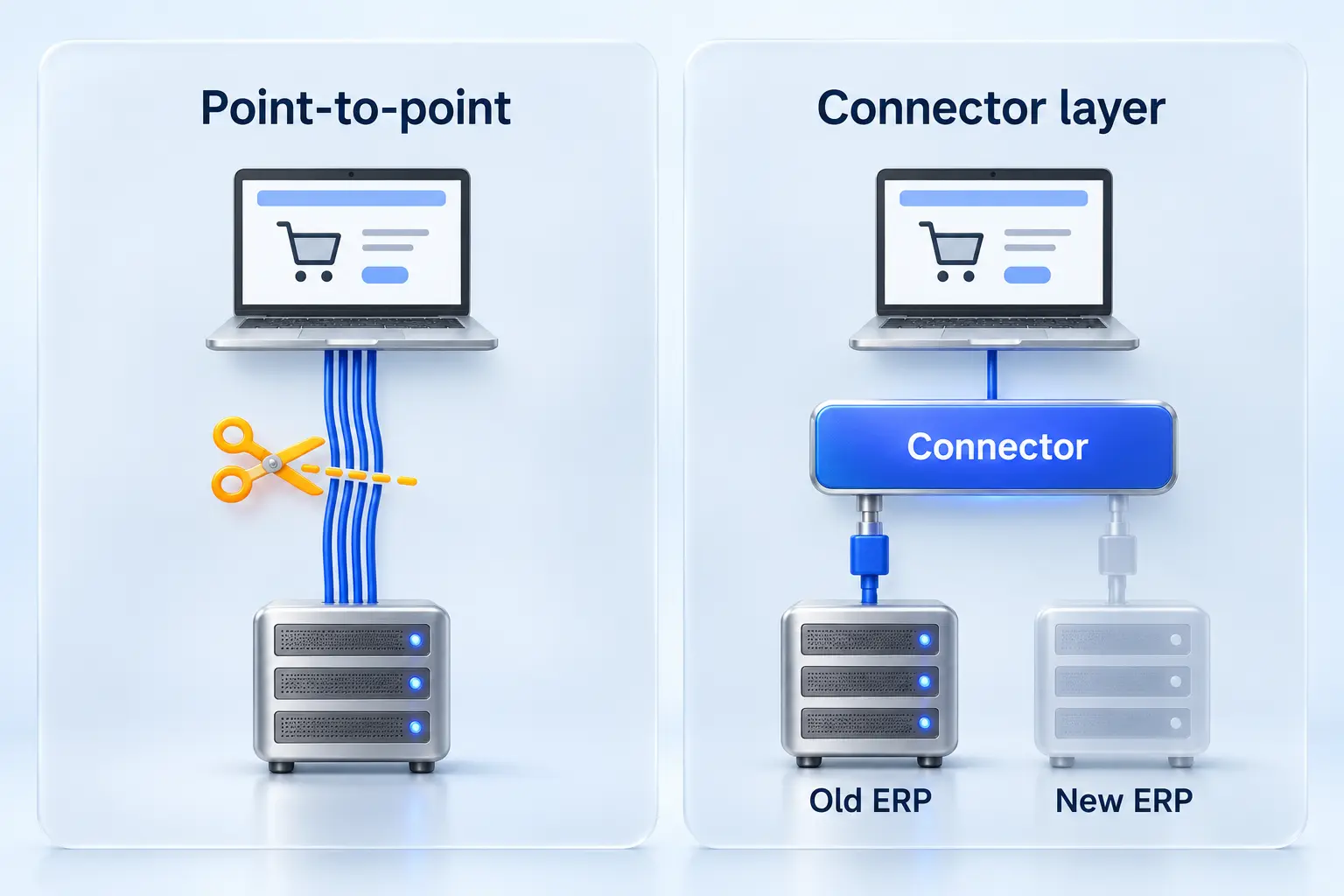
It can separate the storefront from the ERP version. When Prophet 21 moves from on-premises to the Epicor Cloud, or Infor ships a multi-tenant update, a connector that supports both versions takes the change and the storefront code stays as it is. If the connector doesn’t support the target ERP, the ERP move becomes a connector replacement. Check connector support for your target ERP before you sign either statement of work.
You remap once. The connector maps ERP data to one model, and a new storefront reads the same model the old one did. Two point-to-point builds would each map the ERP from scratch, with their own pricing and unit-of-measure edge cases.
You get cutover options. Without a connector, cutover usually means one weekend in which the ERP, the integration and sometimes the storefront all change together. With one, you can choose:
| Cutover option | How it works | When to use it |
|---|---|---|
| New storefront on the old ERP | Launch the new storefront against the current ERP through the connector; repoint the connector when the ERP moves | Commerce first, with an ERP re-host coming later |
| New ERP behind the old storefront | Repoint the connector to the new ERP; the storefront the buyers know stays in place | ERP first, when the old storefront already runs on the connector |
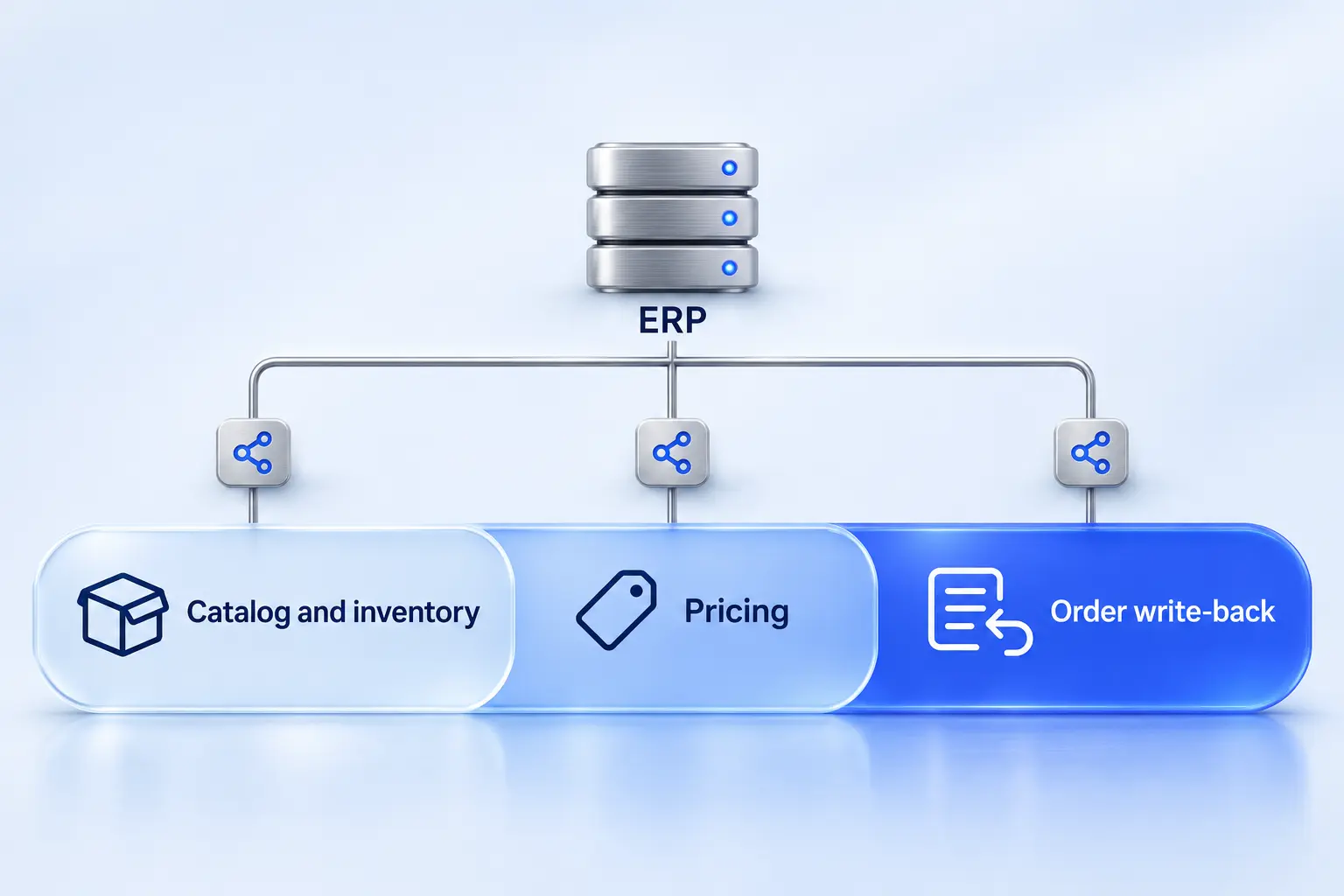
| Phased by type of data | Move catalog and inventory reads first, then pricing, then sending orders to the ERP | Parallel programs, or any ERP move where pricing is the highest risk |
| Planned maintenance window | The storefront shows a maintenance page while the ERP is offline, then reopens | Short ERP cutovers and the vendor’s scheduled maintenance weekends |
Taking orders while the ERP is offline and posting them later sounds simple, but it needs a tested retry and alerting path. If a vendor offers it, ask to see it working on a live store.
A connector doesn’t remove the remap when the data model changes. If the new ERP renumbers customers, the connector needs a crosswalk too. It confines the change to one place that one team owns.
We built Sirius, our ERP connector for Infor CloudSuite Distribution and SX.e, for this role. In production, it connects those ERPs to Adobe Commerce and Shopware storefronts, syncing products and inventory, customer data, and orders and fulfillment, and pulling customer-specific, tiered and contract pricing from the ERP. For other ERPs, including NetSuite, we build custom integrations.
The risks, by sequence
Every sequence has failure modes. These are the ones we plan for.
| Risk | Hits hardest | Mitigation |
|---|---|---|
| Storefront built to a pricing model the new ERP replaces | Commerce first | Freeze the pricing data contract before the storefront build; if pricing changes, go ERP first |
| Integration built twice | ERP first without a connector; commerce first with point-to-point | Put a connector that supports both ERP versions in first, then sequence the platforms |
| ERP experts split across two teams | Parallel | One program owner, one backlog for ERP decisions, every vendor in the same tracker and meetings |
| Two go-lives too close together, one support team | Parallel | Separate go-lives by at least two months; no go-live in peak season |
| Customer and item renumbering breaks order history, saved lists and reorders | ERP first and parallel | ID crosswalk in the connector; migrate history under the new IDs; test your largest accounts’ reorder lists before launch |
| A cloud ERP update or maintenance window breaks storefront sync | Any sequence on a cloud ERP | Test each release in the vendor’s preview environment where one exists (for NetSuite, the Release Preview account), plan for API maintenance windows and limits, and monitor sync after every update |
| Live orders expose integration faults: slow ERP calls at checkout, sync queues that stall without an alert, and duplicate orders | Any sequence, at every go-live | Load-test checkout against the ERP before launch, alert when a queue stops moving as well as on errors, and check each order’s web ID before posting it so a retry can’t create a duplicate |
| Wrong prices shown during the transition | Commerce first and parallel | Compare storefront prices with the ERP for your top accounts before launch; soft-launch to a group of accounts first |
| Storefront improvements wait a year while phone orders grow | ERP first | Fix the worst friction on the current site, usually search and price display, while the ERP project runs |
The case for commerce first
The strongest argument against my default is speed. A storefront can go live in months and start earning, an ERP program runs longer and slips more often, and a storefront held hostage to the ERP timeline can wait years. Commerce-first advocates are right about that, and right again when the ERP move is a re-host or the current storefront is losing orders today.
Where I disagree is the distributor whose storefront displays contract pricing. If the ERP team is redesigning price structures while the commerce team builds price display, the storefront’s pricing work gets redone, because it was built for a price model that no longer exists. Go ERP first, and the redesigned prices reach the storefront through the connector with little or no storefront change.
The best version of the commerce-first argument is a connector-first argument. Put the integration layer in before either platform moves, and the sequencing question gets smaller, because either platform can change behind a stable interface.
What this looks like in our projects
None of our projects combined an ERP move with a full storefront replatform in the same year, but three show parts of this argument.
- Commerce move on the existing ERP. Halron moved off a closed eCommerce platform to Shopware, integrated with Infor CloudSuite Distribution for accurate product, pricing and customer data across all ordering channels. Both teams chose a site that felt complete on day one over a quicker launch, and our Halron migration write-up covers why the launch waited.
- Replatform behind a middleware layer. Graphic Solutions Group replatformed to Adobe Commerce in 13 months, with zero downtime and no negative impact on sales. Its storefront gets Infor CSD data through Kodaris, a middleware layer, and never calls the ERP’s APIs directly; we also cut the calls the site makes so the systems behind it don’t get overloaded.
- Fix the integration first. At Turf Care, more than 120,000 SKUs sat across disconnected systems. We stabilized the Magento (Adobe Commerce) and Infor CSD integrations so pricing, inventory and orders sync in real time. Sometimes the right first project is the integration between the two systems.
More distributor projects are in the Atwix portfolio.
What to do before you commit the budget
- Fill in the data ownership table with your ERP partner. Mark every ERP-owned row the ERP project changes.
- Classify the ERP move as a re-implementation or a re-host. Ask the ERP vendor for the post-go-live update schedule in writing, and whether its proposal includes its own storefront or connector.
- Choose the integration architecture before signing either statement of work. Connector or point-to-point is the decision that makes this one program or two. If you choose a connector, confirm it supports both the current and the target ERP.
- Name one program owner across both projects, with authority over the ERP decision backlog, and put every vendor, including the ERP integrator, in the same tracker and meetings. Our piece on why good commerce projects go sideways covers the governance questions to settle first.
- Put both go-lives on one calendar, at least two months apart, with peak season blocked out.
- Decide what the replatform has to change in the business. Some replatforming projects change the business and others only change the website.
If Prophet 21 is your ERP, our analysis of why P21 integrations fail after launch covers the pricing and inventory problems to design out before either move.
FAQ
Can we keep our current storefront running during the ERP migration? Yes, if its integration can be repointed to the new ERP or rebuilt for a short bridge period. The cleaner route is to move the current storefront onto a connector that supports the new ERP before the cutover. If the current integration is point-to-point and fragile, budget the bridge as a real work item.
Does moving Prophet 21 from on-premises to the Epicor Cloud mean rebuilding the eCommerce integration? Usually not, but it depends on how your integration connects today. On the Epicor Cloud you get a read-only copy of the database, and anything that writes data goes through Epicor’s APIs. An integration that already uses the P21 APIs needs new endpoints and credentials, plus a plan for the vendor’s maintenance windows and API limits. One that writes straight to the P21 database needs its write side rebuilt on the APIs. Either way, the data model and the storefront mappings usually stay the same, because it is the same ERP product. Check any customizations that feed the storefront too, because Epicor is moving future innovation to the cloud.
How far apart should the ERP and storefront go-lives be? At least two months: enough for one full month-end close plus four to six weeks of ERP stabilization, so your support team isn’t handling two launches at once. For most distributors that also means neither go-live lands in peak season.
Planning both projects for 2027?
If an ERP move and a storefront decision are both on your 2027 plan, the sequence comes down to your data and your integration architecture. Every Atwix project starts with discovery, where we map which data your ERP project changes, how your storefront integration should survive it, and which sequence fits. Talk to our ERP integration team.