atwix

Accessing a custom attribute at checkout/cart in Magento

So you have added a new custom product attribute. It is not a problem to access and use it in Product View. And you probably know that you should enable it under the attribute settings page of Magento backend in order to make it available for the Product List (or category view) section. But what about checkout/cart area?
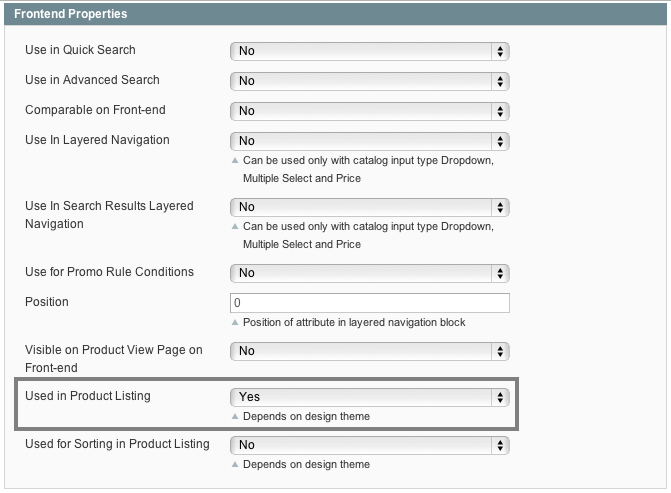
Attribute seetings - Magento
Attribute is not being loaded by default. There is a simple and elegant way to make it available for access. First, we need to create a new module. During the checkout process we have to deal with quotes, so our goal is to add an attribute to the list of attributes that are loading with quote object. This can be done with XML by adding the following code to your config.xml:

<global>
    <sales>
        <quote>
            <item>
                <product_attributes>
                    <attribute1 />
                    <attribute2 />
                </product_attributes>
            </item>
        </quote>
    </sales>
</global>

where attribute1 and attribute2 are your attribute codes.
Then you can access attribute using the code below:

$item->getData('attribute1');
//if you use observer or quote object:
$item->getProduct()->getData('attribute1');

Good luck!


  • SusanMPrice

    Hie i am having trouble setting up my configurable products from
    scratch. I have set up simple products, associated them to configurable
    products with attributes for color and size, but they are just not
    displaying on the front end and the shopping cart. How do i get to this
    config.xml and in which document do i add the $item ->getData code
    snippet?

    Also, how can i get the configured product to display on the front end?

    Thanks in advance, i am a super beginner so please do help.

  • Bradley Clampitt

    Hello I am trying to follow this tutorial and make something work for my online store.

    I have created 3 custom attributes; parts_depth, parts_width and parts_height, I can pull in those three attributes into the default.phtml file so that I can individually show the Dimensions of a product, which was all help from this tutorial.

    What I would like to do from this point is summarize or add up those dimensions with a custom formula I know I have to edit the cart.phtml file but everything I input doesn’t help me get the totals of parts_dept + totals of parts_width and parts_height.

    Is there something I am missing to try to load custom attributes in a fashion to be able to add up the total sum of them?

    thanks for any comments or insight you can give to me.

    Best Regards,
    Bradley

    • vovsky

      Hi, Bradley!
      How do you call your attributes in cart.phtml? And doublecheck if you have added attributes to global->sales->quote->item->product_attributes section in config.xml

  • Rafal

    This solution works partially for my magento installation. I’m able to get data via

    $item->getProduct()->getData(‘attribute1′);
    but it get it from configurable product (not from the simple one).

    It is on the cart page and the cart.phtml file has a loop foreach($this->getItems() as $_item)…
    then in the default.phtml (item folder) has this code:
    $_item->getProduct()->getSKU() – which return SKU of the simple product but the next line:
    $_item->getProduct()->getData(‘attribute1′);
    returns data from the configurable product, the simple product has different value.

    Is there a way to use getData in the cart to read attribute from simple product?